
In a group chat, two people show the typing dots and nobody else ever does. Same thread, same phone, different results.
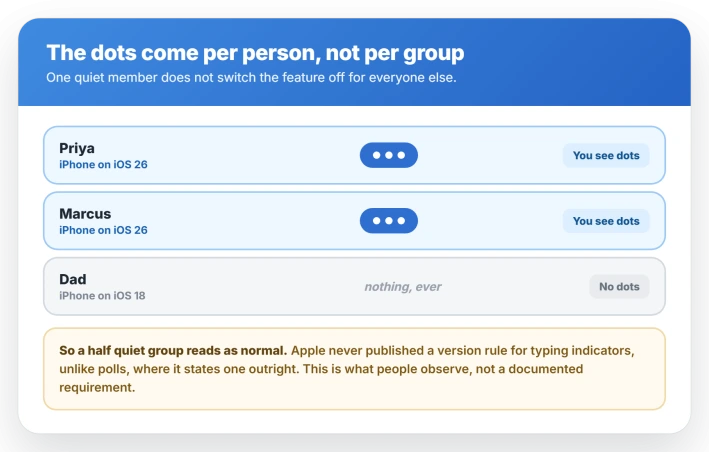
That split is the useful part. Reports from mixed groups point to the typing indicator arriving per person, from whoever is on iOS 26, so a contact on an older iPhone never produces any.
If nobody shows dots, that is a different problem, usually a thread that dropped to SMS. And if you came to switch your own dots off, iOS 26 has no toggle for that.
If only some people in the group show dots
Typing indicators in group chats are new. iOS 26 added them in September 2025, and before that the dots only ever appeared in one to one conversations.
Apple announced the feature but never published a version requirement for it.
Apple does spell out requirements when they exist: polls in Messages carry a stated floor of iOS 26 or later for anyone who wants to see or vote in one.
Typing indicators got no such line.
Apple has not said either way, so treat a partly quiet group as a limit on the other end rather than a setting you can change. Nothing in Messages on your iPhone alters what a contact still on iOS 18 sends.
Your one to one chat is the control test. Dots have always worked there, so if a contact shows dots in your direct thread but never in the group, that is the per person pattern.
If they show nowhere, look at the thread or the contact instead.
If nobody in the group shows dots
Confirm your own iPhone is on iOS 26 first, under Settings, General, About. The group indicator did not exist before it, so an older phone shows nothing no matter who else has updated.
Then check the bubble color, because the message protocol decides whether dots are even possible.
Apple's own breakdown of iMessage, RCS, and SMS lists typing indicators under iMessage and again under RCS.
The SMS and MMS section lists no such support, which is why a thread that falls back to them shows nothing.
So a group sitting on MMS will never show a typing indicator for anyone, no matter who has updated. Green bubbles that lost RCS are the common version of this.
Apple does document group RCS as carrying typing indicators, so a green group is not automatically hopeless.
What is unclear is whether the new iOS 26 group indicator behaves the same way there, which leaves blue iMessage groups as the reliable case.
If your group is blue and still silent, reset the iMessage connection. Open Settings, tap Apps, tap Messages, turn iMessage off, wait a few seconds, then turn it back on. Users report that clears it.
If Messages is refusing to activate at all, that is a separate iMessage problem and worth fixing first.
If it is still silent, start a fresh group with the same people rather than reusing the old thread.
Deleting your copy does not reset the group for anyone else, and with Messages in iCloud switched on, that delete pulls the history from every device signed into your account.
If it shows you typing when you are not
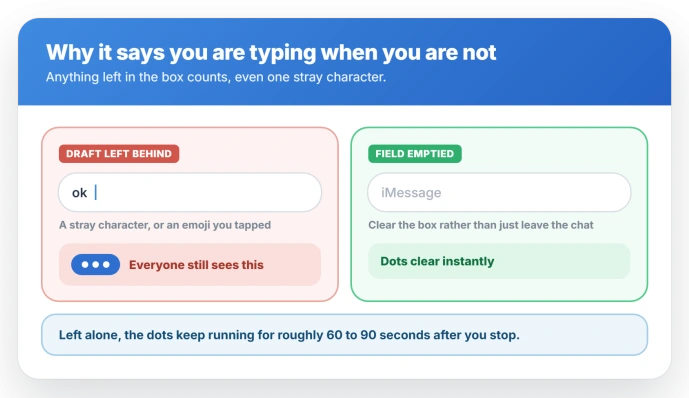
Something is almost certainly still sitting in the text field.
A stray character, an autocorrect leftover, or an emoji or sticker you tapped and abandoned all count, and any of them keep the dots alive for everyone in the group.
Open the thread, tap the text field, select all and delete. The field is genuinely empty only when the send arrow has gone, and the dots clear the moment it does.
Leaving the chat does not stop the broadcast while a draft is still sitting there.
Left alone, the dots run for roughly 60 to 90 seconds after you stop.
No fix has shipped. Apple has never acknowledged this and no release note from iOS 26.1 through 26.5 has touched it.
What iOS 26 changed is the audience. A draft that used to leak to one person now leaks to the whole group, and the mechanism behind it, dots that follow whatever sits in the field, was never reworked for that.
How to turn typing indicators off
You cannot. There is no toggle for typing indicators in iOS 26, not globally, not per conversation, and not for group chats alone.
Send Read Receipts is not it. Read receipts tell someone you opened their message. Typing indicators show a live draft. Turning one off does nothing to the other.
Read receipts can be switched off, and it is worth doing if privacy is why you are here.
Open Settings, tap Apps, tap Messages, then turn off Send Read Receipts.
For a single person, open their conversation, tap the contact icon at the top, and turn off Send Read Receipts there.
That toggle governs iMessage only. RCS sends its own receipts regardless, which is why an Android contact can still see that you read a text.
The only setting that touches typing indicators at all is RCS, under Settings, Apps, Messages, RCS Messaging. It is a blunt trade.
Green threads drop to SMS, which carries no indicators, and your Android conversations lose picture quality and group features along the way.
For a message you want to write without an audience, draft it somewhere else and paste it in.
Status: on iOS 26 there is still no switch to turn your own typing indicator off. Group dots arrive per person, so contacts on older iPhones never produce them, and SMS groups never do either.
The 30 second version
- Confirm the group is blue. Typing indicators cannot exist in an MMS thread, so a green group is the answer rather than something to fix.
- Empty the text field. A single leftover character keeps your dots showing to everyone.
- Toggle iMessage off and on. Settings, Apps, Messages. Commonly suggested for a blue group that went silent.
- Do not expect a settings fix. iOS 26.1 through 26.5 have added no control for this.
Why can I see some people typing but not others in a group chat?
The dots appear to arrive per person, from participants who are on iOS 26. Someone on an older iPhone simply never produces them, which leaves a group where only part of the thread shows dots.
Apple has not published a version requirement for typing indicators, so this is what users observe rather than a documented rule.
Can you turn off the typing indicator on iPhone?
No. iOS 26 has no setting for it, globally or per conversation. Send Read Receipts is a separate control and switching it off does not hide your typing.
For a green thread you can turn off RCS and drop to SMS, which carries no indicators, at the cost of picture quality and group features.
That lever does nothing in a blue iMessage group, so there the answer is to draft the message elsewhere and paste it in.
Why does it say I'm typing when I'm not?
Something is left in the text field, often a stray character or an emoji you tapped. The dots run for about 60 to 90 seconds after you stop and clear instantly once the field is empty.
Do typing indicators work with texts to Android?
RCS supports them and SMS does not, so it depends on whether the thread is running over RCS.
If your texts to Android have dropped to SMS, the indicators go with them.
The Short Version
- Group typing dots came in with iOS 26 in September 2025. Before that they only showed in one to one chats.
- The dots appear to come per person, so contacts on older iPhones never produce them and a partly silent group has nothing left to fix on your end.
- No dots for anyone usually means the thread is not on iMessage or RCS. SMS and MMS carry none.
- Showing as typing when you are not means a draft is still in the field. Empty it and the dots clear immediately.
- There is no way to turn typing indicators off in iOS 26. Send Read Receipts is a different feature and can be turned off.
Where to Next
- Messages failing to activate at all: iMessage will not activate on iOS 26
- Texts to Android not going through: Texts to Android not sending
- Conversations that vanished after the update: Where your iPhone messages went

Isaac Smith is the founder and editor of PC Glance, a website that covers computers, laptops, and technology. He is a tech enthusiast and a computer geek who loves to share his insights and help his readers make smart choices when buying tech gadgets or laptops. He is always curious and updated about the latest tech trends.