
You go to download an app and the App Store stops you until you prove you are 18. You add the card in your pocket, and it still says no.
App Store age verification on iOS 26 will not take a debit card, and gift cards are not supported either. Nothing is defective about your card. It is the wrong kind of card, and no amount of retrying changes that.
Apple accepts three things instead, and it only asks in four places: the UK, South Korea, Singapore, and Texas.
The three ways Apple accepts
Apple lists exactly three routes in its own note on confirming you are an adult.
- Existing account information. Apple tries this first, on its own. It checks whether you already have a credit card on file and how long you have held the Apple Account, so give it a moment before reaching for a document. Long-standing accounts often clear with no action from you.
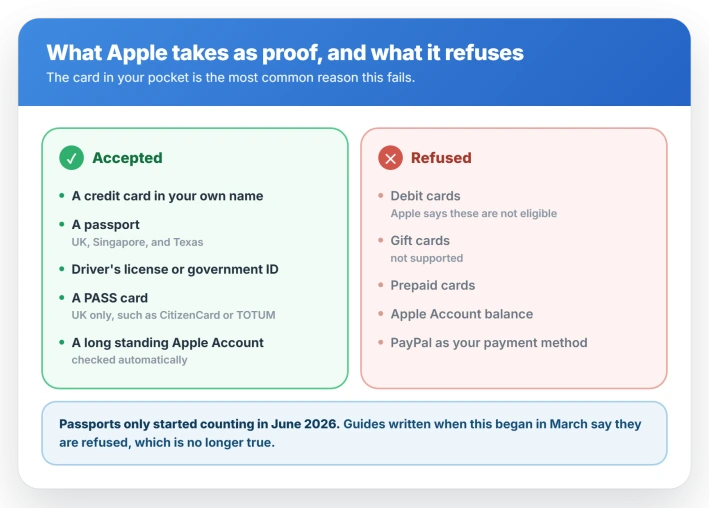
- A credit card that belongs to you. Apple's wording is exact on ownership. Adding a card purely to verify does not store it, if you do not also set it as a payment method.
- A scanned ID. A driver's license or government-issued ID in all four places, plus a passport in the UK, Singapore, and Texas. Passports were rejected everywhere until late April 2026, when Apple added the UK, then Singapore and Texas on 4 June. South Korea still does not take a scanned passport.
- A Digital ID in Apple Wallet built from a US passport. Apple accepts this regardless of your region, which makes it the only document route that works in South Korea.
The UK has a fourth route: PASS accredited proof of age cards, which covers CitizenCard, My ID Card, TOTUM ID, and the Young Scot National Entitlement Card.
That is the one to reach for if you have neither a credit card nor a passport.
If your card was refused
Apple says it directly: debit cards are not eligible, and gift cards are not supported.
A credit card can only be issued to an adult, which is the whole point of accepting one as proof, and a debit card cannot carry that meaning because a minor can hold one.
The same logic rules out the other payment methods.
A prepaid card, an Apple Account balance, or PayPal set as your payment method will not satisfy it either, though Apple does not spell those out in writing the way it does debit and gift cards.
Check which kind you actually hold before you retry, because the card networks are no guide. A Visa or Mastercard can be either.
Look for the word Debit printed on the front, or check whether the account it draws on is a current account rather than a credit line.
Two more things stop a card that should qualify.
The name and billing address on the card need to match your Apple Account profile, under Settings, your name, then Payment and Shipping, which UK devices label Payment and Delivery.
And a freshly made Apple Account has no history for Apple to weigh, so the automatic route has nothing to work with.
If the card is being refused everywhere rather than just here, that is a separate Wallet problem.
What Apple does with your ID
Worth knowing before you photograph a passport.
Apple says the image is kept only long enough to complete the check and is then deleted, and that Apple and its service providers use it to confirm you are an adult and to prevent fraud.
It has not published a number of days, and there is no way for you to check or delete it yourself.
A card used only to verify is not stored unless you also set it as a payment method.
Apps you use receive an age range rather than your birthdate.
Apple does not describe your name, your document, or your card number as being shared.
In Texas that age range goes to developers for every account and cannot be switched off, where elsewhere the choice is Ask First, Always, or Never.
If the ID scan keeps failing
The scan is fussier than it looks.
- Hold still far longer than feels necessary. People who got through describe holding steady for 20 to 30 seconds, with no progress feedback while it works.
- Kill the glare and make sure the document is in focus before you submit. These two are Apple's own advice.
- Background: Apple says use a neutral one. Apple Support has separately walked users through using a black or dark background when neutral failed, so try dark if plain grey gets you nowhere.
- Light it evenly and keep your own shadow off the document. Indoors works better than direct sun.
If you have none of the three
No credit card, no accepted ID, and a young Apple Account is a real dead end, and it is the position a lot of people are stuck in.
Calling Apple Support is the route that has actually worked for them. Ask to be escalated to someone handling age assurance rather than billing, and say plainly which of the three routes you cannot meet.
It is also worth trying if you own no iPhone or iPad at all, since the fullest set of confirmation methods only exists on those two devices.
Where it applies, and where it does not
Apple names four places where adults have to confirm their age: the United Kingdom, South Korea, Singapore, and Texas.
Two US states are widely reported as live and are not. Utah's requirements were pushed back to May 2027, and Louisiana's to July 2027. If you are in either, nothing here should be prompting you.
The Texas rules apply to Apple Accounts created there from 4 June 2026 onward, so older Texas accounts are not asked to re-verify.
The age-range sharing is the exception, since that applies to every Texas account.
Australia and Brazil work differently again. Apple blocks 18+ rated apps there automatically, without asking you to do anything, so most people never see a prompt.
Singapore sits in both groups, with the automatic block and the confirmation requirement.
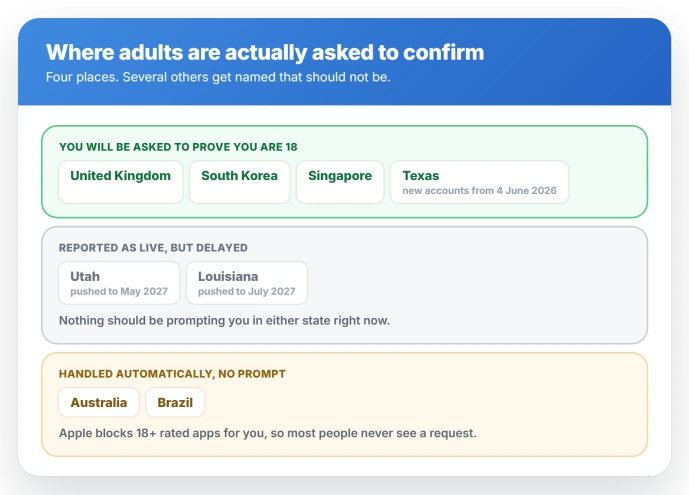
Status: adult confirmation applies in the UK, South Korea, Singapore, and Texas. Debit and gift cards are never accepted, and passports count in all of those except South Korea.
If you are on a Mac, Watch, or Apple TV
Some confirmation methods only exist on iPhone and iPad, so Apple's instruction for a Mac, Apple Watch, Apple TV, or Vision Pro is to confirm on an iPhone or iPad instead. The result then follows your Apple Account.
What happens if you just decline
You can tap Confirm Later and keep using the device. What you lose is the ability to turn off certain safety settings and to download anything rated 18+.
In the UK those restrictions are the starting state rather than a punishment.
Web Content Filter, which blocks sites classified as explicit across Safari and other browsers, and Communication Safety, which blurs nudity in Messages and FaceTime, are both on for anyone who has not confirmed their age.
Confirming is what turns them off.
For under 18s and family accounts
A minor in an affected region has to be in a Family Sharing group with a parent account.
Ask to Buy is switched on automatically for under 18s and, in Apple's own words, cannot be turned off.
The parent cannot override that, even though the toggle is visible at Settings, Family, the child's name, then Ask to Buy.
Texas goes further. A minor needs approval for every download and purchase regardless of the app's rating, not only for 18+ content.
Things that will not clear the check
- Changing your Apple Account country. Your Apple Account country has to match where you actually live, so this is not a route past the check. If you have genuinely moved, changing it is a separate process that requires you to spend your Apple Account balance down to zero first, clear pending purchases, and leave your Family Sharing group.
- A VPN. The check runs against your Apple Account, not your IP address, so a VPN does not touch it.
- Waiting it out. The prompt returns whenever you try to change a safety setting or download an 18+ app.
If your downloads are stalling rather than being blocked by a prompt, that is apps stuck on Waiting, which is an unrelated problem.
Can I verify my age without a credit card?
Yes. Scan a driver's license or government-issued ID, or a passport if you are in the UK, Singapore, or Texas. In the UK a PASS accredited proof of age card also works, including CitizenCard and TOTUM ID.
An Apple Account you have held for many years may also clear the check on its own, because account history is one of the three routes Apple weighs.
Why does my debit card not work for age verification?
Apple does not accept debit cards, and says so directly. A credit card is used as proof because it can only be issued to an adult, while a debit card can be held by a minor.
Gift cards and Apple Account balance are out for the same reason.
Does Apple keep a copy of my ID?
The image is kept only long enough to complete the check and is then deleted. Apple does not publish how long that is. Apps you use receive an age range, never your birthdate, name, or document.
Do I have to verify to update apps I already have?
Adults are gated on new downloads, purchases, and safety settings rather than on updating what is already installed.
Children under parental consent rules are different, because a significant app update needs fresh approval.
The Short Version
- Debit cards, gift cards, prepaid cards, and Apple Account balance are all rejected. Only a credit card in your own name counts.
- Passports were rejected until late April 2026. They now work in the UK, Singapore, and Texas, but not in South Korea. A Digital ID in Apple Wallet made from a US passport works in all four.
- In the UK, a PASS card such as CitizenCard or TOTUM ID is accepted if you have no credit card or passport.
- Only the UK, South Korea, Singapore, and Texas require adults to confirm. Utah was delayed to May 2027 and Louisiana to July 2027.
- Scans clear more often on a dark background, held still for five to ten seconds a side, with the document slightly inside the frame.
- You cannot complete it on a Mac, Watch, or Apple TV. Use an iPhone or iPad.
Where to Next
- Downloads that stall instead of being blocked: iPhone apps stuck on Waiting
- A card Apple refuses to take at all: could not add card to Apple Wallet
- Endless Apple Account sign-in prompts: iPhone keeps asking you to sign in

Isaac Smith is the founder and editor of PC Glance, a website that covers computers, laptops, and technology. He is a tech enthusiast and a computer geek who loves to share his insights and help his readers make smart choices when buying tech gadgets or laptops. He is always curious and updated about the latest tech trends.