
On an 8 GB iPad, the memory apps can actually use fell from roughly 6 GB to roughly 3 GB.
That drop arrived with iPadOS 26.4, an Apple engineer traced the cause on a developer forum, and no release note has ever mentioned it.
That is the backdrop to apps restarting from scratch when you switch back, the page re-fetching, the form emptying.
The fix arrives in iPadOS 26.6. One habit is worth dropping in the meantime, because clearing apps out of the App Switcher makes the reloading worse rather than better.
Why clearing the App Switcher backfires
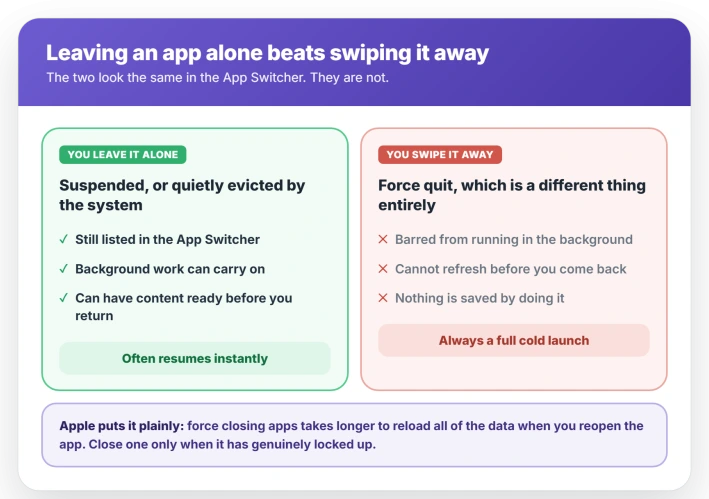
An app you leave alone gets suspended. It sits in memory doing nothing, and returning to it is close to instant.
If the system later needs that memory, it evicts the app quietly. The app stays in the App Switcher, and the system can still wake it in the background before you return.
Force-quitting is different in kind. Swiping an app off the App Switcher tells iPadOS that this app is not allowed to run in the background at all.
It cannot refresh itself before you come back, and reopening it is always a full cold launch.
Swiping the app away forces the exact cold launch you were trying to avoid.
Apple says so in writing: force closing an app "takes longer to reload all of the data" the next time you open it.
Apple's carve-out is narrow: close an app when it has genuinely locked up, or when a specific app is leaking memory, and otherwise leave the switcher alone.
Two things here feel identical and are not. An app reloading is the operating system doing its job.
An app losing your typed text, your scroll position, or your form is the app's developer skipping state restoration, which Apple explicitly asks them to implement.
The bug Apple never told users about
On Apple's developer forums, a developer measured a real regression and an Apple engineer diagnosed the cause.
On an 8 GB iPad, the memory available to apps fell from roughly 6 GB on iPadOS 26.0 through 26.3 to roughly 3 GB on 26.4 and 26.5.
The onset is 26.4, not 26.5, which is where the forum threads have it.
The cause is not physical memory running out. The shortage was in virtual address space instead: not the memory itself, but the numbering system apps use to reserve it.
You can run out of numbers with memory to spare, which is why a bigger iPad does not exempt you.
One limit on all of this. The developer thread concerns memory-hungry apps crashing rather than everyday tab reloading, so treat it as a likely major contributor rather than a proven single cause.
JavaScriptCore, the engine behind Safari and every in-app web view, was reserving far more address space than it needed, and smaller iPads suffered most because that reservation was a fixed-size block rather than scaling to the device.
WebKit's public bug tracker carries the corresponding fix, marked resolved. Apple's engineer said in mid-July that the problem should be fixed from the iPadOS 26.6 betas onward.
If your trouble is specifically Safari tabs rather than apps in general, that has its own set of causes.
What actually helps
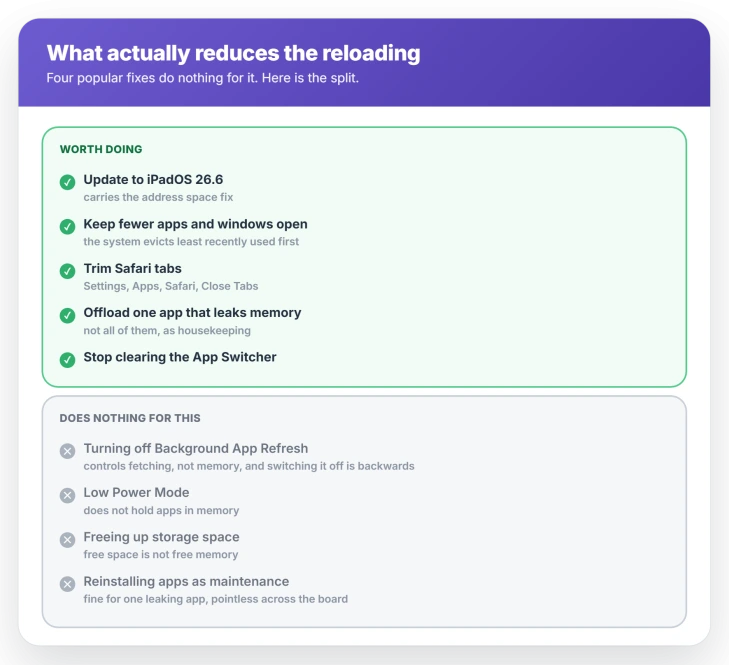
- Stop clearing the App Switcher. Every swipe guarantees the cold launch you were trying to prevent.
- Install iPadOS 26.6 as soon as it reaches you. It carries the address space fix, and it is the single most useful thing on this list. Settings, General, Software Update.
- Restart the iPad. Settings, General, Shut Down. Undocumented by Apple, but it clears the reserved address space that the bug was eating, which makes it the one folk remedy with a mechanism behind it here.
- Keep fewer windows with web content open. The over-reservation came from the web engine, so each open window showing a page costs address space. The system also evicts the least recently used apps first.
- Trim your Safari tabs. Settings, Apps, Safari, then Close Tabs, set to after a day or a week. This closes tabs to reduce memory pressure. Nothing in Safari stops an open tab from re-fetching.
- Offload the one app that misbehaves. Settings, General, iPad Storage, pick the app, then Offload App. The one to pick is the app that reloads even when it was the last thing you had open, or the one that always reloads while others survive. Doing it to every app achieves nothing.
- Check your storage tier, not your free space. On M-series iPads with enough storage, spare space genuinely backs virtual memory swap. A smaller iPad without that swap has no such cushion.
Four fixes that do nothing here
- Background App Refresh. It controls whether suspended apps fetch new content, and has nothing to do with whether an app stays in memory. Switching it off is the most commonly recommended fix for this and it is backwards: it removes the one mechanism Apple built for having fresh content ready before you open the app, so the fetching lands while you wait instead.
- Low Power Mode. Apple documents it as capping the refresh rate, dimming the display, pausing iCloud Photos, and switching off email fetch and background refresh. It does not hold apps in memory, and it is more likely to make background content staler. If battery is the actual worry, iPad battery drain is a separate matter.
- Freeing up storage space. iPadOS compresses memory rather than swapping to disk on most devices, so free space is not free memory. Apple does ask you to keep at least 1 GB free to avoid general slowdowns, which is worth doing for its own sake.
- Reinstalling every app as maintenance. Fine for the one app that misbehaves, pointless across the board.
The rare setting that causes this on purpose
One toggle produces exactly this symptom by design. It is rare, and it takes ten seconds to rule out.
Open Settings and look for Developer in the sidebar. If it is there, tap it and check Fast App Termination.
Switched on, it terminates backgrounded apps instead of suspending them, which is the symptom you came here for, working as designed.
The Developer menu only appears once a device has been set up for development, so most people will not have it at all.
If you do find it switched on, a person turned it on, whether or not anyone remembers doing so. Turning it off ends the problem completely.
Status: the memory regression began in iPadOS 26.4, and an Apple engineer says it should be fixed from the 26.6 betas onward. Apple has never mentioned it to users in any release note.
Why more RAM does not rescue you
The reports do lean toward 8 GB iPads, which fits a fixed-size reservation eating a larger share of a smaller pool.
One widely disputed post on iPadOS 26.5 came from a 16 GB owner reading a percentage off a third-party utility, and other posters in that thread pushed back on both the tool and the conclusion.
Buying more memory reduces how often eviction bites, and it does not exempt you, because the address space problem was not about physical memory in the first place.
What you cannot change
Some of this is simply how iPadOS works, and no setting reaches it.
Apple tells developers that terminations are part of the app lifecycle, that they are expected, and that the system uses them to keep whatever you are looking at responsive.
There is no user-facing control over that eviction policy, and no way to pin an app in memory.
Whether a particular app restores your place when it comes back is also entirely down to its developer, which is why one app returns you to your scroll position and another dumps a half-typed message.
Does closing apps on iPad free up memory?
No. Suspended apps are already using memory the system can reclaim whenever it wants. Closing them by hand gains nothing and forces a slow cold launch next time.
Apple's guidance is to close an app only when it has stopped responding.
Why do my iPad apps reload but my iPhone apps do not?
iOS and iPadOS share the same memory manager, so iPhones are not immune, and plenty of iPhone reports exist.
The iPad plausibly takes it harder because iPadOS 26 brought full windowing to much older hardware, and because the address space bug hit devices with less memory hardest.
The counter-evidence, such as it is: one owner compared an 8 GB M1 iPad on an iPadOS 26 beta against an 8 GB M2 on 18.5 and counted no extra reloading. It was reload-counting by eye rather than a measured test.
Will iPadOS 26.6 fix it?
It carries the fix for the address space regression, and Apple's engineer expects that to resolve the crashes and pressure it caused.
Whether it ends everyday tab reloading for you is less certain, because normal eviction continues regardless.
The Short Version
- Swiping apps off the App Switcher makes reloading worse. It bars background work and guarantees a cold launch.
- A real regression started in iPadOS 26.4, cutting available memory on an 8 GB iPad from roughly 6 GB to roughly 3 GB.
- Apple engineers traced it to virtual address space, not physical RAM, and to Safari's JavaScript engine over-reserving. The fix arrives in 26.6.
- Check Settings, Developer, Fast App Termination if that menu exists. It causes exactly this and turning it off ends it.
- Background App Refresh, Low Power Mode, and freeing storage do nothing for this.
- An app reloading is the system working. An app losing your place is the app's developer skipping state restoration.
Where to Next
- Safari specifically, rather than apps in general: Safari reloading tabs on iOS 26
- The battery side of iPadOS 26: iPad battery draining fast
- Windows collapsing instead of reloading: iPad window shrinks to a tiny box

Isaac Smith is the founder and editor of PC Glance, a website that covers computers, laptops, and technology. He is a tech enthusiast and a computer geek who loves to share his insights and help his readers make smart choices when buying tech gadgets or laptops. He is always curious and updated about the latest tech trends.