
You tap a name, the screen says Calling, and two seconds later it says Call Failed. Same number, same result, over and over, and by now you are wondering whether the phone is finished.
It usually is not the phone. The trouble is that nothing on that screen tells you whether the fault is your handset or your line, and they look identical from the keypad.
So before you reset a single thing, do one test with me. It takes two minutes and it answers that question outright.
Make one call over Wi-Fi and watch what happens
Wi-Fi Calling sends the call through your carrier over the internet instead of over the cellular radio. That makes it a clean split. Two paths, one account.
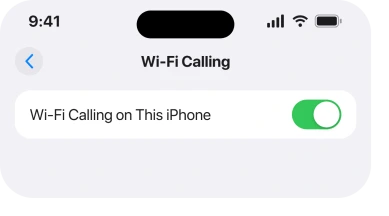
Turn it on at Settings, then Cellular, then Wi-Fi Calling. Apple: "Tap Enable. You might need to enter or confirm your address for emergency services."
Then turn Wi-Fi on, put the phone in Airplane Mode so it cannot fall back to cellular, and dial.
A call that connects this way tells you three things at once. Your number is active. Your account is not barred. The dialling software works.
What is left is the cellular radio and how your line is registered on the network.
A call that fails this way too points at the account or the carrier itself, and that is a phone call to them rather than anything you can fix in Settings.
Four things only your carrier can see
Apple's advice for a failed call starts with the carrier, and its list is more specific than the usual "ring them and see".
When you call them, Apple, on its failed calls page, says to make sure that "your account is set up to use your iPhone", that "there aren't any localized service outages", that "your account doesn't have a billing-related block", and that "your calls don't have errors on the carrier system".
The billing one is the sleeper. A block for a missed payment or a fraud flag can stop outgoing calls and leave texts and cellular data untouched. Which reads exactly like a broken phone.
The last one matters too. Carriers hold provisioning records per line, and an entry that went wrong during an upgrade or a number transfer will reject call setup every time without touching anything else.
Ask them to reprovision the line. It is routine, and it takes minutes.
If it only fails on some numbers
Every call failing and one call failing are different problems, so count before you troubleshoot.
If a single number fails and everything else connects, the fault is very likely at the other end or on the route between the two carriers. Try the same number from a different phone before you touch yours.
If every call fails but texts and data still work, that is the voice service specifically, which is the provisioning case again.
If nothing works at all, you are not really looking at Call Failed, you are looking at a phone with no usable service, and our page on an iPhone stuck on SOS or No Service is the right starting point.
Two lines, and only one of them is being tested
On a phone with two SIMs, cellular settings are held per line rather than for the phone as a whole.
Apple says as much in its own Wi-Fi Calling instructions: "If your iPhone has multiple SIMs, tap the line you want to use Wi-Fi Calling."
So every check in this article has to be done on the line that is actually placing the call. Turning Wi-Fi Calling on for your work line proves nothing about your personal one.
It is also why a dual-SIM phone can seem to fail at random. It is not random. Two accounts, two networks, and one of them has a problem.
The four checks on the phone worth making
Apple gives four settings checks, and they are quick.
Toggle Airplane Mode, with a pause. Apple: "Wait five seconds between turning Airplane Mode on and off." That gap is there so the phone drops its registration and asks for a fresh one rather than resuming the old one.
Then check for a carrier settings update at Settings, then General, then About. Wait on that screen for about fifteen seconds and a prompt appears if one exists.
Then install any iOS update that is waiting. Apple lists both updates before it lists any reset.
Then, last, Reset Network Settings. Apple's own warning is that it "will erase all current saved settings, including Wi-Fi passwords, preferred networks, and VPN and APN settings that you've used before".
That is a real cost, so it belongs at the end rather than the beginning, which is the opposite of the order it usually gets run in.
Run them in that order and stop the moment calls come back. I would rather you kept your Wi-Fi passwords than cleared them for nothing.
If calls go through but the Phone app keeps opening on the keypad since iOS 27, that is a smaller fault with its own fix, in the keypad page.
A VPN makes a very particular pattern
There is one signature worth knowing because it is unmistakable and it fools people for days.
Outgoing calls die with Call Failed while incoming calls ring but cannot be answered. That combination points at a VPN sitting on the connection, and our page on Mac calls failing documents the same pattern from the other end.
Turn the VPN off completely rather than disconnecting it. Then test. Some clients keep a filter installed even when they look inactive.
What does not work
- Erasing the phone. A provisioning fault, a billing block and a carrier outage all survive a full erase, because none of them lives on your phone.
- Swapping the SIM into the same phone again. Reseating helps a phone that cannot read the card at all, which shows a different message entirely. Our page on a No SIM alert covers that one.
- Turning 5G off. It is a reasonable thing to try for a slow or dropping data connection, and Apple does not list it anywhere in its advice for a failed call.
- Reset All Settings as a first move. Apple puts Reset Network Settings last for a reason, and the broader reset is bigger again with no more to offer here.
Status: iOS 26.6, checked 16 August 2026. Apple's page on failed calls, doc 118427, still routes owners to the carrier before any phone setting, and does not mention Wi-Fi Calling as a test.
What does Call Failed actually mean on an iPhone?
It means the call was set up and then rejected or dropped before it connected, rather than the phone being unable to try. That is why the phone shows Calling first. Because the attempt reaches the network, the answer usually sits with the account or the carrier's records rather than with the handset.
Why do my texts work but calls fail?
Texts and voice are carried differently and are provisioned separately, so a line can be authorised for one and not the other. A billing block or a provisioning error after an upgrade or a number transfer can take out voice while leaving messaging and data untouched.
Should I reset network settings for Call Failed?
Only after the carrier checks and the two updates. It clears saved Wi-Fi passwords, preferred networks, VPN and APN settings, which is a genuine cost, and it cannot repair anything held on the carrier's side.
The Short Version
- One Wi-Fi call splits the problem. Connecting proves your account and the phone's dialling both work.
- Apple sends you to the carrier first, and names a billing-related block as one of the four things to ask about.
- Ask them to reprovision the line. A bad record after an upgrade or a port rejects voice and nothing else.
- Every number failing and one number failing are different faults. Count before you troubleshoot.
- On a two-SIM phone, settings are per line, so check the line that is actually dialling.
- Airplane Mode on and off, with five seconds in between, then carrier settings, then iOS, then reset.
- Outgoing failing while incoming rings but cannot be answered is the VPN signature.
Where to Next
Nothing on that screen tells you which side the fault is on, and that is what makes this so frustrating. The Wi-Fi call is what buys you the answer.
Two minutes of setup, one test call, and you know whether to keep poking at Settings or to pick up another phone and ring your carrier.
When texts fail rather than calls, and the reply says message blocking is active, that wording means something specific.
Where the message is User Busy rather than Call Failed, one test separates a real busy line from your phone.
When it is FaceTime that will not start rather than a normal call, being greyed out has six specific reasons.
Where the call connects and Hold Assist gives up instead, SmartHolding failing has its own answer.
Skip it and you will spend the day resetting things that were never at fault, then ring them anyway. If your Wi-Fi call connects and the carrier still insists the line is fine, tell me in the comments and I will take it further with you.

Isaac Smith is the founder and editor of PC Glance, a website that covers computers, laptops, and technology. He is a tech enthusiast and a computer geek who loves to share his insights and help his readers make smart choices when buying tech gadgets or laptops. He is always curious and updated about the latest tech trends.