
Two very different people land on this page. You plug the phone into your computer and the Trust This Computer box never shows up at all, so you cannot get at your own photos.
Or you see that box every single time you plug in and you are sick of tapping it.
If you are the second one, I have good news. Your iPhone is not faulty, it is doing exactly what Apple designed it to do, and there is a sentence from Apple further down that explains why.
If you are the first one, that is a real fault, and it is nearly always something small at the computer end rather than anything on the phone.
If the box never appears
Start with the phone itself, because the alert cannot appear on a locked screen.
Unlock it with the cable already connected. Apple's order is connect, then passcode, then answer the box. People routinely do it the other way round.
Then work through Apple's list, testing after each step, because the order runs cheapest to most expensive.
Update the computer first. Apple singles out one Windows case: if you installed iTunes from the Microsoft Store, make sure that "iTunes Mobile Device Helper is enabled as a startup item".
That one setting stops the prompt dead. Nothing on the phone hints at it.
Then disconnect and reconnect. Then restart the computer. Then restart the phone.
Only after all four does Apple reach for a reset, and there are two of them.
Two resets, and they cost very different amounts
They get treated as one thing. They are not.
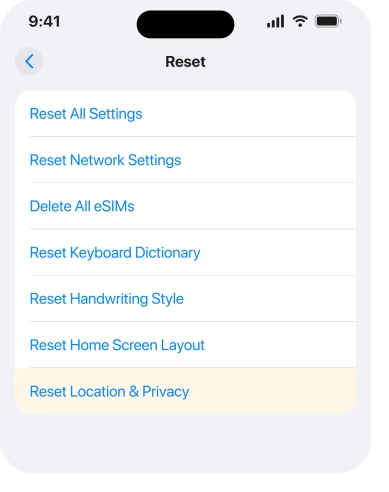
Reset Location & Privacy clears the list of computers your phone has already trusted, and almost nothing else.
Apple: "Now when you connect your device to formerly trusted computers, the alert message will ask whether you trust that computer."
The route is Settings, then General, then Transfer or Reset iPhone, then Reset, then Reset Location & Privacy. Your apps will ask for location and camera permissions again. That is the whole bill.
Reset Network Settings is the expensive one, and Apple spells out what it takes with it: it "also resets Wi-Fi networks and passwords, cellular settings, and VPN and APN settings that you've used before".
Apple's own guide adds two more that catch people out. Your phone's name goes back to iPhone, and manually trusted certificates "are changed to untrusted".
Apple lists them in that order for a reason. Try the cheap one first, plug in again, and only reach for the second if the box still refuses to appear.
If the box appears every single time
Apple documents two reasons for this, and neither of them is a fault.
Apple, on its Trust This Computer page: "With iOS 16 and later, the alert message appears when you back up your device. If you turn on automatic backups, the alert message appears every time that you connect your device to the computer."
So the trigger is the backup, not the connection. And automatic backups turn every plug-in into a backup.
The prompt is the phone asking permission for the thing it is about to do.
Turn automatic backups off on the computer and the box goes quiet. You will need to start backups yourself, which is the trade.
There is a second reason it can repeat, and it is worth ruling out before you change anything. Apple: "If you choose not to trust a computer, you block its access to content on your device. The alert message appears every time that you connect your device to that computer."
One accidental tap on Don't Trust, months ago, does exactly this. Reset Location & Privacy clears that decision and lets you answer again.
What tapping Trust actually hands over
Worth knowing before you tap it on a machine that is not yours.
Apple: "Trusted computers can sync with your device and access your device's photos, videos, contacts, and other content. These computers remain trusted unless you change which computers you trust or erase your device."
Read the second sentence twice. Trust does not expire. It does not lapse after a week. And nothing on the phone lists which computers hold it.
Apple does not offer any way to see that list, only a way to clear the whole thing at once. Which makes Reset Location & Privacy an occasional housekeeping job rather than only a fix.
A hotel lobby machine, an old work laptop and a friend's PC are all still on that invisible list.
Erasing the phone clears it too, which is the other half of Apple's sentence, and is a good thing to know before you sell one.
What does not work
- A different cable, first. Reasonable eventually, but a cable that charges and passes no data is uncommon, and none of Apple's first four steps involves the cable.
- Erase All Content and Settings. It clears trusted computers, and so does a reset that takes ten seconds and keeps your phone intact.
- Turning the phone off and on repeatedly. Apple lists one restart of each device. A second one adds nothing.
- Trusting from the computer only. The confirmation on the phone is the part that counts. Clicking Trust in Finder without answering on the phone leaves the pairing unfinished.
A working Trust prompt matters beyond syncing. It is the first step of the reinstall that clears a Cellular Issue Detected message, and that job stops dead without it.
If the computer will not see the phone at all, with or without a prompt, that is a connection problem rather than a trust problem, and our page on the USB-C port covers the permission that governs it.
Status: iOS 26.6, checked 16 August 2026. Apple's Trust This Computer page, doc 109054, still describes the every-time behaviour as iOS 16 and later, so it applies to every phone on iOS 26.
Why does my iPhone keep asking me to trust this computer?
Two documented reasons. Since iOS 16 the alert is tied to backing up, so automatic backups make it appear on every connection. The other is that Don't Trust was tapped at some point for that computer, and Apple says the alert then appears every time you connect to it.
Is it safe to tap Trust on someone else's computer?
Apple's own description is that a trusted computer can sync with your device and reach your photos, videos, contacts and other content. Trust also persists until you clear it or erase the phone. On a machine you do not control, Don't Trust is the safer answer. Your phone charges the same either way, and all you give up is access you did not want that computer to have.
How do I see which computers my iPhone trusts?
You cannot. The phone keeps the list and does not show it anywhere in Settings. The only control available is clearing the whole list at once with Reset Location & Privacy, which is why doing it occasionally is reasonable.
The Short Version
- Connect the cable first, then unlock the phone. The alert cannot appear on a locked screen.
- On Windows with iTunes from the Microsoft Store, iTunes Mobile Device Helper has to be a startup item.
- Apple's order is update, reconnect, restart the computer, restart the phone, then reset.
- Reset Location & Privacy clears trusted computers and little else. Reset Network Settings takes your Wi-Fi passwords with it.
- The prompt every time is the backup asking permission. Automatic backups make every connection a backup.
- An old Don't Trust tap produces the same repetition, and the cheap reset clears it.
- Trust never expires and the phone shows you no list of who has it.
Where to Next
The two complaints are opposites and they want opposite responses, so be clear which one you have before you change anything.
A missing prompt is a chain of small things at the computer end. A constant prompt is your phone behaving correctly around a backup, and the only real question is whether you want automatic backups enough to keep tapping.
And if you trusted the computer and the pictures still will not come across, that is the next list to work through.
Trusted the computer and the backup still falls over? that is the next thing to work through.
And on Windows rather than a Mac, the phone not appearing at all has seven fixes.
Either way, Reset Location and Privacy is the underused control here, and I would run it now and again even when nothing is wrong. If yours still will not appear after all of it, tell me what computer you are on and I will help.

Isaac Smith is the founder and editor of PC Glance, a website that covers computers, laptops, and technology. He is a tech enthusiast and a computer geek who loves to share his insights and help his readers make smart choices when buying tech gadgets or laptops. He is always curious and updated about the latest tech trends.