
Spotify does nothing when you click it. Or it opens, shows the interface, and refuses to play a note. Or it names an installation you cannot find anywhere on your machine.
That last one is genuinely maddening, and I want to start you there because it explains a dead end a lot of people get stuck in.
So this page sorts by what yours is doing.
The trap: there are two different Spotify apps
Windows has a Microsoft Store version of Spotify and a desktop installer from spotify.com. They are separate applications, installed to different places, and having both causes a specific, infuriating deadlock.
An owner reported hitting it exactly, in October 2022.
In his words, after reinstalling from the Store: "When I tried to open it, it said 'A Windows Store installation of Spotify was found in your system. Please uninstall that version first, or update through the Windows Store.'"
Then the part that traps you: "I searched in Control Panel and there was no Spotify app. I cannot uninstall as there is no Spotify app to do that and there is no update option in the Store."
That is the deadlock. One install is telling you to remove the other, and the other is not where you would go to remove it.
Ours, and marked as ours: Store apps do not appear in Control Panel. Look in Settings, Apps, Installed apps instead, which lists both kinds together.
That single detail is what breaks the loop, and it is missing from every thread I read on this.
It will not open at all
Start with the version of Windows you are on. It produces a very specific error.
Reported by an owner in February 2025, who could not run the installer from spotify.com: "I can't open the .exe file, because of a missing entry point???"
His Windows build turned out to be the reason. His own diagnosis: "I have a version to early for the command to work properly."
A missing entry point error means the app is calling something the version of Windows on your machine does not have. It is not a corrupt download, and reinstalling will not fix it. Only updating Windows will.
Nobody confirmed a fix on that thread, either. He could not update Windows, because his clock was out of sync and he had no administrator rights, which is its own trap and not one Spotify caused.
It opens but plays nothing
Work through Spotify's own list first. Two items on it are things people genuinely miss.
Documented by Spotify on its not playing page: check that your device "is not in offline mode", and that your "network connection" is working.
Two more from the same page are worth checking rather than skimming: your "device has at least 250MB of available memory", and for desktop, "Your firewall isn't blocking Spotify".
And one that explains a specific symptom: Spotify notes that songs may appear grayed out if they are "not available in your market". A greyed track is not a fault, and no amount of reinstalling changes it.
If there is no sound at all from anything
Then it is not Spotify. Play something on YouTube first. Silent there too? Then no sound on a computer is the page you want.
If sound works everywhere except through your headphones, headphones dead when you plug them in has a fix one owner confirmed.
Reset before you reinstall
Resetting keeps your account and clears the local data. That is enough for a lot of these.
Go to Settings, then Apps, then Installed apps. Find Spotify, open its three-dot menu, choose Advanced options, and use Repair first. If that changes nothing, use Reset.
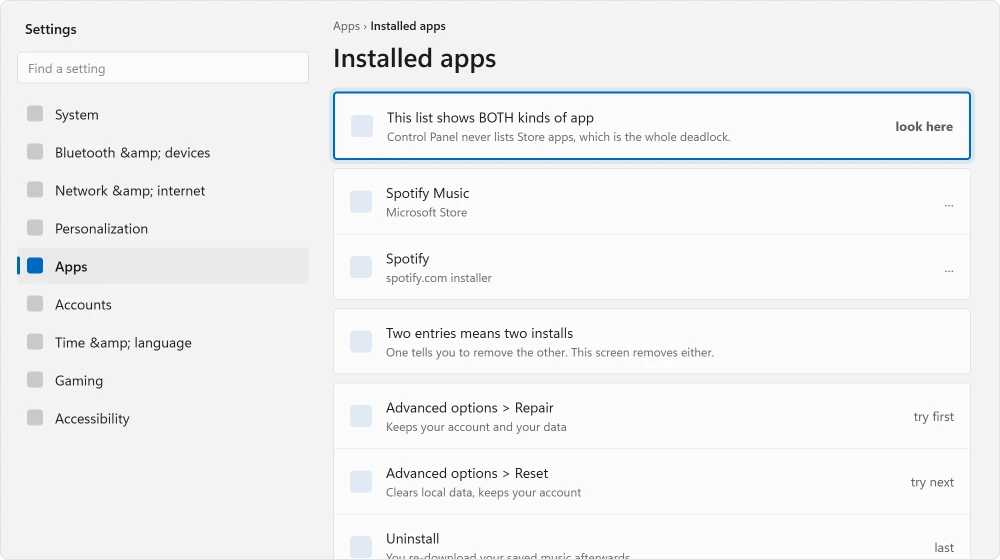
Reported by advisers on Microsoft's boards, repeatedly, as the first suggestion for this: reset the app via Advanced options, and reinstall if that does not help.
Spotify's own warning about reinstalling is worth reading before you do it: "You need to re-download any downloaded music and podcasts after reinstalling." On a metered connection or a small drive that matters.
What happens on these threads
I read four of them in full. Let me be straight about the pattern.
Not one reached a confirmed fix. The 2025 thread ends with a volunteer moderator suggesting reset or reinstall, an Independent Advisor asking clarifying questions, and no reply from the person who asked.
The 2022 thread ends with an adviser listing the Store troubleshooter, wsreset.exe, SFC, DISM, a PowerShell re-registration and an in-place upgrade, and no follow-up.
That is not because the advice is bad. It is because people who get it working stop typing, and a thread with no reply looks identical to a thread where nothing worked.
Ours, and marked as ours: so treat the list above as ordered by cost rather than by likelihood. Reset costs a minute. Reinstalling costs your downloads. Updating Windows costs an afternoon.
Work up that order rather than starting at the bottom.
The web player, as a test and as an answer
Open open.spotify.com in a browser. Try to play something.
If the web player works and the app does not, your account, your subscription and your connection are all fine, and the fault is the app on this machine. That is worth knowing before you spend time on anything else.
Ours, and marked as ours: it is also a perfectly good stopgap. If you need music now and the app is broken, the web player will carry you until you have time to fix it properly.
Status: written 22 August 2026. Windows carries two separate Spotify apps, and having both produces an uninstall deadlock Control Panel cannot resolve. No thread reached a fix.
Why does Spotify say a Windows Store installation was found?
Because you have both Spotify apps: the Microsoft Store one and the desktop installer from spotify.com. They are separate applications.
Store apps do not appear in Control Panel, so look in Settings, Apps, Installed apps, which lists both kinds and lets you remove either.
What does entry point not found mean when installing Spotify?
That the app is calling something your version of Windows does not provide. One owner traced it to a Windows build that was simply too old. Redownloading the installer will not help, because the download is not what is wrong.
Should I reset or reinstall Spotify?
Reset first, in Settings, Apps, Installed apps, Advanced options. It keeps your account and clears local data. Reinstalling costs you more: Spotify's own guidance is that you need to re-download any downloaded music and podcasts afterwards.
Why are some songs greyed out in Spotify?
Spotify's own explanation is that they may not be available in your market. That is licensing rather than a fault on your machine, so resetting, reinstalling and reinstalling again will not bring them back.
The Short Version
- Windows has two separate Spotify apps, and having both creates an uninstall deadlock.
- Store apps are not in Control Panel. Settings, Apps, Installed apps lists both kinds.
- An entry point error means your Windows build is too old, not that the download failed.
- Spotify's own list includes offline mode, 250MB free memory and your firewall.
- Greyed out tracks are a licensing thing, not a fault, and no reinstall touches them.
- The web player tells you in one minute whether your account and connection are fine.
Where to Next
Open open.spotify.com and press play before you touch anything else. Working there means your account and connection are fine and only the app on this machine is broken, which cuts the list in half.
If nothing on the PC makes a sound rather than just Spotify, no sound on a computer starts wider.
And if the Microsoft Store is misbehaving generally, the Snipping Tool refusing to open covers a Store fault with a confirmed fix.
Where you want a local file to play rather than a streaming app, Windows ships two media players and they are different.
Was yours the two-install deadlock? Say so below. I would like to know how common that one really is, because nobody seems to have counted.

Isaac Smith is the founder and editor of PC Glance, a website that covers computers, laptops, and technology. He is a tech enthusiast and a computer geek who loves to share his insights and help his readers make smart choices when buying tech gadgets or laptops. He is always curious and updated about the latest tech trends.