
You push the plug in and the sound carries on out of the speakers. Or everything goes silent and the headphones stay dead. Windows offers you Speakers and no headphones at all, as though nothing were plugged in.
And the same headphones work perfectly on your phone, which is the part that makes it feel personal. I have a confirmed fix for one version of this, so let me get you to the right section fast.
Where you plugged them in changes the answer completely. So that is how this page is arranged. Find your section.
First, a question that saves most people the rest of this page
Does a full restart bring them back?
Restart with the headphones already plugged in. Do they work? And does unplugging and replugging lose them again? Then you have a specific and fixable fault. Skip to the Fast Startup section.
That one detail separates the people this page can fix in two minutes from everybody else.
The 3.5mm jack on the front of a desktop
Front panel audio is a small board joined to the motherboard by a thin internal cable, fitted at a factory. It is the least reliable audio path in your machine.
Test the back panel first. Do they work in the green socket on the back but not the front? Then the front panel is your problem, and no Windows setting reaches it.
There is a specific version of this worth knowing. An owner posted in September 2024 with a two week old PC where the front jack recognized his headphones as a microphone rather than an output.
In his words: "the PC recognises it as an input device instead of an output device, meaning I do not get any sound output. This is observable both in my Asus Xonar Soundcard Control Panel (the headphones pop up as 'FP microphone') and also in the Windows sound settings."
Reported by an adviser on that thread, explaining why: combo jacks that carry both microphone and headphone signals are used to save space, and they can misidentify devices or wear out if they are not well made.
The detail that settled it had nothing to do with audio. His front USB ports were dead too, so check yours.
Two different things failing on the same panel is a wiring fault behind it, not a driver problem, and reinstalling the audio driver changed nothing for him.
Ours, and marked as ours: if anything else on that front panel is also dead, stop working on sound. Check the panel's own cable at the motherboard end, or use the back ports and get on with your day.
The jack on a laptop, where they vanish after you unplug them
This is the one with a confirmed fix, and it is not a fix anybody expects.
An owner posted in December 2025 on Microsoft's boards, on an HP running Windows 11. The description is precise.
In his words: "After unplugging my Realtek headphones from the headphone jack, then reconnecting them, I only hear sound from the computer speakers. Under 'System/Sound Output,' 'Select where to play sound,' only Speakers is available. There's no Headphones option."
And the crucial line, which may be yours too: "After restarting the PC, the jack appears."
He had already tried the entire list. Audio settings, driver reinstalls, different ports, Windows updates, testing the headphones elsewhere, restarting the Windows Audio service, and swapping both the PC and the headphones.
An Independent Advisor pointed him at Fast Startup. Nine days later a different person on the same thread confirmed it.
In that second owner's words: "Was having this exact issue, and just the first few steps fixed it. Turned off fast startup."
Why that works
Windows does not fully shut down when you tell it to. Fast Startup saves the system state and reloads it. That is why your PC boots quickly.
Hardware needing a fresh start does not always get one, which is exactly why a restart fixes this and a shutdown does not.
A restart genuinely reinitializes, while a shutdown followed by a power-on reloads the same tired state instead, jack detection included.
Open Control Panel, then Hardware and Sound, then Power Options. Click Choose what the power buttons do, then Change settings that are currently unavailable, and untick Turn on fast startup (recommended).
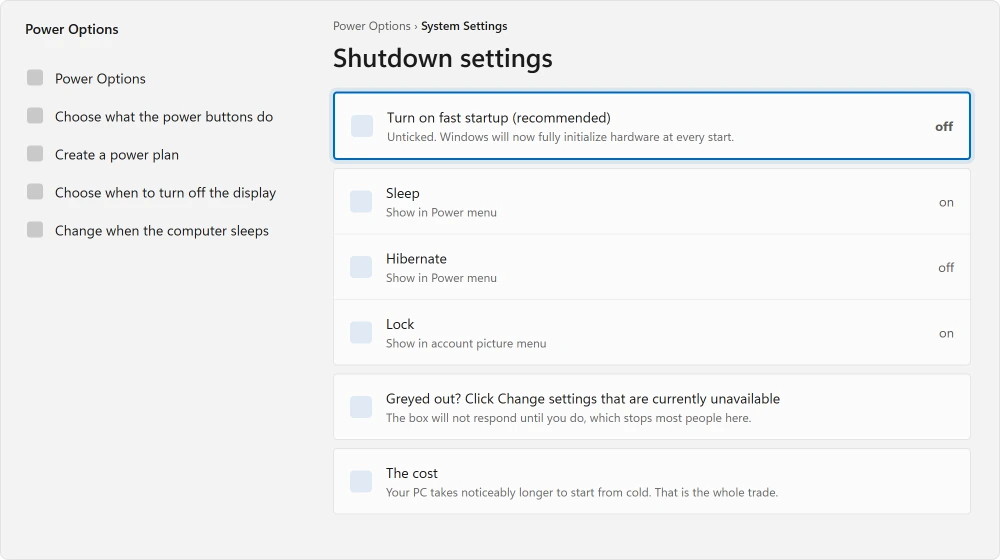
There are two warnings before you do it. Your PC will take noticeably longer to start from cold.
And an owner on that same thread reported that on his Windows 11 Home machine there was no Fast Startup option at all, and a command line check showed it already off while the fault persisted. It does not work for everybody.
Did a pop-up ask what you plugged in, and the mic died after you answered? That box belongs to the audio maker's app, and choosing Headset there brings it back.
The driver reinstalls people recommend, and how long they last
Every page on this topic says to remove the audio driver and let Windows reinstall it. Two owners did exactly that and reported back honestly, which is rarer than it should be.
The first, on Intel drivers: "One solution worked temporarily - when I uninstalled Intel SST BUS and OED drivers and then restarted my laptop. Windows reinstalled the drivers, and for the rest of that day, everything worked okay. But the next day the problem reappeared."
The second, on Realtek drivers, was delighted at first: "you guys just have to remove all realtek drivers and restart your pc/laptop windows will automatically install the driver, this worked for meeeeeeeeeeeeee."
He edited the same post later: "happiness faded after some time, the issue came back and its same as before."
I am printing both halves because the first half is all over the internet and the second half is not. A driver reinstall here buys you a day. It is worth one try and it is not a repair.
USB headphones or a USB dongle
Different problem entirely. The audio never touches your machine's sound hardware, because a USB headset carries its own.
If Windows does not see it at all, that is a USB fault rather than an audio one, and a USB device Windows will not recognize sorts that by what the message says.
If Windows sees it but plays elsewhere, open the volume icon, click the arrow beside it, and pick your headset by name. Windows does not always switch to a new device automatically.
Bluetooth headphones
Check they are connected rather than merely paired. Those are different states. The Windows list shows both together, which confuses everybody at least once.
Connected, and still missing from your sound output list? The headset's stereo service may be switched off, and one tick in its Properties brings it back.
If nothing on the machine makes a sound rather than just the headphones, no sound on a computer starts wider.
Ours, and marked as ours: if they connect but sound thin and tinny, Windows has selected the hands-free profile rather than the stereo one, usually because something has claimed the microphone.
Close whatever app is using it and reconnect.
That is a fix for the quality, not for silence.
A high-pitched tone in Google Meet is a different fault again, and the Meet tone page shows the audio setting behind it.
Two settings that hide a working device
Both of these make headphones appear to be missing when Windows has simply stopped showing them to you.
Right-click the volume icon and open Sound settings, then More sound settings. Right-click inside the Playback tab. Tick both Show Disabled Devices and Show Disconnected Devices.
Anything greyed out that appears can be right-clicked and enabled. Two clicks when it is the answer, and nothing lost when it is not.
Status: written 22 August 2026. One owner confirmed turning off Fast Startup fixed headphones that vanished after unplugging. Two others watched driver reinstalls fail within a day.
Why do my headphones only work after I restart the PC?
Because Fast Startup reloads a saved system state instead of initializing hardware properly, and jack detection is part of what gets skipped.
A restart initializes fully, a shutdown does not. Turning Fast Startup off in Power Options fixed it for one owner who confirmed it.
Why does my PC think my headphones are a microphone?
Your front panel combo jack carries both microphone and headphone signals down one connector. An adviser on Microsoft's boards notes they can misidentify devices or wear out.
One owner saw his headphones appear as "FP microphone". His front USB ports were dead too, which pointed at the panel wiring rather than software.
Does reinstalling the audio driver fix headphone detection?
For about a day, based on two owners who reported back. One removed Intel SST drivers and had a working day before it returned on him.
Another removed Realtek drivers, said it worked, then edited his post to say the problem came back. Worth one try, not a repair.
Why do my headphones work on my phone but not my PC?
Because the PC end is what has failed, not the headphones. That test is genuinely useful though: it rules out the headphones and the cable in one go, and sends you to the jack, the front panel wiring, or Windows own detection.
The Short Version
- If a restart brings them back but replugging loses them, Fast Startup is your answer.
- Fast Startup reloads a saved state, so a shutdown does not reinitialize jack detection.
- One owner confirmed it: "just the first few steps fixed it. Turned off fast startup."
- On Windows 11 Home the option may not be there at all, and one owner had it off already.
- A front panel jack calling your headphones a microphone is usually the panel, not the software.
- Two owners reported driver reinstalls working for a day and then failing again.
Where to Next
Try a full restart with the headphones plugged in before anything else. If they work that way and stop working when you replug them, you have found the exact fault that has a confirmed fix on this page.
If they are Bluetooth and the sound is present but awful, the fault is a different one entirely. Your headset is offering Windows two connections and one of them is a phone line.
If nothing on the machine makes any sound at all rather than just the headphones, no sound on a computer starts wider.
And if your headset is USB and Windows cannot see it, a USB device that is not recognized is the page for that.
And if you want the game on the speakers and the chat in the headset, Windows can send each app somewhere different.
Where the headphones are Bluetooth and Windows will not list them at all, the pairing order matters more than people expect.
For Bluetooth pairs specifically, there is a reset most people never do. Both ends store the pairing and Windows only clears its own.
If turning off Fast Startup worked for you, say so in the comments with your make and model. Several people on that thread found it did nothing on their machines, and I would like to know where the line falls.

Isaac Smith is the founder and editor of PC Glance, a website that covers computers, laptops, and technology. He is a tech enthusiast and a computer geek who loves to share his insights and help his readers make smart choices when buying tech gadgets or laptops. He is always curious and updated about the latest tech trends.