
You want a second passcode for your iPhone. Type it under pressure, and the phone wipes itself or opens something harmless instead of your real life.
Wanting that is reasonable, and plenty of people ask. I can save you the hunt through Settings.
No, the iPhone has no duress password. What it does have is a set of quicker, narrower tools. Each one fits a different situation.
The short answer: no
Apple's page on passcode options lists the settings you can change. There is no second code among them. No decoy screen, and no panic PIN.
Advisers on Apple's forum say the same.
A Level 9 member put it exactly in a community thread on the subject: "No, Apple does not offer a built-in duress password or panic PIN feature on the iPhone that can silently wipe data or open a fake interface when entered."
The feature does exist elsewhere. GrapheneOS, a privacy-focused system for Pixel phones, offers a duress PIN or password that "will irreversibly wipe the device (along with any installed eSIMs)".
A forum member noted that standard Android has none either.
So the useful question is what worries you. The answer changes with the situation.
1. Someone could force you to look at the phone
This is the case people usually mean. The iPhone has a fast answer for it.
Squeeze the side button and one of the volume buttons at once, for about two seconds. Apple lists this among the moments your passcode becomes required.
In Apple's words: "After initiating power off or Emergency SOS by pressing and holding either volume button and the side button simultaneously for 2 seconds."
From then on, Face ID stays off until the passcode is typed. Holding the phone up to your face does nothing.
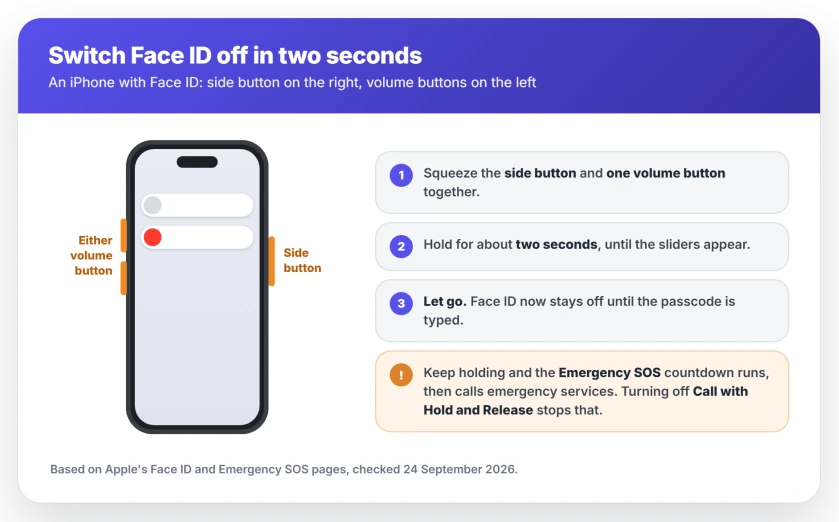
Let go as soon as the sliders appear. If you keep holding, Apple says the countdown runs. When it ends, the phone calls emergency services.
You can stop that happening by accident. In Settings, Emergency SOS, turn off Call with Hold and Release. The squeeze still brings up the sliders, and Face ID still switches off.
Restarting does the same job more slowly. Apple requires the passcode whenever the phone "has just been turned on or restarted."
2. Someone keeps guessing your passcode
The closest thing to a self-destruct the iPhone offers is one switch. You will find it in Settings, Face ID & Passcode.
Apple describes it plainly: "Erase Data: Choose whether to erase your device automatically after ten failed passcode attempts."
Think hard before turning it on. The wipe is final. Everything not backed up is gone, and a child playing with your phone could trigger it.
It also only fires after ten wrong guesses. It will not help if someone makes you type the real code.
3. The phone has been stolen
Here the iPhone does well. You just have to set things up before it goes missing.
Stolen Device Protection asks for Face ID for certain sensitive changes when you are away from familiar places. The most serious ones get a delay too.
If it ever refuses to switch off, the Stolen Device Protection page explains why.
Once it is gone, mark it as lost in Find My. Apple says that stops Face ID being used to unlock it.
You can also erase it remotely from Find My. Apple's condition is simple: you "must turn on Find My [device] before it's lost." An offline phone gets erased the next time it connects.
4. Someone close to you has access
This is a different danger. Apple built a separate tool for it, called Safety Check.
Go to Settings, Privacy & Security, Safety Check, then Emergency Reset. Apple says it helps you "quickly change your passcode and Apple Account password, stop sharing your location with Find My" and more.
It does not wipe anything. It cuts off the access other people have to your accounts and your location. Often that is what matters most.
5. You only want to keep some apps private
For a phone you hand to other people, Apple offers app locking and hiding.
Touch and hold an app, then tap Require Face ID. A locked app needs Face ID or the passcode to open. Apple says a hidden app "moves to a Hidden folder in App Library that requires authentication to open."
This part is ours, not Apple's: it protects you from a nosy friend. It will not stop someone forcing you, because your passcode opens locked and hidden apps too.
Two forum members gave the blunt version. One said what you would not want revealed under pressure is best kept off the device entirely. Another suggested putting it "on separate media."
Lockdown Mode is not a duress mode
It comes up every time this question is asked, so it needs a clear answer.
Apple calls Lockdown Mode "an extreme protection feature". It says to use it "only if you believe you might be targeted by a highly sophisticated cyberattack". It limits apps and connections against spyware.
It does not hide, wipe or disguise anything. Anyone holding your unlocked phone sees everything as normal. A newer reply in the same thread made the point that in a hold-up, "An attacker must not be alerted."
Status: iOS 27. Verified on 24 September 2026 with Apple's passcode, Face ID, Emergency SOS and Safety Check pages. The iPhone has no duress passcode, decoy profile or panic PIN. The two-second button squeeze, Erase Data after ten failed attempts, Stolen Device Protection, Safety Check and Find My each cover a different part of what a duress code would do.
Does iPhone have a duress password?
No. Apple's passcode settings include no second code, no decoy screen and no panic PIN. The nearest tools are the side and volume button squeeze, which switches Face ID off, and Erase Data, which wipes the phone after ten wrong passcodes. GrapheneOS on Pixel phones is the system that offers one.
Can an iPhone wipe itself after wrong passcodes?
Yes, if you turn on Erase Data in Face ID and Passcode settings. Apple says it erases the device after ten failed passcode attempts. Without it, the phone needs restoring on a computer after ten failures. Either way, a wipe cannot be undone, so keep a current backup.
How do I quickly disable Face ID?
Squeeze the side button and one volume button for about two seconds, until the sliders appear, then let go. Face ID stays off until you type your passcode. Let go before the Emergency SOS countdown ends, or your phone will call emergency services.
Does Lockdown Mode protect you if someone forces you to unlock?
No. Apple built Lockdown Mode against sophisticated spyware attacks, and it limits apps and connections. It does not hide or wipe anything, so someone holding your unlocked phone sees everything as usual.
Which phone has a duress password?
GrapheneOS, a privacy-focused version of Android for Google Pixel phones, offers a duress PIN and password that wipe the phone when entered. The iPhone and standard Android do not have one built in.
The Short Version
- The iPhone has no duress password, decoy profile or panic PIN.
- Squeeze the side and one volume button for about two seconds to switch Face ID off, then let go.
- Turn off Call with Hold and Release so that squeeze never calls emergency services by accident.
- Erase Data wipes the phone after ten wrong passcodes, but only then, and for good.
- Stolen Device Protection and Find My cover theft. Safety Check covers people close to you.
- Locked and hidden apps stop snooping, not coercion, because your passcode opens them.
Where to Next
A duress code sounds like one feature. On an iPhone it is really four or five smaller ones, and which you need depends on who you are worried about.
Set up the ones that fit you now, while nothing is wrong. Most of them only work if they were switched on beforehand.
Is there a situation this page does not cover? Leave a comment describing what you want to guard against, and I will add it if Apple has an answer.
If the squeeze left Face ID asking for your passcode at a bad moment, Face ID has been disabled explains every reason that message appears.
And if your phone now asks for the passcode more often than you expect, Require Passcode stuck on Immediately covers what changed.

Isaac Smith is the founder and editor of PC Glance, a website that covers computers, laptops, and technology. He is a tech enthusiast and a computer geek who loves to share his insights and help his readers make smart choices when buying tech gadgets or laptops. He is always curious and updated about the latest tech trends.