
Your phone shows full Wi-Fi bars and nothing will load. Someone in the house says the Wi-Fi is down. Someone else says it is the internet.
It is a maddening moment, and it is not a silly mix-up. Most of us use the two words for the same thing, yet they name two different things. Knowing which one failed tells you who to call.
I will explain the difference in plain terms first, and then give you the four checks Microsoft itself uses to tell which one failed.
The short answer
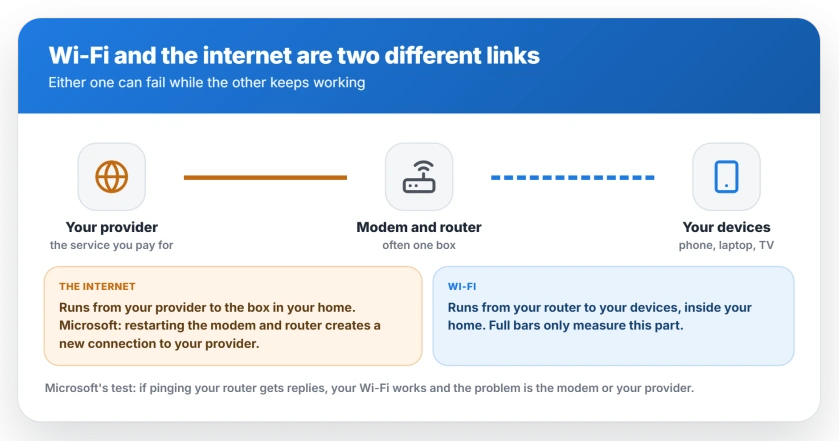
No. Wi-Fi is the wireless link inside your home, between your devices and your router. The internet is the service your provider brings to your home, and it arrives at one box.
Wi-Fi carries that service the last few yards, to your phone, laptop and TV. You own that part. The provider owns everything beyond the box.
The name gives it away. Wi-Fi is built on a standard called IEEE 802.11. The IEEE group that writes it calls itself "The Working Group Setting the Standards for Wireless LANs".
LAN stands for local area network. Local is the whole point: your home, your office, the coffee shop down the road.
Where one ends and the other begins
Microsoft's Wi-Fi help page draws the line for you: restarting your modem and router, it says, "helps create a new connection to your Internet service provider (ISP)."
So the modem faces your provider, and the router faces your devices. Many homes have both jobs in one box. How the two jobs split, and what each costs you.
That is why you can have perfect Wi-Fi and no internet at the same time. Your bars measure the signal to your router. They know nothing about the line beyond it.
Four checks that tell you which one broke
Do these in order. I start with the second device every time, because it needs no tools and usually settles it.
1. Try a second device. Microsoft's own step is to connect another laptop or phone to the same network, and if that one connects, Microsoft says your own device is the likely cause.
If the second device loads pages and yours does not, the problem is your device. If nothing in the house loads, it is the internet side or the box it arrives at.
2. Ping your router. Microsoft documents the test. Open Command Prompt, type ipconfig and find the Default gateway under your Wi-Fi network. Then type ping and that address, such as ping 192.168.1.1.
Replies mean your Wi-Fi works. Microsoft says a reply means "you have a connection to your Wi-Fi router, so there might be a problem with your modem or ISP."
3. Try a cable. Plug your PC straight into the modem with an Ethernet cable, if you can. Microsoft says that if the cable works, "it confirms the connection problem is due to the Wi-Fi router."
4. Check for an outage. Microsoft's advice is plain: "Contact your ISP or check online on another device (if you can)" to see whether there is an outage. Your phone on cellular data counts as another device.
Full bars with no pages is its own case, with its own layers. That case has three layers, and the test shows which one failed.
Why mixing them up costs money
This part is ours, from watching what gets sold: a Wi-Fi problem gets sold a faster internet plan. More speed down the line does nothing for a weak signal upstairs.
An internet problem gets sold a new router. A better router cannot create a connection that is not arriving.
So I would work out which half failed before spending anything at all. And if the problem is one far room, an extender buys coverage, not speed. Both makers say so in their own words.
Two speeds, not one
The speed on your bill belongs to the internet side, while your Wi-Fi link has its own speed. The slower of the two sets the pace.
Copying a file between two computers at home never touches the internet at all. That is pure Wi-Fi, or pure cable.
A weak Wi-Fi link can be slower than the plan you pay for, and on one laptop, the cable's link was more than ten times faster than its Wi-Fi.
The network name is a Wi-Fi setting
The name you see in your Wi-Fi list, and the password, belong to your router. Changing them changes nothing about your internet service.
It does kick every device off until you reconnect each one. Plan the change before you make it.
Status: checked 25 September 2026 against Microsoft's Fix Wi-Fi connection issues page for Windows 11 and Windows 10, and the IEEE 802.11 working group's own page. Microsoft's own steps split the two: a reply from your router means the Wi-Fi works and the fault is the modem or provider. Nothing on a live connection was measured for this page.
Is Wi-Fi the same as the internet?
No. Wi-Fi is the wireless link between your devices and your router, inside your home. The internet is the service your provider delivers to your home, and Wi-Fi carries it the last few yards once it arrives.
What is the difference between Wi-Fi and internet?
The internet is what you pay a provider for, and it arrives at your modem. Wi-Fi is how your router shares that connection with your devices without cables. Either one can fail while the other keeps working.
Can I have Wi-Fi without internet?
Yes. Your devices can connect to your router with full bars while the router has no connection to your provider. Things on your home network, such as a printer, can still work, but websites will not load.
Will a better router make my internet faster?
Only up to what your plan delivers. A better router can improve coverage and handle more devices at once, but it cannot create speed your provider is not sending you.
Is it my Wi-Fi or my internet that is down?
Test another phone or laptop on the same network. If it works, the problem is your first device. If nothing loads, ping your router: replies mean your Wi-Fi works and the fault is the modem or your provider.
The Short Version
- Wi-Fi is the wireless link inside your home. The internet is the service your provider sends to it.
- Full Wi-Fi bars only measure the signal to your router.
- Microsoft says restarting the modem and router creates a new connection to your provider.
- A second device that works means the problem is your first device.
- A ping reply from your router means your Wi-Fi works, per Microsoft.
- If a cable to the modem works, Microsoft says the Wi-Fi router is the problem.
- A faster plan does not fix weak Wi-Fi, and a new router does not fix a dead line.
- The network name and password are Wi-Fi settings, not internet ones.
Where to Next
Next time the house goes quiet, pick up a second device before you pick up the phone. It settles the argument in a minute.
If nothing loads anywhere, restart the box your connection arrives at, then check for an outage, but if only one device fails, leave the router alone.
Did someone once sell you the wrong fix for this? Share what you were told in the comments, so the next reader can spot it coming.

Isaac Smith is the founder and editor of PC Glance, a website that covers computers, laptops, and technology. He is a tech enthusiast and a computer geek who loves to share his insights and help his readers make smart choices when buying tech gadgets or laptops. He is always curious and updated about the latest tech trends.