
Your new iPhone 18 Pro crackles in your ear partway through a call. Or you hear a faint click every time you tap a text box. On a phone this new, that is a worry.
The return clock is running as well, so I will keep this practical. I split the two sounds, give you a test for each, and finish with what to do before your return window closes.
Two sounds, not one
Owners on Apple's forum describe two different faults, in two threads. Know which one you have. The tests are different.
The first is crackling on calls, through the earpiece, and the thread's starter wrote: "The crackling sound does not occur on every call; it appears randomly". It has 54 Me too.
The second is a click or pop that follows what you do on screen, and its starter hears it when "Tapping any text field to bring up the keyboard". It has 42 Me too.
Others set off the click by dragging the brightness slider, or by switching Airplane Mode on. One owner put it this way: "Opening/closing apps you can hear almost a cricket sound".
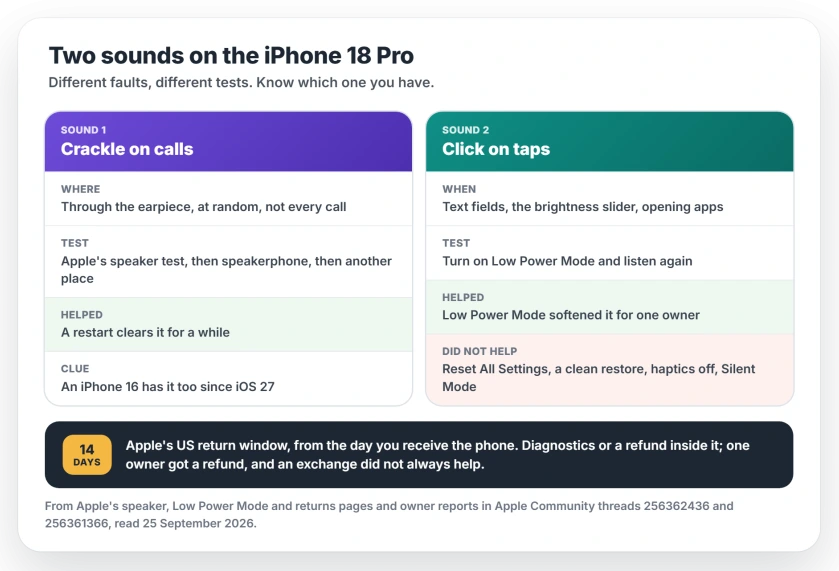
Status: iOS 27.0 on iPhone 18 Pro and Pro Max, checked 25 September 2026. Apple has not commented or shipped a fix. A restart clears the call crackle for a while. Reset All Settings, a clean restore, System Haptics off and Silent Mode did not stop the click. One owner got a refund.
1. Crackling on calls: run Apple's speaker test
Apple wrote a page for these sounds. Its steps cover the times you "hear crackling, hear static, or have issues with sound quality".
Start with the physical checks. Apple says to take off any screen protector and case first. Then check that the receiver, the thin slot over the display, is clear and clean.
Next, open Settings, then Sounds & Haptics, and slide the Ringtone and Alerts control left and right a few times. Clean sound means the speaker is fine.
Then make a call and switch to speakerphone, Apple's next step, and if the crackle is only in the earpiece, note that down. You will want it for Apple.
Last, Apple points at the network. If you still "hear static or crackling, then your network or reception could be the issue", so its advice is to call again later, or from a different location.
2. Restart when the crackle starts
If you need the crackle gone right now, the thread starter found a stopgap: "If I switch the iPhone off and on, the crackling usually disappears temporarily".
A Level 9 adviser read that as a clue: "The fact that a restart temporarily fixes it strongly points to a software buffer".
Another sign points the same way. An older phone has it too. An owner wrote: "My iPhone 16 has been doing it since the ios27 update".
Not only your phone calls, either. One owner heard it in a video call in Safari: "Whenever the other party spoke, there was a crackling or popping noise".
That same owner wrote: "I haven't heard this during any of my phone calls, music, nor instagram or YouTube apps".
I read it this way, and the reading is ours: a crackle that a restart clears, on an iPhone 16 as well, is iOS 27 rather than a bad earpiece. Keep an eye on Settings, General, Software Update on your iPhone for Apple's fix.
3. The click when you tap: skip the resets
The starter of the click thread tried the big fixes before posting. They did "Reset All Settings" and a "Full clean restore via Recovery Mode". They also "Turned off System Haptics and Lock Sound" and "Enabled Silent Mode".
The click stayed through all of it. So I would not bother with those on your phone.
One owner noticed a difference: "Sound isn't as prominent when in low power mode". That gives you a quick test. On iPhone 15 and newer models, Apple's steps are "Open Settings. Tap Battery. Tap Power Mode." Then turn on Low Power Mode.
If the click softens, you have the same fault as the thread. My guess, labeled as ours: a sound that follows screen activity and eases when the phone slows down comes from the electronics working, not from the speaker.
It is faint for some owners. One described it as "Random click pop sound, and if I put my ear close to it I hear mini sounds".
Before day 14: return, exchange or wait
Apple's US policy is short: "You have 14 calendar days to return an item from the date you received it". That covers phones bought from Apple, online or in an Apple Store, and its returns page says other shops apply their own policies.
A Level 9 adviser gave two options in one reply: "You need to have Apple perform diagnostics on your iPhone". And, "Personally, I'd just return the device within Apple's 14 day return period".
One owner in the click thread did return theirs: "Got a refund". The same owner added a warning: "Some people have had the same issue even after an exchange".
My own rule would be simple. For a crackle that a restart clears, wait for the update, but set a reminder a couple of days before your return date.
For a click that bothers you on every tap, book Apple's diagnostics while you are still inside the window.
If the phone passes and you still hate the sound, a refund is the cleaner exit. Exchanges did not always help.
If it is not this
Calls that go silent or fill with white noise are a different problem, and the no-sound call fixes cover that one.
A speaker that has gone quiet rather than crackly has its own checks and a safe way to clean it.
If your new iPhone 18 Pro Max also restarts by itself, that fault is settled by Apple's diagnostics, and some owners got a replacement.
Either way, tell Apple on the iPhone feedback page, and say which sound you hear, on which calls or taps.
Why does my iPhone 18 Pro crackle on calls?
Owners report a random crackle through the earpiece on iOS 27, and restarting your iPhone clears it for a while. An iPhone 16 owner reports it since the iOS 27 update too, which points at software. Apple has not commented.
Why does my iPhone 18 Pro make a clicking sound?
Owners hear a faint click or pop when they tap a text field, drag the brightness slider or open apps. Reset All Settings, a clean restore and turning off System Haptics did not stop it for the thread's starter. Low Power Mode softened it for one owner.
Should I return my iPhone 18 Pro?
Apple's US policy gives you 14 calendar days from the day you receive it, for phones bought from Apple. A Level 9 adviser suggested Apple's diagnostics or a return inside that window. One owner got a refund, and exchanges did not always help.
Does Low Power Mode stop the clicking?
It softened the click for one owner, but it did not remove it, so it works as a test you can run, not a fix.
The Short Version
- The iPhone 18 Pro has two separate sound faults on iOS 27: a call crackle and a tap click.
- For the crackle, run Apple's speaker test on your phone and try speakerphone.
- A restart clears the crackle for a while, and an iPhone 16 has it too.
- For the click, skip the resets; they did not help.
- Low Power Mode softened the click for one owner.
- Apple's US return window is 14 calendar days. Decide before it closes.
Where to Next
The date on your receipt matters more than any setting here. Put it in your calendar today. Then run the tests.
Which of the two sounds do you have, and does a restart clear it? Tell me in the comments. I read every reply, and your answer helps the next owner decide faster.

Isaac Smith is the founder and editor of PC Glance, a website that covers computers, laptops, and technology. He is a tech enthusiast and a computer geek who loves to share his insights and help his readers make smart choices when buying tech gadgets or laptops. He is always curious and updated about the latest tech trends.