
You press the middle button on your EarPods to pause a song, and nothing happens. The volume buttons still work. Hold the button down, and Siri still answers.
It is not your EarPods, so hold off on a new pair. I cover the quick fix that brings the button back for a while, a workaround that keeps you going, and what updates have and have not fixed.
Is it this fault?
Apple says what the center button should do, in its EarPods guide: "Pause: Press the center button. Press again to resume playback."
If yours matches, the thread on Apple's forum will look familiar.
One owner described the same odd split: "Volume up/down, long press for Siri and normal press to accept/end a phone call work, but normal press to play/pause in any audio context doesn't work".
The thread has 356 Me too. Its starter wrote: "The play/pause (single press) button doesn't work in any media apps". They named Apple Music, Spotify and YouTube.
It does not matter which kind of EarPods you own, either. Reports cover the USB-C pair, the Lightning pair and the 3.5 mm plug on an adapter, and one owner had it with "brand new wire headphones" on a new iPhone 17.
My reading, labeled as ours: if the same button still works for Siri and for calls, the button itself is fine. The fault sits in how iOS passes that one press to the app.
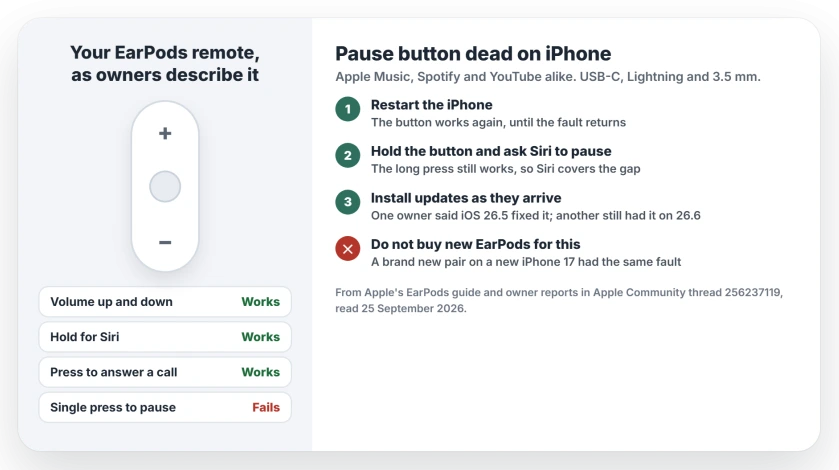
Status: iOS 26 to 26.6 in the main thread, checked 25 September 2026. Apple has no permanent fix yet. Restarting the iPhone makes the button work again, until the fault returns. One owner said iOS 26.5 fixed it, and another still had it on 26.6. The thread has no report from iOS 27 yet.
1. Restart your iPhone
This is the quick fix, and owners keep coming back to it. The starter wrote that "a restart on my device makes it functional again".
Another owner agreed: "A temporary solution to this is restarting your device." Note the word temporary. The fault comes back.
2. Pause with Siri meanwhile
The long press still works, so let Siri do the pausing. In Apple's words: "Press and hold the center button until you hear a beep." Then say "Pause", or "Play" to carry on.
That workaround is ours. It rests on what owners say still works, and you never have to take the phone out of your pocket.
3. Install updates, but do not count on them
One owner reported a fix after an update: "The issue is resolved with the recent update 26.5". Another owner, on a later version, was not so lucky: "im on 26.6 and it's still a problem".
So install updates as they arrive, under Settings, General, Software Update. Just do not wait on one. The thread has no word yet on iOS 27.
4. A setting one owner is testing
On 24 September, an owner switched Call Audio Routing back to Automatic and wrote: "It seems this might help". That is all the evidence so far, so treat it as a maybe.
Apple's route is "Settings > Accessibility > Touch > Call Audio Routing". If yours is set to something other than Automatic, switching it back does no harm.
What does not help
A new pair of EarPods. The owner with brand new ones on a new iPhone 17 had exactly the same fault. A restart fixing it for a while also points away from the hardware, in our reading.
If it is something else
If your audio pauses by itself when you have not touched anything, that is a different iOS fault with its own causes. If the buttons on the iPhone itself fail, the phone button guide covers volume, side and Action.
Why won't my EarPods pause music on iPhone?
Owners on iOS 26 report that a single press of the center button stops working in every media app, while volume, Siri and calls still work. Restarting helps until the fault returns. Apple has not explained it.
How do I fix the EarPods play/pause button?
Restart your iPhone to get it working again for a while, and meanwhile hold the center button and ask Siri to pause or play. Install updates as they arrive, since one owner said iOS 26.5 fixed it.
Do USB-C EarPods have the same problem?
Yes. Owners report it on USB-C, Lightning and 3.5 mm EarPods, so a different connector does not avoid it.
Will new EarPods fix it?
Not for one owner, who had the same fault with a brand new pair on a new iPhone 17, and the restart working is a sign the button itself is fine.
The Short Version
- A single press on EarPods stops pausing, while volume, Siri and calls still work.
- It happens in Apple Music, Spotify and YouTube, on every EarPods connector.
- Restart your iPhone. The button works again until the fault returns.
- Meanwhile, hold the center button and ask Siri to pause.
- One owner said iOS 26.5 fixed it. Another still had it on 26.6.
- Do not buy new EarPods for this.
Where to Next
Restart first, then keep the Siri trick for the days it comes back. I will add the real fix here once Apple ships one.
Did the restart hold for you, and which iPhone and iOS version are you on? Say so in the comments. Your answer tells me whether iOS 27 finally fixed it.

Isaac Smith is the founder and editor of PC Glance, a website that covers computers, laptops, and technology. He is a tech enthusiast and a computer geek who loves to share his insights and help his readers make smart choices when buying tech gadgets or laptops. He is always curious and updated about the latest tech trends.