
You get an email from no_reply@email.apple.com. It looks like an Apple receipt. Or it wants you to do something with your account, and you do not remember buying anything.
Before you tap anything, know this. The answer does not live in the address. I start with the short answer, then give you two checks I trust whatever the email claims.
The short answer: yes, but the address proves nothing
The address is real. In the forum thread on this, a Level 10 adviser was plain about it: "Yes, that is a legitimate address." Another Level 10 member added: "My receipts from Apple are being sent form this address."
One owner who asked found the same in their own inbox: "I do have other legit emails from Apple from this address".
The first adviser also named the problem: "The controversy only arises because sender email addresses can be easily spoofed." A third Level 10 member agreed there is "usually no definitive answer to these because of spoofing".
So a real Apple email and a fake one can show the same sender. My advice, and it is ours: never judge an Apple email by its sender. The next two checks ignore the sender.
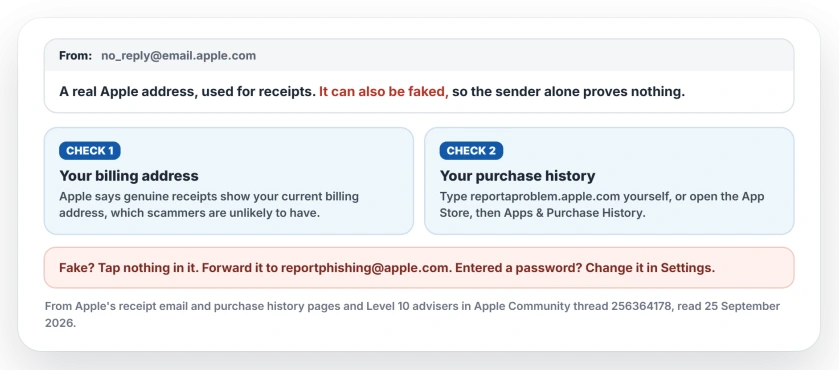
Status: checked 25 September 2026. Level 10 advisers confirm the address sends genuine Apple receipts and warn that it can be spoofed. Apple's own pages give the billing address and purchase history checks, and the address to report fakes.
1. Look for your billing address
Apple's first test is simple. Genuine receipts "include your current billing address, which scammers are unlikely to have."
Open the email without tapping any link, and look for it. If your real billing address is there, that is a strong sign. Missing or wrong? Treat the email as fake.
2. Look for the purchase yourself
Skip the links in the email. Type the address into your browser yourself: reportaproblem.apple.com. Apple's steps are to sign in there and read the list of purchases.
On an iPhone, the App Store has the same list. Tap your photo or initials, then Apps & Purchase History, then Purchase History.
If the purchase is there, the charge is real, and you can deal with it from that page. Not there? Do not act on the email.
Apple adds one exception: you "might have used a different Apple Account" for a purchase, so check any other account you use.
What a real Apple email never asks for
Apple's receipt email page lists what a genuine purchase email will never ask for: your Social Security number, your mother's maiden name, your full card number or its security code.
It also says: "Never enter your account information on websites linked from these messages, and never download or open attachments included within them."
If an email asks you to update your details, Apple's rule is to "only do so in Settings directly on your iPhone, iPad, or iPod touch". That way you never rely on the email at all.
If it is fake, or you already tapped a link
Report it. Apple's address for this: "If you received a suspicious email, please forward it to reportphishing@apple.com."
If you typed a password into a page the email opened, Apple is blunt: "immediately change your Apple Account password". Do that in Settings, not from the email.
For the wider set of signs, our guide to spotting a phishing email goes further. And if you want a real person at Apple, you can start a support chat yourself rather than trusting a number in the message.
Is no_reply@email.apple.com a real Apple email address?
Yes. Level 10 advisers on Apple's forum confirm Apple sends receipts from it. Because sender addresses can be faked, the address alone does not prove an email is genuine.
Can scammers send emails from no_reply@email.apple.com?
They can make an email look as if it came from that address. That is what advisers mean by spoofing. Check for your billing address and look up the purchase yourself.
How do I check if an Apple receipt is real?
Apple says genuine receipts include your current billing address. Then sign in at reportaproblem.apple.com, typed yourself, or open Purchase History in the App Store and look for the purchase.
How do I report a fake Apple email?
Do not tap its links or open its attachments. Forward it to reportphishing@apple.com, as Apple asks, then delete it. If you entered a password anywhere, change your Apple Account password in Settings.
The Short Version
- no_reply@email.apple.com is a real Apple address, used for receipts.
- The sender can be faked, so the address alone proves nothing.
- A genuine receipt shows your current billing address.
- Look the purchase up yourself at reportaproblem.apple.com or in the App Store.
- Never enter account details through a link in the email.
- Forward fakes to reportphishing@apple.com.
Where to Next
Run the purchase history check whenever a receipt surprises you. It settles the question quickly, whatever the email looks like.
Got an email that passed one check and failed the other? Tell me about it in a comment, leaving out your personal details, and I will help you read it.

Isaac Smith is the founder and editor of PC Glance, a website that covers computers, laptops, and technology. He is a tech enthusiast and a computer geek who loves to share his insights and help his readers make smart choices when buying tech gadgets or laptops. He is always curious and updated about the latest tech trends.