
Your child's Mac has a Screen Time limit on Roblox, and when time runs out the icon dims, as it should. Then Roblox opens anyway.
Owners in a long thread worked out why, and found two things that do hold. I checked the Mac side against Apple's Screen Time guide for macOS 27, which works differently from Tahoe.
The icon dims, the game still starts
The parent who started the thread has a MacBook Air. The limit looked set, they wrote, "but the app opens anyway".
Another owner found the reason: "Roblox app is using RobloxPlayer which is not getting restricted by the screen time". The launcher obeys the limit, but the game runs as a second program.
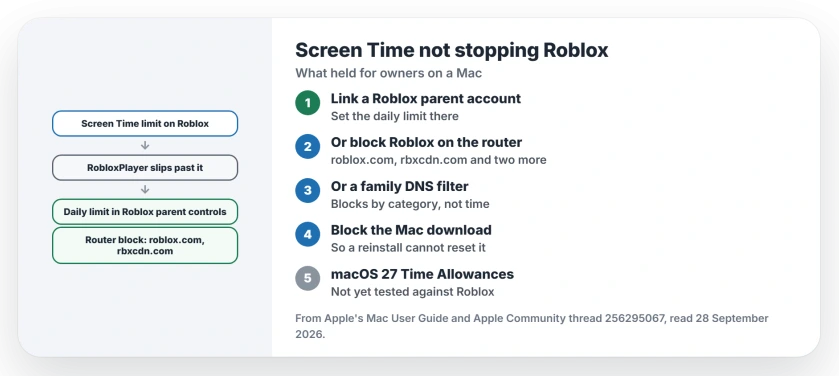
Status: Macs on Tahoe 26 or macOS 27, checked 28 September 2026. Screen Time misses the RobloxPlayer process for owners. Roblox's own daily limit and a block on the router are what held.
1. Set the limit inside Roblox
Two parents landed on the same answer. One wrote: "This is only way I have gotten it to work." They set the time limit in Roblox's own parent controls.
Another put it the same way: "The only solution for now is to download the Roblox app, set up a parent account, and set up time limits through the app." Roblox covers it in its help pages under Managing Screen Time.
2. Block Roblox on your router
If you want the Mac's own rules to win, block the game where your internet comes in. One owner wrote: "I have blocked Roblox at the router level."
They listed the addresses they blocked: roblox.com, rbxcdn.com, clientsettings.roblox.com and api.roblox.com. The router block is user-reported, so test it on your own network.
The parent who started the thread later moved to a router that can "block Roblox either completely or on a schedule".
3. Or use a family DNS filter
A lighter option came from a later reply. You can point the Mac, or the whole network, at a family filter such as Cloudflare for Families (1.1.1.3) or OpenDNS.
A filter blocks by category, not by the clock, so it works as an on or off switch. That limitation is our reading, not the owner's.
4. Stop a reinstall from resetting it
One parent found that deleting and reinstalling Roblox reset the time limit. A Level 10 volunteer suggested blocking Roblox's Mac download address in Screen Time's website restrictions, so it cannot come back quietly.
On macOS 27, Apple's Screen Time guide describes a different system. Apple says: "You can use Time Allowances to set how long you use your apps each day, and Schedules to set when during the day you can use them."
No owner has reported trying it against RobloxPlayer yet, and we could not test it ourselves.
More Screen Time trouble
If limits get ignored on an iPhone or iPad, the Screen Time page goes through the switches that decide it. And if you have lost the Screen Time passcode itself, the passcode page covers the recovery options.
Why does Screen Time not stop Roblox on a Mac?
Owners found that Roblox runs the game as a second program, RobloxPlayer, which the Screen Time limit does not catch. The icon dims, but the game still starts.
How do I limit Roblox time on a Mac?
Set a daily limit in Roblox's own parental controls, with a parent account linked to your child's. One parent says nothing else worked for them, and another calls it the only solution for now.
Can I block Roblox on the router?
Yes. One owner blocked roblox.com, rbxcdn.com, clientsettings.roblox.com and api.roblox.com at the router, and it seems to be working for them.
Does macOS 27 fix it?
Not that anyone has reported yet. macOS 27 swaps App Limits for Time Allowances and Schedules, and owners have not tested those on Roblox.
The Short Version
- The Roblox icon dims but still opens.
- RobloxPlayer slips past Screen Time.
- Set a limit in Roblox's parent controls.
- Or block Roblox at the router.
- A family DNS filter is an on or off option.
- Block the download so it cannot reinstall.
Where to Next
Link a Roblox parent account tonight and set the daily limit there. Then check the Mac the next day, once the limit should have run out.
If Roblox still opens past its limit, leave a comment naming the macOS version on that Mac. I will add what the owners on macOS 27 find.

Isaac Smith is the founder and editor of PC Glance, a website that covers computers, laptops, and technology. He is a tech enthusiast and a computer geek who loves to share his insights and help his readers make smart choices when buying tech gadgets or laptops. He is always curious and updated about the latest tech trends.