
Swipe up to switch apps on iOS 27 and the cards jerk and stutter instead of gliding. Everything else feels quick, so it seems random. I would look at your Home Screen icon style before you reset anything, because owners traced it there.
One MacRumors owner found the stutter only with tinted or clear icons, and a second owner has it on both their devices. A round-up of owner reports by MacObserver describes the same jitter.
What the owners found
The opening owner put it exactly: "the app switcher would stutter miserably when you have tinted or clear icons turned on, but works fine when your using the default light and dark icons".
It shows with ProMotion at 120 Hz. It skips the newest phones: "This problem affects all devices except the new iPhone 18 Pro" and its Max sibling. The update did not cure it either: "This bug is still around as of iOS 27.0.1."
A second owner replied. In their words: "Have the same issue on both my devices." Both reports are user-reported, with no word from Apple yet.
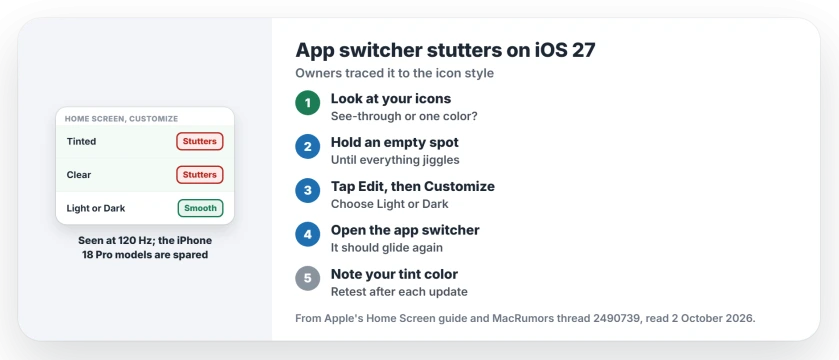
Status: checked 2 October 2026. On iOS 27.0.1 the app switcher stutters for owners using tinted or clear icons on 120 Hz iPhones. Light or dark icons run smoothly.
1. Check your icon style
Go to your Home Screen and look at the icons. If they are see-through, or all one color, you are on Clear or Tinted, the two styles in the reports.
Apple says in its Home Screen guide that Clear makes "the icons translucent". Tinted is a single color across every icon, picked with sliders or an eyedropper from your wallpaper.
2. Switch to Light or Dark
Press and hold an empty spot on the Home Screen until everything starts to jiggle. Tap the Edit button, then Customize. Choose Light or Dark instead of Clear or Tinted.
Then open the app switcher and move between a few open apps. The opening owner said the switcher "works fine" with those plain icons.
MacObserver's round-up reports the same from another owner, who found that "changing back to standard icons noticeably reduced interface jitter".
3. Keep the look you like until a fix
You lose the tinted look for now. Ours: write down your tint color first, so you can set it back exactly once Apple fixes the stutter in a later update.
Test again after each new iOS 27 update. Switch back to Tinted, open the app switcher, and see whether the stutter is gone.
4. Or try Limit Frame Rate
Ours, untested: the owners tie the stutter to 120 Hz, and iPhone has a setting that caps the screen at 60 frames per second. The animations page explains Limit Frame Rate and what it costs you.
It could keep your tinted icons while smoothing the switcher. None of the owners has tried it yet, so tell me how it goes if you do.
5. Rule out the icon glitch itself
If your icons look wrong rather than slow, such as a target symbol in place of an app, that is a different fault. The target symbol page covers it, and switching the look helps there too.
Why does my iPhone app switcher lag on iOS 27?
Owners linked it to tinted or clear Home Screen icons on 120 Hz iPhones. With light or dark icons the switcher ran smoothly, and the iPhone 18 Pro models did not show it.
How do I change iPhone icons back to normal on iOS 27?
Press and hold an empty spot on the Home Screen, tap Edit, then Customize. Choose Light or Dark. That replaces the Clear or Tinted look.
Did iOS 27.0.1 fix the app switcher stutter?
No. The owner who reported it said it was still there on iOS 27.0.1.
The Short Version
- The app switcher stutters on iOS 27 for some owners.
- Tinted or clear icons set it off.
- It shows at 120 Hz and skips the iPhone 18 Pro.
- iOS 27.0.1 did not fix it.
- Switch your icons to Light or Dark.
- Note your tint color to restore it later.
- Retest Tinted after each iOS update.
Where to Next
Switch your icons to Light or Dark now and open the app switcher a few times. If it glides again, keep that look until the next update.
If it still stutters with plain icons, post your iPhone model under the article. I will note every model that turns up.

Isaac Smith is the founder and editor of PC Glance, a website that covers computers, laptops, and technology. He is a tech enthusiast and a computer geek who loves to share his insights and help his readers make smart choices when buying tech gadgets or laptops. He is always curious and updated about the latest tech trends.