
You press Ctrl+J in Chrome and nothing happens, and Downloads in the three-dot menu is just as dead. Yet typing chrome://downloads into the address bar opens your Downloads page at once, so your files are fine.
I would start Chrome once with two features switched off. An owner on Chrome 154 did exactly that, and the shortcut worked again.
The Google help thread about it has 88 upvotes since 2 October.
Why the shortcut went quiet
Google says in its shortcut list that Ctrl + j should "Open the Downloads page in a new tab". So the key is not retired; something inside Chrome simply stopped listening to it.
A long-time helper on the thread pointed at "an ongoing Chromium trial on Windows", one that moves Chrome's menu commands onto new code. That matches what you see.
Chromium's own source carries the comment "Enables the migration of browser commands to Action API". Chrome 154 ships that feature switched off, while Chromium's list of field trials holds a study that switches it on.
Ours: that is why your PC has the fault and the next one may not. Chrome is changing its menus in stages this year, and Ask Gemini reached the right-click menu the same gradual way.
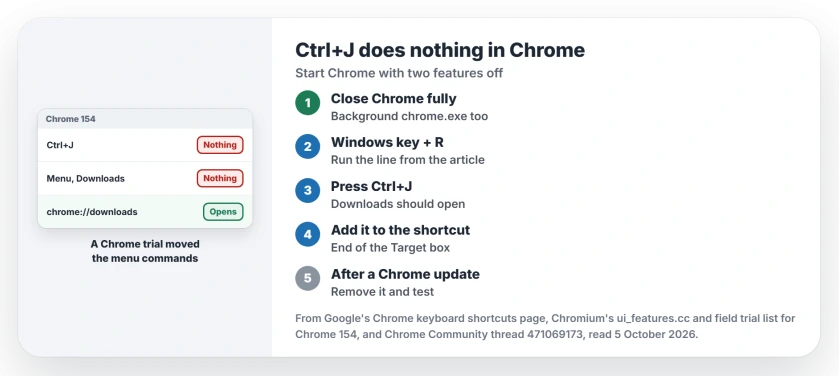
Status: checked 5 October 2026. An owner on Chrome 154 fixed it by starting Chrome with two features off. Typing chrome://downloads works in the meantime.
1. Close Chrome completely
The switch only counts when Chrome starts cold. The helper's first step was to "Close Chrome completely, including any background chrome.exe from the task manager".
Ours: Chrome can keep running after you close its last window, so open Task Manager, look for Google Chrome and end it there.
2. Start Chrome with the two features off
Press Windows key + R, paste this line into the box and press Enter:
chrome.exe --disable-features=UseActionsForBrowserCommands,AppMenuGlowUpNow press Ctrl+J. In their words, "launching Chrome with the following command solved the issue". The owner behind that fix used the full path to chrome.exe, on Chrome 154 build 8037.98.
Why both names? Ours, from reading Chromium's code: Chrome takes the new command path when either feature is on. Switch off only one and your fault stays. I would keep both names in.
3. Keep it on your shortcut
A Run box switch dies with that session. To keep it, right-click the Chrome shortcut you start from and open Properties.
In Target, click after the closing quote. Type a space, then the switch from step 2 without the chrome.exe part. For a taskbar pin, right-click the icon first, then right-click Google Chrome in that list.
Ours: if another app opens a link while Chrome is closed, Chrome starts without your switch, so close it and start it from your shortcut again.
4. Meanwhile, type the address
The thread's starter confirmed that typed into the address bar, "the Downloads page opens normally". Bookmark it if you download a lot.
One owner found that opening it once brought Ctrl+J back for that session: "I am guessing this is some bug with Chrome not loading the download list until forced to". Another said it "doesn't fix the issue for me". Try it and see.
Already tried by the first poster
Restarting Chrome and Windows, updating Chrome, Incognito, every extension off, a new profile and a full reset of Chrome's settings were all on the first poster's list.
None of it changed a thing, which fits a trial on Google's side much better than anything stored in your own profile.
A reader thought "there has been a chrome update pushed recently that messed with the functionality of this shortcut". Ours: both can be true, because an update carries the code and the trial decides who gets it.
When to take the switch off
Ours: after each Chrome update, remove the switch and test Ctrl+J. Trials end or change between builds, and you do not want a stale switch sitting on your shortcut for months. I would set a reminder.
Google has fixed Chrome 154 bugs inside the same version before, as the screen dimming during videos showed. Check chrome://settings/help now and then.
Is the switch safe?
Yes. It turns off two features that Chromium's code for Chrome 154 already ships switched off. Bookmarks, passwords and settings stay as they are.
Why does Ctrl+J work on my other PC?
Trials reach some installs and skip others. Chromium's test list shows the study for Windows, Mac, Linux and ChromeOS.
Do I need to type the switch every time?
No. Once it sits on the shortcut you start Chrome from, it applies every time Chrome starts that way.
The Short Version
- Ctrl+J and the menu's Downloads line doing nothing is a Chrome fault.
- Typing chrome://downloads still opens the page.
- Close every Chrome process first.
- Start Chrome with UseActionsForBrowserCommands and AppMenuGlowUp disabled.
- Put the switch on your shortcut to keep it.
- Take it off after a Chrome update and test again.
Where to Next
Run the Run box line now and press Ctrl+J. If your Downloads page opens, add the switch to the shortcut before you forget.
Which Chrome build are you on, and did the switch work? Leave both in the comments so others can see when Google fixes it.

Isaac Smith is the founder and editor of PC Glance, a website that covers computers, laptops, and technology. He is a tech enthusiast and a computer geek who loves to share his insights and help his readers make smart choices when buying tech gadgets or laptops. He is always curious and updated about the latest tech trends.