

Your Mac's fan spins up while the Mac sits idle. Activity Monitor puts mediaanalysisd at the top, with hours of CPU time. Touch the mouse and it quietly drops away.
I would find the folder it is stuck on and keep Spotlight out of it. That beats switching features off.
An owner posted that fix on Ask Different in June 2026, on macOS Tahoe 26.4.1. The question was asked in December 2024 and has 14,500 views. A second owner later cleared it the same way.
What owners see
The asker had a new M4 Mac mini and logged the process every second. In their words, "It averaged nearly 85% CPU over a two hour window when my mac was idle and the screen was off."
The moment they came back, it stopped. "When I started using my mac again, the CPU dropped to 0%." So you only notice it as heat and fan noise.
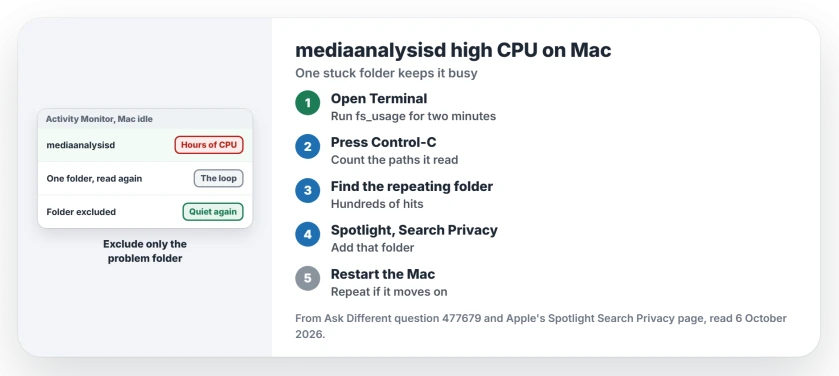
Status: checked 6 October 2026. mediaanalysisd ran for hours on idle Macs, Tahoe included. Owners found it looping on one folder, kept Spotlight out of it, restarted, and it calmed down.
A laptop owner described the same pattern: "My M4 MBP stays warm (sometimes hot) while not in use."
Ours: mediaanalysisd is the Apple process that analyzes your photos and videos, for features such as Live Text and Visual Look Up. It saves that work for when you step away, which is why it hides from you.
1. Find the folder it keeps reading
The June owner watched the process with two Terminal tools. In their words, "that immediately showed a constant stream of accesses and output originating from files in one specific directory."
You can do the same. Open Terminal, paste this line, and leave the Mac alone for about two minutes:
sudo fs_usage -w -f filesys mediaanalysisd > ~/Desktop/ma.txtThen press Control-C to stop it. This line lists the paths it touched most:
grep -oE '/Users/[^ ]+' ~/Desktop/ma.txt | sort | uniq -c | sort -rn | headLook for one folder repeating hundreds of times, because that is your loop. For the second owner it was a folder of video files the process could not handle.
2. Exclude that folder from Spotlight
Apple documents the switch on its Spotlight privacy page: "You can exclude files in specific folders or disks from Spotlight searches."
Open System Settings, then Spotlight, then click Search Privacy. Click the add button and pick the folder. Then restart.
The June owner did exactly that, and "mediaanalysisd dropped back down to negligible CPU" after the reboot. Their fan finally went quiet.
The second owner wrote that "I just finally cleared up the problem completely." Their notes add that it moved on to another folder once, and they repeated the step.
Ours: files in an excluded folder stop showing up in Spotlight searches. Pick only the problem folder. Apple warns that excluding some folders can stop update notices for apps, so never exclude Applications.
3. Two other causes owners found
If you build apps, check Xcode. One owner wrote, "In my case, I had an iPhone simulator running and it was actually mediaanalysisd inside the simulator which was maxing." Shutting the simulator down and restarting fixed it.
Updates come and go too. The asker found macOS Sequoia 15.3 calmed it. Then, in their words, "minor/patch releases after 15.3 is causing my initial problems again."
So I would install macOS updates, but not count on them alone.
Undo it later
The exclusion is easy to reverse. Select the folder in Search Privacy and remove it. Our page on reindexing an external SSD uses the same list and explains what Spotlight does next.
Another background process can heat a Mac the same way. Our apfsd page covers the disk one.
Is mediaanalysisd a virus?
No. It is part of macOS, and the trouble is a loop on files it cannot finish. Ours: quitting it in Activity Monitor is a pause at best, because macOS starts its own processes again.
The Short Version
- mediaanalysisd works while your Mac is idle, so you notice heat, not the process.
- One stuck folder can keep it busy for hours.
- Run fs_usage for two minutes to see the folder it reads.
- Add that folder to Spotlight's Search Privacy list, then restart.
- Running Xcode? Shut down the iPhone simulator.
- macOS updates have helped and then not helped.
Where to Next
Open Terminal, run the fs_usage line for two minutes, and find the folder it repeats. Then add it to Search Privacy and restart.
Which folder was yours stuck on, and which Mac do you have? Tell me in a comment.

Isaac Smith is the founder and editor of PC Glance, a website that covers computers, laptops, and technology. He is a tech enthusiast and a computer geek who loves to share his insights and help his readers make smart choices when buying tech gadgets or laptops. He is always curious and updated about the latest tech trends.