
You press an arrow key and your mouse pointer moves a few pixels, or jumps into a corner of the screen. Mouse Keys is off. Restarting fixed nothing, or fixed it only until the next day.
I would look for Paint before any setting. On Microsoft Q&A, the answer naming it has 3,100+ people marking it helpful, and a Super User question with 213,294 views found the same culprit by closing programs one at a time.
Why Paint does it
Paint learned to draw from the keyboard in Windows 10 version 1903. Its arrow keys move its pointer. The bug is that it keeps listening after you switch to another window.
Microsoft says so in the notes for Insider Build 18975, from September 2019. The bug: "if MS Paint was open in the background, using the arrow keys would result in the mouse cursor changing position despite MS Paint not being in focus".
That note calls it fixed. Owners kept hitting it anyway. One on Windows 10 wrote on Q&A in June 2024 that with mspaint open, arrow keys make "the mouse jump to the right-bottom corner of the screen".
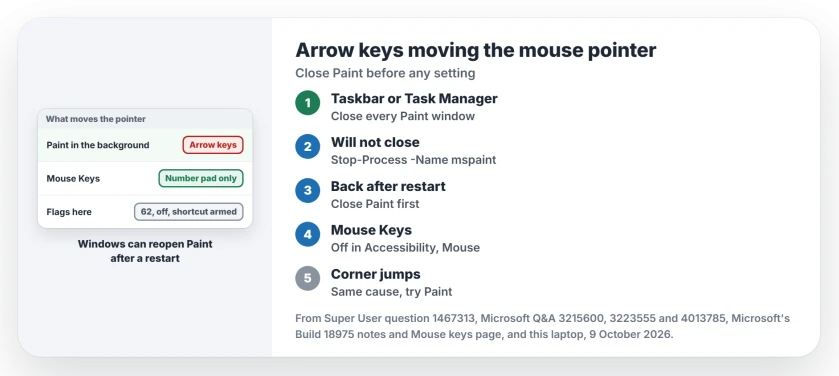
Status: closing Paint is the fix owners report on Microsoft Q&A and Super User, and Microsoft's own Build 18975 notes describe the bug. Our 25H2 laptop was examined 9 October 2026.
Ours: on this laptop Paint is the Store app, version 11.2605.81.0, and System32 has no mspaint.exe. Typing mspaint still starts it through an alias, and its process is still called mspaint.
1. Close every Paint window, minimized ones too
Look at your taskbar for Paint, or open Task Manager and check the Processes list. Close every copy.
The accepted Q&A answer is short: "Closing all instances of paint fixed the problem for me". Over 1,900 people marked it helpful.
The Super User asker took the long road. They "Tried killing all running processes on my PC till the problem went away", and Paint was the last one standing.
One owner found a gentler way. Clicking into the Paint window once freed the pointer.
Will Paint not close from the taskbar? This PowerShell line stops every copy at once without asking, so save your drawing first:
Stop-Process -Name mspaint2. Stop Paint coming back after a restart
Why does a restart not help? The Super User asker explained that Windows saved the open session and would "reopen Paint at system boot". Several commenters hit it right after a crash or an update restart, which is the same reopen.
In Windows 11, open Settings, Accounts, Sign-in options, and turn off the switch that restarts your restartable apps when you sign back in. On this laptop it was never turned on.
The simpler habit works too: close Paint before you restart. Do you use Paint for screenshots all day, like many of these owners? Our page on screenshots pasting smaller into Paint has a quicker route.
3. Then rule out Mouse Keys properly
Mouse Keys works through the number pad. Microsoft's Mouse keys page puts it simply: "you can use the numeric keypad on your keyboard" to move the pointer.
The separate arrow keys are not part of it, so if those move your pointer, Mouse Keys is a weak suspect. Check it anyway: open Settings, Accessibility, Mouse, and make sure Mouse keys is off.
Its shortcut can switch it on without you noticing. Microsoft lists it as "LEFT ALT+LEFT SHIFT+NUM LOCK", and on this laptop the Mouse Keys flags read 62: off, with that shortcut armed.
Our Sticky Keys page shows how to disarm shortcuts like it.
When the pointer snaps to a corner
Some owners see a jump, not a nudge. One Super User commenter wrote that "arrow keys teleported my mouse to the bottom right hand corner of my screen", found Paint running, and fixed it by closing Paint.
A Q&A question about a snap to the top left has 100+ on Same question and no answer that fixed it.
I would still try Paint first. Every confirmed corner case I found had the same cause as the small nudge.
Paint is closed and it still happens
Do what the Super User asker did. Close your programs one at a time, newest first, and press an arrow key after each. Drawing tools and keyboard macro software are the next suspects.
Do your arrow keys scroll a whole Excel sheet instead of moving between cells? That is Scroll Lock, a different fault with its own page.
The Short Version
- Close every Paint window, including minimized ones, or run Stop-Process -Name mspaint.
- Restart did not help: Windows reopened Paint, so close it before restarting.
- Mouse Keys uses the number pad; check it is off and mind Left Alt, Left Shift, Num Lock.
- Corner jumps count too; try Paint first.
Where to Next
Was Paint open on your PC when this started? Leave a comment and say how it got there.

Isaac Smith is the founder and editor of PC Glance, a website that covers computers, laptops, and technology. He is a tech enthusiast and a computer geek who loves to share his insights and help his readers make smart choices when buying tech gadgets or laptops. He is always curious and updated about the latest tech trends.