
Deleting text messages on iPhone starts in Messages: hold a bubble and choose More to remove selected messages, or swipe left on a conversation to remove the thread. Ordinary deletion leaves a recovery period.
Choose the messages carefully before confirming. With Messages in iCloud enabled, deletion also reaches your other participating Apple devices. It does not erase the recipient's copy.
Choose the amount of history to remove
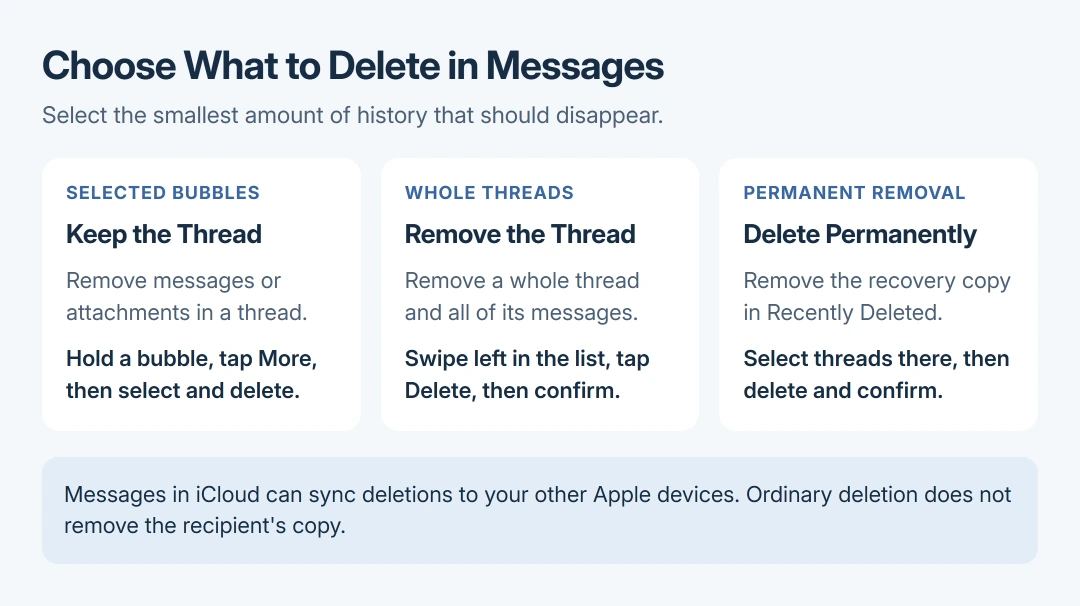
Use bubble selection when the conversation should stay. Use conversation deletion when all its messages and attachments can go. Apple's Messages deletion instructions document both routes.
Save any needed text or attachment outside the conversation first. That precaution is ours: a second device using the same synced message library is not an independent copy.
For a readable record before cleanup, make a checked paper or PDF copy and keep the conversation until the output is complete.
Before removing a message that another person needs, send them a forwarded copy. Review the recipient before sharing.
Status: Apple's iOS 27 message deletion, recovery and iCloud guidance checked October 28, 2026. No messages were accessed or deleted.
For storage cleanup, reviewing large message attachments can be more useful than deleting short texts. Keep that choice separate from removing a conversation for privacy.
For private reading while keeping the history, hide incoming message text with notification and app controls.
Delete selected messages inside a conversation
- Open Messages and the intended conversation.
- Touch and hold a message bubble or attachment, then choose More.
- Select the messages to remove, tap the Delete button (the trash can), and confirm if prompted.
Check the selected bubbles before the last tap. The remaining messages should stay in that conversation. Holding a bubble opens its menu; simply tapping it does not start this selection procedure.
Return to the conversation list for a whole-thread removal. That avoids selecting a long history bubble by bubble.
Remove one conversation or several threads
For one thread, swipe left across it in the conversation list and tap the Delete button. Confirm the removal. Another documented route is to touch and hold the conversation, then choose Delete.
For several threads, use the conversation list's Edit > Select Messages command and select the conversations. Tap the Delete button, then Delete to confirm.
Verify the names and selected conversations before confirming a group. If only one message in a thread should go, cancel and use the bubble procedure instead.
Decide whether to remove the recovery copy
Apple says in its recovery guide that deleted messages remain recoverable for up to 30 days. An item in Recently Deleted does not mean that the initial deletion failed.
For immediate permanent removal, open the conversation list, tap the Filter button, then Recently Deleted. Select the relevant conversations, tap the Delete button, and confirm with Delete.
That final removal cannot be undone. If something was selected by mistake, stop there and use the iPhone message recovery checks while a retained copy is available.
Understand which copies deletion affects
Apple documents that Messages in iCloud keeps changes synchronized. A deletion can therefore remove the same history from an iPad or Mac using that feature and Apple Account.
For the desktop controls, remove Mac message bubbles or sidebar conversations according to how much history should go.
The person who received a message still has their copy. Apple's Undo Send instructions describe a separate, two-minute iMessage feature. SMS, MMS and RCS cannot use it.
Even Undo Send can leave the original visible to a recipient using older software. Deleting your copy afterward does not extend its time limit or change that compatibility restriction.
To attempt a recall, open the sent bubble's Undo Send menu and inspect the confirmation and recipient warning.
If the documented controls are missing or deletion fails, give Apple Support the installed iOS release and failed step. Describe whether the issue affects selected bubbles, whole conversations or Recently Deleted.
The Short Version
Hold a bubble and choose More for selected messages. Swipe left for a whole conversation, or use Edit > Select Messages for several. Recently Deleted controls permanent removal; deleting your history does not recall the recipient's copy.

Isaac Smith is the founder and editor of PC Glance, a website that covers computers, laptops, and technology. He is a tech enthusiast and a computer geek who loves to share his insights and help his readers make smart choices when buying tech gadgets or laptops. He is always curious and updated about the latest tech trends.