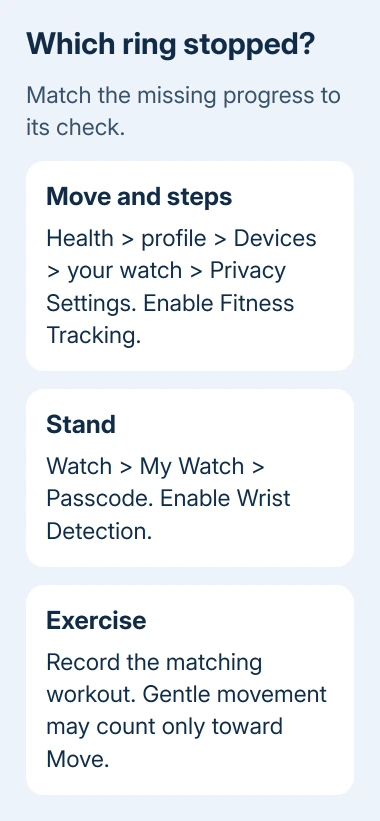
The fix for an Apple Watch that isn't tracking activity depends on what's missing. Enable Fitness Tracking for missing steps and movement, Wrist Detection for a stalled Stand ring, or a matching workout for missing Exercise minutes.
Start by opening Activity on the watch itself. If its totals change there but the iPhone shows older numbers, focus on the phone connection rather than changing how the watch measures your movement.
In this guide
1. Restore Fitness Tracking when activity stays empty
On your iPhone, open Health, tap your profile picture, then Devices. Select your current Apple Watch, open Privacy Settings and enable Fitness Tracking. This lets the watch record movement information for Health.
Take a short walk wearing the watch, then compare its Activity app with Fitness on the phone. Look for new movement after changing the setting. The watch won't fill in activity it didn't record earlier.
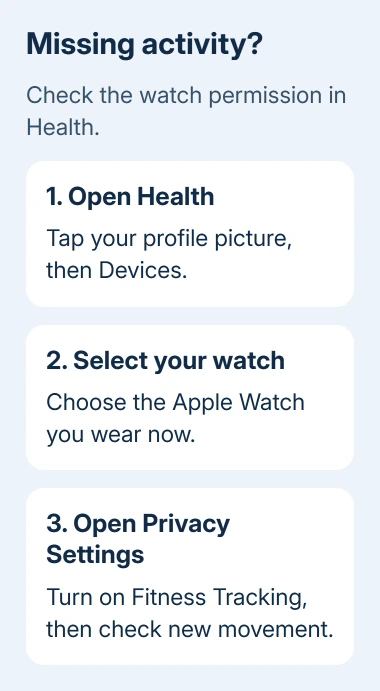
Apple's Health data instructions identify this switch for missing steps and other information. If it was already enabled, leave it on and continue with the ring-specific checks.
Check that Health lists the watch you're using. Previous watches can remain in the device list; changing a setting for an old one won't fix the current watch. Leave historical Health data intact during troubleshooting.
I'd check this permission before resetting anything. It's quick, keeps your history intact and shows whether tracking was disabled. Calibration helps the watch learn your movement; resetting it is a later step for inaccurate totals.
2. Turn on Wrist Detection for Stand progress
In the iPhone's Watch app, select My Watch > Passcode and enable Wrist Detection. When this is off, the watch can't track Stand progress or give Stand notifications. It also stops taking background heart rate readings.
Keep the watch face on your wrist's upper side, with the back against your skin. A band that lets the watch slide around gives less reliable sensor contact. Tighten it for exercise if needed, then loosen it again for comfort afterward.
Stand progress needs at least a minute of standing and movement in an hour. In the next hour that hasn't earned credit, get up and move around. Standing still and looking at the display won't test whether the ring can advance.
For someone who uses a wheelchair, the activity goal uses Roll rather than Stand. Check the wearer's personal details before treating that ring as a fault. The goal and movement need to match the person using the watch.
If Stand still doesn't change with Wrist Detection enabled, note whether other activity also remains empty. When you ask for help, say whether just Stand is stuck or the watch isn't recording any movement.
3. Record the right workout for missing Exercise minutes
The green Exercise ring counts full minutes of movement at least as intense as a brisk walk. Your fitness level helps determine that threshold. Gentler activity can count toward Move without adding Exercise time.
Let the arm wearing your watch swing naturally while walking. Hold a leash or bag in the other hand when practical. If both hands are occupied, such as when pushing a stroller, start Workout > Outdoor Walk on the watch.
Workout can use heart rate and GPS as well as movement, which helps when your arm isn't moving enough to track the activity. Start it before walking, end it afterward and compare the recorded workout with your Exercise total.
Select a workout type suited to your activity. For a treadmill run, choose Indoor Run. If the type isn't in the initial list, use Add Workout to choose an appropriate activity.
A workout's duration won't always match the Exercise minutes it earns. Check whether the session recorded duration and heart rate before deciding that a low ring total means the entire workout disappeared.
If heart rate is missing too, open Watch > My Watch > Privacy and check Heart Rate. Persistent gaps need the separate heart rate sensor checks, especially when the fit is already correct.
4. Correct personal details and calibrate inaccurate totals
Open Watch > My Watch > Health > Health Details, tap Edit and correct any changed details. Height, weight and age affect calorie calculations. An inaccurate calorie estimate needs different checks from activity that wasn't recorded at all.
Next, open the iPhone's Settings > Privacy & Security > Location Services. Turn Location Services on, open System Services and enable Motion Calibration & Distance. These settings help the watch learn how you move.
Wear the watch outdoors in a flat, open area with good GPS reception. Start Outdoor Walk or Outdoor Run in Workout and complete about 20 minutes at your usual pace. That time can be spread across several outdoor sessions.
For walking or running at several speeds, spend about 20 minutes at each pace. Calibration helps the watch learn stride length and improves distance, pace and calorie estimates, including when GPS is limited.
Ultra models, Series 8 and later, and SE second generation use the watch's GPS even with an iPhone nearby. Older models use the phone's GPS when available. That matters when comparing routes recorded with and without your phone.
If accuracy remains poor, use Watch > My Watch > Privacy > Reset Fitness Calibration Data, then repeat the outdoor calibration. For distance-specific problems, the watch distance guide goes further without changing your daily goals.
5. Separate a phone delay from a watch recording fault
When Activity updates on the watch but Fitness on the phone doesn't, keep them nearby with Bluetooth and Wi-Fi enabled. Compare today's date and totals in both apps. A connection problem can leave the phone's totals behind.
Check Airplane Mode on both devices and turn it off if enabled. With watchOS 10 or later, the side button opens Control Center. For watchOS 9 or earlier, swipe upward while viewing the watch face.
Restart both devices normally, then check a new period of activity. Install available iPhone and watch software updates through Settings > General > Software Update and Watch > My Watch > General > Software Update respectively.
Ask Apple Support about Activity recording and Health syncing if it still fails. Give your watch model, both software versions, the affected ring and whether workouts still record. Ask about a sensor check if heart rate is absent too.
The Short Version
Enable Fitness Tracking for movement, Wrist Detection for Stand, and the correct workout for Exercise credit. Correct personal details and calibrate inaccurate totals. If only the phone is behind, check its connection.
Checked November 10, 2026.