The #images GIF search sits in Messages' Add menu; swipe up if needed to find it. For a missing button, check Settings > General > Language & Region. The feature is limited to supported countries and regions.
A missing #images button, an empty GIF search, and a received GIF that won't move are different problems. Start with the matching check rather than deleting conversations or resetting the phone.
In this guide
1. Look through the full Messages app menu
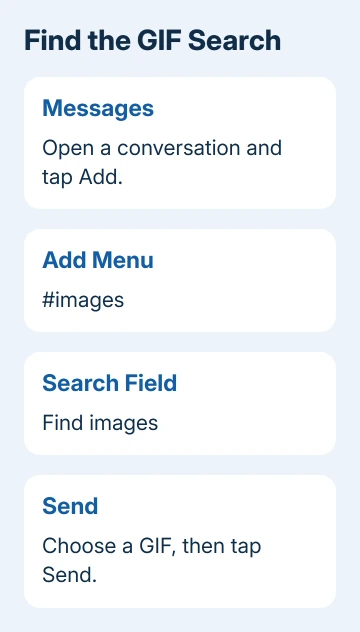
Open Messages, enter a conversation, and tap the Add button beside the message field. Look for #images, swiping up through the menu if necessary. It doesn't have to appear among the first few choices.
Tap #images, then tap Find images and search for a simple word such as birthday. Choose a suggested search, or use the keyboard to search for the word you typed. Tap a result to put it in the message, then send it.
If results load and a GIF reaches the conversation, the feature is working. Its position in the menu was the issue. If the button is absent, continue with the regional check; if the panel opens empty, move to the connection check.
Stickers, conversation backgrounds, and #images aren't interchangeable features. A missing background belongs with the iMessage conversation background settings, not the GIF search panel.
2. Check the supported region before reinstalling anything
Open Settings > General > Language & Region and check the phone's language and region settings. Apple says to check Language & Region when #images is absent.
The supported countries and regions listed are the United States, United Kingdom, Canada, Australia, New Zealand, Ireland, France, Germany, Italy, India, Singapore, Philippines, and Japan.
The #images feature isn't available in every region. Check whether the setting correctly describes where you use the phone before assuming an app disappeared during an update.
I'd check this before trying a whole-phone reset. A reset doesn't change which countries support the feature, and it creates much more work than checking one menu.
For an unsupported region, reuse a saved GIF or another messaging app's GIF tools. Changing your Apple Account's country is a separate task. The missing-button advice is to check the phone's Language & Region settings.
3. Test a blank search on another connection
When #images opens but no thumbnails load, leave Messages and check whether a normal web page loads on the same connection. This tells you whether the phone has working internet access before you change Messages settings.
Try another search word too. An empty result for one unusual term is different from an entire panel that never loads. Use an ordinary word and wait for the thumbnails before selecting anything.
With no internet access, reconnect Wi-Fi or try working cellular data. Repeat the search in that conversation. Results that load through the other connection suggest a problem with the first network, not a missing app.
If the search works but sending fails, check for a delivery error beside the message. Finding a GIF and sending it are separate steps. Use the iPhone message-delivery checks for an unsent message.
Don't delete the conversation to test this. Keep the thread so you can show support the failed message and its exact error wording.
4. Reopen Messages, then restart the iPhone
Close and reopen Messages if its search stays stuck on working internet. For a Face ID iPhone, swipe upward from the display's bottom edge. Pause with your finger on the glass, then swipe the Messages preview upward to close it.
On a Home-button iPhone, double-press Home to show app previews, then swipe the Messages card up to close it. Open Messages again and return to the GIF search. If the panel responds again, leave your account settings alone.
For iPhone X and newer, keep either volume button pressed together with the side button; release when the shutdown slider shows. Drag the slider, then wait about 30 seconds. Hold the side button to restart; release at the Apple logo.
On iPhone 6, 7, 8, or SE (second or third generation), hold the side button for the slider. On first-generation SE, iPhone 5, and earlier models, use the top button. Turn the phone back on with the same button.
These are ordinary restarts. An ordinary restart reopens the app without erasing your messages. If it still fails, keep the missing-button or empty-search distinction for the next step.
5. Separate GIF playback from GIF search
A GIF can arrive successfully without behaving as expected in every app. The Messages GIF guide notes that #images animation works in the Messages app on Apple devices only.
Open the received item in the Messages conversation when checking animation. If the preview stays still in another app, that app may limit animation playback. Compare the received message with the preview that looked still.
For a GIF you've received and want to reuse, touch and hold it in Messages, then tap Save. It goes to Photos. That gives you a saved file without repeating the search for that particular GIF.
If ordinary photos also fail to send, follow the Messages photo-sending checks instead. If all attachments fail, the problem goes beyond the #images menu.
For a received photo that never opens, work through the picture download checks instead of changing the GIF picker.
6. Get help for a button that's still absent
Check for an iOS update in Settings > General > Software Update, then retry the matching check. An update doesn't make #images available in an unsupported region. Note your region settings along with the iOS version.
For a supported-region phone still missing #images, ask Apple Support about Messages and missing #images. Give the model, iOS version, region settings, and whether the button is absent or the search is empty.
For an empty panel, also say whether another connection changed the result. That gives support a specific failure to work with and avoids repeating steps meant for a different screen.
The Short Version
Open the full Add menu first, then check Language & Region if #images is missing. For an empty search, compare a working internet connection and restart Messages. A received GIF's animation is separate from searching for and sending it.
Checked November 12, 2026.
 If you have any business, I can build it online