Microsoft Word displays the document's word count on its bottom status bar. Select part of the text to count that passage instead. For characters and other statistics, click the count or open the Word Count command.
The controls differ slightly between Windows, Mac and the browser. Start with the document open in the version you're using, then check whether anything is selected before treating the displayed number as the total.
In this guide
Read the count at the bottom of the document
With the document open, find Word's bottom status bar. The word total updates while you type. Don't confuse the page indicator with the word counter: a document can gain words without gaining a page.
Click ordinary document text to clear any selection, then read the count. With a passage selected, Word can show that passage's count alongside the document total. Those figures answer different questions.
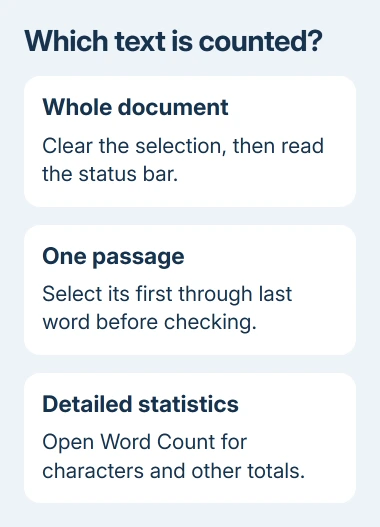
Microsoft says the Word Count controls show character, paragraph and line totals as well as words. You don't need to copy the document into a separate counting website.
A counting or invoicing app showing a Word.Application connection error needs a separate registration check even when this built-in count works.
On Windows, if the counter isn't visible, right-click the status bar and check Word Count in its customization menu. This changes what the bar displays, rather than adding or removing words from the document.
The number belongs to the open document. Before reporting it, check its filename, especially when several drafts or downloaded copies are open. Counting an earlier copy can explain a difference that looks like a broken counter.
Open detailed statistics in Word for Windows
Choose Review > Word Count. The dialog shows word count alongside other statistics, including characters, paragraphs and lines. For repeated checks, Ctrl+Shift+G opens the Word Count dialog in desktop Word for Windows.
For a character limit, read the character count that matches the requirement. Characters with spaces and characters without spaces are different measurements. A form asking for 1,000 characters isn't asking for 1,000 words.
For a document with notes or text boxes, review the Include textboxes, footnotes and endnotes option if your dialog offers it. Set it to match your submission's rules. The default won't suit every assignment.
Reopen the dialog after your final edit. A count copied into an email yesterday describes yesterday's text. Word updates its display while you work, but a number typed manually elsewhere won't follow the edits.
I'd check the dialog just before submitting a document with a strict limit. It gives you the unit and counting options in one place, rather than relying on a total remembered from an earlier draft.
Count only the essay, section or selected passage
Select the first word of the passage and extend the selection through its final word. Read the status bar or open Word Count while that selection remains active. That count applies to the passage you've selected.
For an essay, begin at the first word of the essay itself if the rules exclude the title and name block. End before the reference list if references are excluded. Word follows your selection; it doesn't decide which assignment rules apply.
Our MLA setup guide separates the heading, essay and Works Cited page. Use those boundaries when the instructor asks for the body text's count rather than everything in the file.
Check the highlighted area before trusting its total. A drag can accidentally stop halfway through the last paragraph or include a heading you meant to omit. The counter can't correct a selection that doesn't match the passage you intended.
For several separate sections, count each passage you need and write down its total, then add the totals. Note which sections you included so someone checking the document can get the same result.
Find the same information in Word for Mac
In Word for Mac, click the word count in the status bar to open the statistics box. For the menu route, choose Tools > Word Count. With no text selected, you'll see the document's statistics.
To count one passage on the Mac, select it first and then open Tools > Word Count. Clear the selection when returning to the full-document total. As on Windows, selecting a passage changes which text Word counts.
Read the character, paragraph or line count when that's what you need to measure. Page count depends on layout, so shrinking the font or margins can change pages without shortening the writing.
If someone else's computer shows a different total, compare your saved copies and the passages you've selected. Then compare the options for including text boxes and notes, where available.
Changing the document's formatting won't settle which text should be counted.
Turn on the browser version's counter
In browser Word, open the document in Editing view. If it opened for reading, use Edit Document and choose the option to edit in your browser when available. Your account needs permission to edit the file.
Open Review > Word Count and enable Show Word Count if the counter is hidden. That control can also hide the count again. Turning its display off doesn't remove text or change the document's content.
Select a passage when you need its partial count, then clear the selection for the total. Before submitting, check the final saved file in the version of Word you'll use to send or export it.
If the file is shared as view-only, request editing permission or an allowed copy from the owner instead of altering account settings. The Word sharing guide explains the difference between viewing and editing permissions.
Put a count in the document when it's required
For desktop Word on Windows, place the cursor where the number belongs. Choose Insert > Quick Parts > Field, select NumWords in the field list, then select OK. This inserts a field, a value Word can update, instead of a typed number.
The word-count field instructions also explain updating it: right-click the field and choose Update Field. Check it after the last edit before exporting or printing.
A field that counts the whole document won't give you an essay-only count. Use it when the requested figure is the document's count; use the selection method when a title, references or other sections must be excluded.
If the counter still fails in an editable document, tell Microsoft Support the Word edition and platform and whether a new blank document behaves the same way. Include whether the problem affects the status bar, dialog or inserted field.
The Short Version
Read the total on Word's status bar, highlight a passage to count just that text, and open Word Count for detailed statistics. Check the required unit and inclusion rules. In browser Word, use Editing view and turn on Show Word Count.
Checked November 15, 2026.
 If you have any business, I can build it online