A MacBook Pro serial number can identify its model through Apple's Check Coverage page, but it can't show where the laptop is. To locate a missing Mac, use Find My with the Apple Account that had Find My enabled before it disappeared.
Start with the number if you need the model, service details or a repair record. Start with Find My if the computer itself is missing. Those are separate tasks, even when the same serial number appears in your paperwork.
In this guide
Enter the serial number to identify the model
Open checkcoverage.apple.com, type the complete serial number, and follow the page's verification prompts.
Apple's model-identification instructions recommend this lookup for finding a Mac's model name.
Read the result for the MacBook Pro model name and the service information the page offers. The result won't show the Mac's current location. Keep the serial number out of public posts when asking for help.
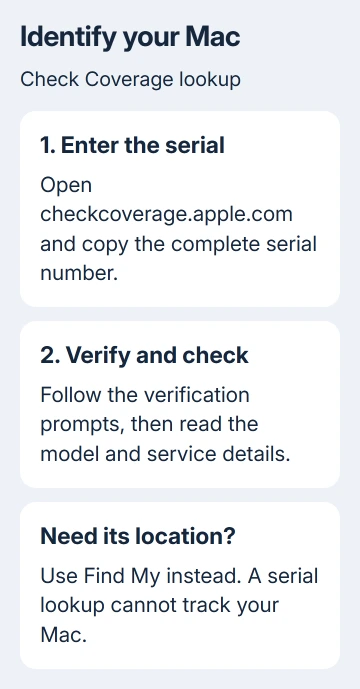
Record the full model name, screen size and model year, rather than just MacBook Pro. Different generations share that name; those details matter when choosing accessories, checking compatibility or requesting a repair.
The serial number identifies one machine; a model identifier describes a model family. The number beginning with A on the case is a different label again.
Enter the serial number in the coverage form, rather than swapping between these labels.
For a used machine, a recognized serial number doesn't settle ownership or prove the laptop is free of account or organization restrictions.
Confirm the actual computer matches the information before treating the lookup as a buying decision.
Read the current serial from a working MacBook Pro
Choose Apple menu > About This Mac. Read the Serial number entry and the model name in that window. On an Intel Mac, this window lists the serial. Apple silicon laptops show it here too, with no need to remove the bottom cover.
The same window identifies the processor family. Apple silicon shows Chip, while an Intel Mac shows Processor. That distinction helps when another guide offers different instructions for the two kinds of Mac.
For additional identifiers, hold Option while opening the Apple menu, then choose System Information. Select Hardware in the sidebar and read Serial Number, Model Identifier, and any model-number entry shown.
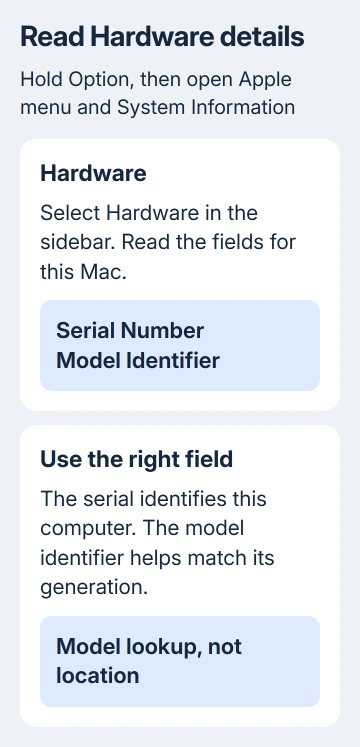
A model identifier such as MacBookPro18,1 can be matched against the MacBook Pro identification list. That tells you which generation of MacBook Pro you have.
I'd record the model name and current serial together before contacting a repair desk. It avoids a second conversation when the technician asks which MacBook Pro you mean.
The laptop serial-number guide covers the equivalent checks for Windows machines if you're sorting records for more than one computer.
Don't enter a Windows manufacturer's serial into Apple's form.
Find the number when the laptop won't start
Turn the closed MacBook Pro over carefully and read the underside near the regulatory markings. Use good light to distinguish similar characters. The serial is usually small, so a clear close-up can make it easier to copy accurately.
Check the original packaging for its barcode label. A purchase receipt may also carry the serial number, though the information printed on receipts varies. Match the paperwork to this particular laptop.
From another device, sign in to account.apple.com with your Apple Account. Open Devices and select the Mac if it's listed. Those details show the model and serial even while your laptop is off.
The account's device list isn't a public lookup service. A serial number alone won't let someone open another person's device details or reveal their Apple Account. Use the account that was associated with the Mac.
If a logic board was replaced during repair, the serial printed on the case or box might no longer be active.
Compare repair documentation with the current number in About This Mac or your account before assuming a mismatch means the machine is counterfeit.
Use Find My when the MacBook Pro is missing
On a different Apple device using your Apple Account, open Find My. Select Devices, then choose the missing MacBook Pro. Alternatively, sign in to icloud.com/find and select the missing Mac.
Find My must have been set up on the Mac before it went missing. The serial-number checker can't enable tracking afterward. Check whether the Mac is absent from the device list or listed without a current position.
When a location is available, review it and use Play Sound if the Mac could be nearby. A displayed position isn't a reason to confront a person at an unfamiliar address. Give suspected theft information to local law enforcement.
Turn on Lost Mode in Find My, or select Lost Mac on iCloud.com. An Apple silicon Mac locks with your Apple Account password. An Intel Mac without a T2 security chip instead uses the remote-lock passcode you create.
The Mac must be running and online before remote locking can take effect. An offline Mac may still have a location available in Find My, so check the device entry rather than treating offline as a lost cause.
The lost-Mac procedure covers protecting accounts too.
Without tracking, change your Apple Account's password and then any important email, banking or shopping passwords used on that Mac.
Handle a rejected number or an ownership problem
Recheck the serial character by character and confirm it came from the correct label. If the Mac works, prefer its current serial shown in About This Mac over a number copied from an old box after a board replacement.
If the page still won't recognize it, contact Apple Support with the serial, model details, and proof of purchase or repair paperwork.
Ask them to check its coverage or device record. The coverage website can't supply the laptop's address.
If a used Mac asks you to enroll with an organization, that organization needs to release it.
The Remote Management explanation describes why erasing the laptop doesn't settle that restriction.
Give the police your Mac's serial number when reporting a theft. Use the number saved in your purchase or device records.
When Find My wasn't enabled, that report and account protection remain useful; there isn't a replacement public serial-number tracking tool.
The Short Version
Use Check Coverage to identify the MacBook Pro model, About This Mac to read its current serial, and packaging or your Apple Account when it won't start. Use Find My for location.
A serial number helps with identification and a police report, not live tracking.
Checked November 15, 2026.
 If you have any business, I can build it online