Yes, Teams Phone can replace a business phone system, including mobile and landline calls. A normal Teams account alone isn't enough: the organization needs Teams Phone licensing and a telephone-network service.
Start by checking the numbers and call handling the business must keep. Then choose a compatible carrier arrangement and test it with a small group before moving the main number. Installing Teams on laptops doesn't finish telephone setup.
In this guide
List the calls the replacement must handle
Write down the main business number, individual employee numbers, departments, voicemail needs, and opening hours. Include where an unanswered call should go. That list tells you what Teams needs to do to replace your current service.
Colleagues inside Teams use its built-in calling. Calls involving ordinary telephone numbers need a connection to the public switched telephone network, usually shortened to PSTN. That's the outside telephone service.
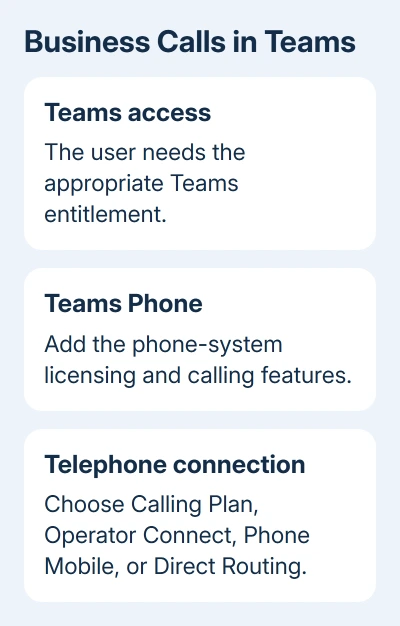
Microsoft's Teams Phone guidance describes it as a replacement for a business's private telephone exchange. That includes managing calls in Teams rather than relying on an office switchboard alone.
List the devices using the telephone service, including specialist equipment. Ask the provider how each one will be supported. A working call on a laptop doesn't tell you whether that other equipment will work.
If the current requirement is just staff chatting and joining meetings, the ordinary Teams setup guide covers that task. Buying business telephone service is a separate decision from enabling those existing app features.
Check the licenses before ordering numbers
Have the Microsoft 365 administrator confirm the licenses assigned to people who need telephone calls. The subscription name on an invoice won't tell you whether each person who needs to make calls has the right features turned on.
Teams Phone licensing provides the phone-system features. The telephone-network connection is separate. Some bundles include a Calling Plan, while other arrangements use an operator's service alongside Teams Phone.
Each user also needs a license that lets them use Teams. Some Microsoft 365 or Office 365 plans include relevant features and others require add-ons. Have the administrator check, rather than assuming every business plan includes calling.
Plan to assign each person their own number if they need one. For users who don't need individual numbers, ask the administrator whether Shared Calling fits.
Shared Calling uses a licensed resource account and a phone number shared through policy. It isn't permission for anyone with the Teams app to make business telephone calls. The participating users still need Teams Phone licensing.
I'd ask for a written list of the license and carrier charges together. Otherwise, it's easy to compare the cost of the old complete phone service with only one part of the proposed replacement.
Choose how Teams will reach telephone numbers
Microsoft Calling Plans use Microsoft as the telephone operator. Check availability for the countries where the business needs service. This can be straightforward when the available plan matches the calling requirements.
Operator Connect uses a participating telephone provider that has integrated with Teams. The operator supplies the telephone service and numbers, while the administrator enables the connection and assigns the numbers inside Teams.
If that route fits, use the Operator Connect setup steps for the administrator's sequence. Check that your existing carrier participates in the program in your country before planning to keep it.
Teams Phone Mobile uses participating mobile operators. A user's SIM-enabled mobile number can also be their Teams number. Ask the operator about availability and the exact business subscription needed before planning around this option.
Direct Routing connects a chosen telephone operator through a certified session border controller, a device or managed service joining the phone systems. It requires more planning and management than simply adding a carrier in the app.
A business with offices in several countries or an existing phone system may need to combine these options. Choose what fits each location and the services you're replacing. The offices don't all have to use the same option.
Map the main number, menus, and unanswered calls
An auto attendant is the greeting and menu that directs callers to a department or person. A call queue holds callers and routes them to available staff. Both need setup, even if employees can already call each other.
Plan the greeting, business hours, holiday behavior, and destinations for those calls. Include the behavior when staff don't answer. Have the person who handles the existing switchboard review this list before the new routing is built.
Service numbers for menus and queues are different from ordinary user numbers. They can support different calling requirements. Have the administrator and operator order a suitable number type for each purpose.
Existing numbers also need a planned transfer. Confirm the transfer requirements and schedule with the receiving operator before canceling the old service. Keep the current arrangement working while the replacement is being prepared.
Pilot the service on the devices people will use
Teams Phone works in desktop and mobile Teams clients and on supported certified devices. Employees can use a suitable computer and headset, while a reception desk may need a different supported device and call-handling arrangement.
Try the planned licenses, carrier connection, numbers, and policies with a small group. Test inbound calls from an outside phone, outbound calls to ordinary numbers, transfers, voicemail, and the main-number menu before the full changeover.
Include the actual office and remote-work connections. A working call on one fast office connection doesn't tell you how a home worker's normal setup behaves. Record failed calls and audio problems with their time and device details.
Emergency calling also needs its own setup. The organization and carrier must configure the required emergency locations and routing for the selected service. The administrator should follow the process for each user's location.
Settle the remaining gaps before switching the business
Ask the administrator to resolve any missing feature or device. Keep a clear owner for number transfer, call routing, user setup, and support so a failed incoming call doesn't get passed between teams without action.
Use the chosen PSTN service's support route. Give the operator or Teams Phone partner the affected number, call direction, time, user, and client device. Those details help the provider trace the failed call.
The Short Version
Teams Phone can replace a business phone system when the licenses, telephone connection, numbers, call routing, and emergency setup are ready. Pilot the complete arrangement before transferring the main number and retiring the old service.
Checked November 16, 2026.
 If you have any business, I can build it online