The full Microsoft Office license key isn't visible inside Word or Excel. For most modern retail copies, reinstalling needs the account used for purchase or redemption. Start with that account before trying to extract a code.
A physical key card, an uninstalled Microsoft Store purchase, and an older workplace-discount purchase are different cases. These can have a key to retrieve, while a direct Microsoft 365 subscription usually needs your account instead.
In this guide
Find the account Office belongs to first
On Windows, open Word and select File > Account. Look under the product name for Belongs to and its email address. Record that address and the product name before signing out or removing Office.
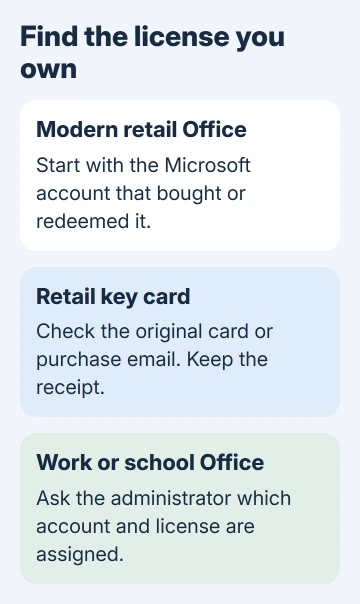
The account signed into the app doesn't always own its license. Check the ownership information rather than assuming any email address visible in the app is the one that bought the product.
Microsoft's product-key guidance explains that Office doesn't display the full key for security reasons. Once you've redeemed a retail key, you normally use that account instead of entering the key again.
On a Mac, don't look for the Windows File > Account page. Check the Microsoft account used to activate the apps and your purchase records, then confirm the product under that account's Services & subscriptions page.
For an organization-supplied Office copy, ask the administrator which account and license are assigned to you. A copy managed by your workplace can activate differently from one you bought yourself.
Check the product in your Microsoft account
Sign into account.microsoft.com and open Services & subscriptions. Use your original purchasing account, or the personal account used during retail-key redemption. Find the Office product or Microsoft 365 subscription associated with it.
Check the exact edition and year when several products are listed. Office 2021, Office 2024, and a current subscription aren't identical licenses. The product you reinstall should match the purchase you actually own.
If the goal is to reinstall Word, follow the product's installation option. The Word installation guide explains the download side, including differences between Windows and Mac.
I'd check this account page before using a key-finder tool. You don't need a code when your account already lets you install and activate the apps again.
If the product is missing, try the other personal account used at purchase time and search your inbox for the original order. Don't assume a school email or the account currently signed into Windows must own your personal Office purchase.
Look for a retail card or purchase email
A boxed or emailed retail purchase may include a product key. Look through the original card, packaging, retailer account, and purchase email. Keep its receipt as a record of the license purchase.
The normal key has 25 characters in five groups. A barcode, order number, or product ID isn't the same thing. On a key card, a silver coating may cover the code; reveal it carefully without damaging the printed characters.
Treat the key as private. Don't post the full code in a public forum or send it in a screenshot when asking for help. Support can tell you which purchase details they need through its own contact channel.
A new unused retail key is redeemed at microsoft365.com/setup under the account that should own it. If you redeemed the key earlier, install from that account instead of trying to redeem the same code again.
A used-key message can mean the code is already redeemed under your account. It doesn't automatically mean a failed purchase. Compare the account's products with the receipt before requesting a replacement from the seller.
Check an eligible Microsoft Store order
For certain one-time Office or individual-app purchases that haven't been installed, the Microsoft Store can show the key. This applies to those purchases. The Store doesn't have a page that reveals every Office key you've ever owned.
Sign into microsoftstore.com with the purchase account, select your name, and open Order History. Find the one-time Office product or individual app. Select Install Office if the order offers that control.
The support instructions explain that this option can display the key without actually installing Office. If your account doesn't show that option, don't treat its absence as a reason to buy another license immediately.
A key shown with an account or Store record can differ from the code on the original retail card. The activation process uses different types of keys. A mismatch alone doesn't mean somebody changed your purchase.
A Microsoft 365 subscription bought directly online normally has no key to retrieve from its receipt. Manage it through the owning account. A retail subscription card differs because you redeem its code first.
Handle older workplace and company licenses separately
Some older Office Professional Plus, Visio Professional, or Project Professional purchases through the Microsoft Workplace Discount Program have a key available through their order details. Use the purchase history for that program.
That's different from a current employer assigning Microsoft 365 to a work account. Ask the administrator about reinstalling a company-managed license rather than using a key recovered from a personal purchase or another computer.
For Office bought under a company volume license, the organization may handle installation and activation centrally. Ask the organization for its supported method. The home-purchase setup page won't help you fix that installation.
If a new PC has Word preinstalled but only offers a trial, the app's presence doesn't mean the manufacturer owes you a permanent Office key. Check the PC invoice for a separately included paid Office product.
Deal with a lost key or an activation warning
For a key lost before redemption, contact Microsoft Support or the supplying retailer with proof of purchase. Include the edition, date, and order number. Don't count on an old installation to reveal the missing full code.
If Office is installed but says Unlicensed Product, use the Office activation checks before replacing the license. The problem can be the selected account or subscription access rather than a missing key.
If a listed purchase won't activate, request Microsoft activation help for that product and account. For an employer's copy, tell its administrator which message appears and which account Word displays.
What matters is getting access to the license you own again. A written-down code helps only when that particular product and purchase method actually require one.
The Short Version
Office doesn't show the full key inside its apps. Find the owning account first, then check a retail card, purchase email, eligible Store order, or older workplace order only when that purchase type needs a key.
Checked November 16, 2026.
 If you have any business, I can build it online