Outlook's Keyset does not exist error, 80090016, can come from saved sign-in information that no longer matches Windows' security keys. Start by removing the affected Office credentials and signing in again.
If this began after a motherboard replacement, tell IT immediately because the computer now has a different security chip.
The code doesn't automatically mean the chip is broken. Clearing the TPM or reinstalling Windows changes far more than repairing the account's saved sign-in information.
In this guide
1. Remove the affected Office credentials
Save open work and exit Office, including Outlook. Search Start for Credential Manager and launch it. In Windows Credentials, inspect the Generic Credentials entries associated with MicrosoftOffice16.
Expand the Office entry for the affected account and select Remove. Outlook will request a fresh sign-in. Have your password and the phone or security key used for verification ready.
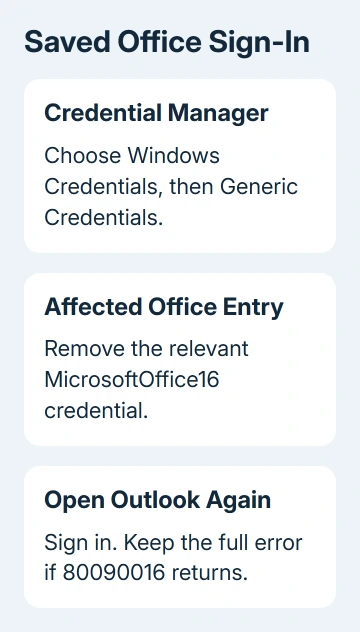
Leave unrelated saved credentials alone. If you can't tell which Office entry belongs to the failing account on a shared PC, have IT identify it rather than removing every person's stored sign-in.
Launch Outlook again and enter your account details. If mail opens without 80090016, removing the old saved sign-in information fixed this failure. Check OneDrive or another affected Office app afterward if it showed the same error.
One owner in an 80090016 discussion confirmed that removing Credential Manager entries fixed the problem after a disk swap. Their TPM driver was already current.
I'd try the credential repair before a Windows reinstall. An Outlook profile stores your mail-account settings. That's separate from the Windows sign-in information that several apps use.
2. Reconnect an extra work account only when appropriate
On either Windows version, open Settings > Accounts, then choose Access work or school. Check whether the account used for Office appears there and whether it's also the account you use to sign into Windows.
Microsoft's TPM activation troubleshooting steps allow disconnecting the listed Office account when it isn't the Windows sign-in account. Restart afterward and try activating or signing into Office again.
On a company-managed PC, ask IT before disconnecting anything. That connection can also let your company manage the PC and control access. Disconnecting it can affect more than an extra account you've added to an app.
After the restart, open Outlook and complete its account sign-in. Follow your organization's instructions if Windows offers to let it manage the device. Use the company-required setup when connecting its account.
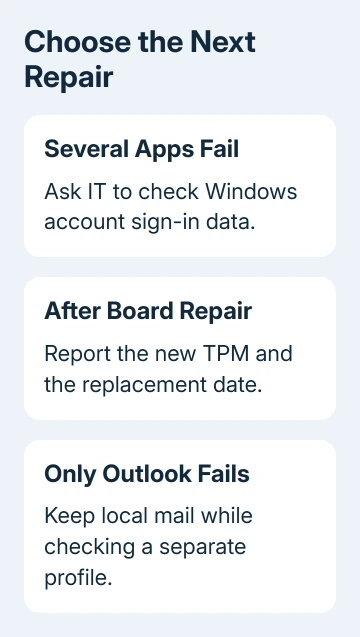
Tell IT when browser access succeeds but several installed apps reject the account. That helps them check the parts of Windows that handle your account instead of resetting the mailbox password again.
For a separate numeric error with tag 657rx, the Windows sign-in repair guide covers its account-package checks. Keep the full number alongside the short tag when reporting either problem.
3. Mention a motherboard replacement before further repairs
The Trusted Platform Module, or TPM, is a security chip used to protect sign-in information. Replacing a motherboard also replaces that chip. Old sign-in tokens can then point to security keys that aren't available on the new hardware.
Dell's 80090016 repair procedure specifically covers this situation. Ask the repair provider or IT to use it if Outlook stopped signing in after the board was changed.
Its repair sequence includes reconnecting the work account, rebuilding the authentication broker's cached data, and removing stale credentials. The broker is the Windows component that handles app sign-ins.
If IT needs to rebuild that cache, have them work on the affected Windows user's profile. Renaming a folder in an administrator's own profile won't repair the person whose Outlook is failing.
Keep the service record and the date the error first appeared. A hardware replacement is a useful explanation for why an account worked before repair and now fails on the same disk, without any password change.
If no hardware was changed, report that too. The code can still need account repairs, but the motherboard-specific explanation shouldn't be assumed for every computer showing it.
4. Let IT check the Windows sign-in components
When credentials and the account connection don't fix it, ask IT to check Microsoft.AAD.BrokerPlugin_cw5n1h2txyewy, the work-account sign-in component. Security software, a proxy, or a firewall can block it.
The vendor procedure includes checking for those blocks before rebuilding account data. Give IT the error time and the affected apps so they can compare security logs with the sign-in failure.
The steps for repairing saved sign-in data depend on what went wrong. The general activation article clears specific TokenBroker\Accounts data, while Dell's board-replacement procedure renames the affected broker package folder.
Have the administrator choose the steps that fit your situation instead of combining both lists of files to delete. Once they've repaired the account data, restart Windows and sign into Outlook with the original affected Windows account.
If only Outlook continues to fail, a separate classic Outlook profile is a reasonable later check. Keep the original profile and local mail files. The Outlook send/receive guide covers that mail-specific branch.
5. Check TPM and device registration before a reset
Press Windows + R, enter tpm.msc, and press Enter to inspect TPM status. Report a ready status to support, but keep checking the old Office tokens if app sign-in still fails.
If the chip isn't ready or the computer's work registration is invalid, give the result to IT or the laptop maker. They can check firmware and device registration against the machine's actual management setup.
Before any TPM clear, secure the BitLocker recovery key and other recovery information for TPM-protected data. Have IT handle that step on a managed device. An account sign-in fault isn't a reason to erase security keys casually.
In the original keyset discussion, the owner eventually reported success after reinstalling Windows. They had already tried clearing the TPM and other changes without fixing the sign-in.
I'd keep that Windows reinstall as a last resort. Ask IT to review your Microsoft 365 credentials, broker data, and device registration before planning a Windows rebuild with a proper backup.
The Short Version
Remove affected Office credentials and check the work-account connection with IT. Mention hardware repair. Have IT review sign-in data and device registration before a TPM clear or Windows reinstall.
Checked November 17, 2026.
 If you have any business, I can build it online