Excel returns 2 for =WEEKNUM(DATE(2021,1,3),1) because the week containing January 1 is week 1, and Sunday, January 3 starts the next week. The formula is working as designed.
Choose the week-numbering rule your calendar needs before changing the formula, because Monday-start weeks and ISO weeks aren't the same thing.
In this guide
1. Check which dates belong to the first week
With WEEKNUM(date,1), weeks start on Sunday and week 1 includes January 1. In 2021, January 1 fell on Friday. That leaves Friday and Saturday in week 1, followed by week 2 starting on Sunday, January 3.
Enter these formulas in three empty cells to see the boundary without depending on a text date's regional format:
=WEEKNUM(DATE(2021,1,1),1)
=WEEKNUM(DATE(2021,1,2),1)
=WEEKNUM(DATE(2021,1,3),1)
The results are 1, 1, and 2. Nothing has skipped a week. Your weekly calendar may list only Sundays, which means its first listed date doesn't include the two January days that Excel counted as week 1.
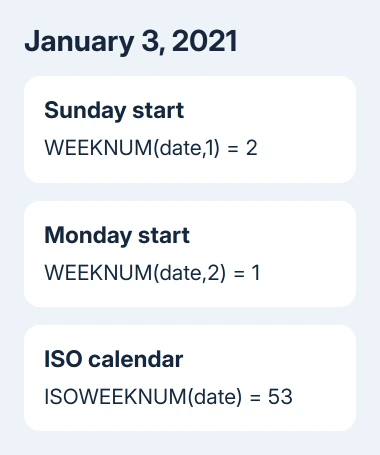
Microsoft's WEEKNUM function reference explains the distinction between the January 1 system and ISO numbering. The second argument, the value after the comma, sets the week's start day. Using 21 also switches to ISO numbering.
If your workbook groups work by Sunday, the default result may already be correct. Before replacing it, check one report that uses the same calendar. Check more than January 3, since changing the rule affects later reports too.
2. Use Monday-start numbering when that is the rule
Change the second argument from 1 to 2 if the reporting week starts on Monday but the week containing January 1 should still be week 1. With a date in A2, use:
=WEEKNUM(A2,2)For January 3, 2021, this returns 1. Monday, January 4 returns 2. The Sunday is still in the first week because a Monday-start week hasn't ended yet.
That's the right change for a Monday-based calendar. It isn't a Sunday-start calendar with a different label. If your business week must begin on Sunday, changing this argument changes the boundaries you actually use.
In the original discussion, changing the start day was suggested as one way to keep January 3 in week 1. Choose it only if those calendar rules match your report. Excel's function isn't broken.
I'd check the start day with whoever receives the report before filling the new formula down a whole year. A visible result of 1 can look right while grouping Sunday's figures with the wrong working week.
These formulas use the same arguments in Excel for Windows and Mac. If your regional settings use semicolons between arguments, enter the formula with those separators instead of commas.
3. Choose ISO weeks only for an ISO calendar
ISO weeks start on Monday, and week 1 is the week containing the year's first Thursday. Use either of these formulas when that is the calendar your report requires:
=ISOWEEKNUM(A2)
=WEEKNUM(A2,21)
January 3, 2021 returns 53 under ISO numbering. It belongs to the final ISO week of 2020. Monday, January 4, 2021 is the start of ISO week 1, so a result of 53 on January 3 is expected.
This is why replacing WEEKNUM with ISOWEEKNUM doesn't make the example Sunday become week 1. It uses a different calendar rule. Use it for ISO reporting, not simply because the default result surprised you.
When a report shows both a year and an ISO week, the calendar year of the date can differ from the ISO week-year near New Year. Don't label January 3, 2021 as ISO week 53 of 2021 just by joining YEAR(A2) to the week number.
Check December dates as well as January dates when reviewing that report. A late-December date can belong to the next ISO year's first week. Your report needs one consistent rule at both ends of the year.
4. Decide what a custom Sunday calendar should do
Some workplaces call the first full Sunday-start week week 1. Others label weeks by their ending date or use a financial calendar. Agree on a starting date for those rules; WEEKNUM's default January 1 rule won't reproduce all of them.
Write down what should happen to January 1 and January 2 before asking for a custom formula. Should those dates stay with the previous reporting year, become week 0, or belong to a short opening week?
Also decide whether the week number resets each January or counts forward from a project start. Those are different calculations, even when both happen to return 1 for the first Sunday in your current sheet.
Don't subtract 1 from every WEEKNUM result as a general correction. That turns the existing week 1 into week 0 and leaves the year boundary unresolved. One date may look right even though other dates still use the wrong week numbers.
For a workbook shared across teams, keep the rule beside the column heading or in the workbook's instructions. A short note explaining Sunday-start, Monday-start, or ISO weeks prevents a later editor from undoing the intended formula.
5. Check the date cell before troubleshooting the result
Use DATE(year,month,day) for your comparison examples. It avoids an ambiguous entry such as 1/3/2021, which can mean January 3 or March 1 depending on the computer's settings.
If the original cell contains text instead of a real Excel date, fix that input first. The Excel date recognition guide covers converting imported dates so date formulas can use them reliably.
Compare your formula with a direct DATE example for the same day. If those disagree, inspect the input cell and the second argument. Even the right week rule will give a different answer if the formula is using a different date.
For a cell displaying its formula instead of a number, use the formula display checks. Changing the week-start argument won't help until Excel evaluates the expression.
For a report that still disagrees with your organization's calendar, give its owner the expected results for December 27, January 1, January 3, and January 4. Ask them to confirm the rule before having a custom formula written.
The Short Version
January 3, 2021 is week 2 under Sunday-start WEEKNUM, week 1 under Monday-start WEEKNUM, and week 53 under ISO numbering. Choose the reporting rule first, then use the matching function and argument.
Checked November 17, 2026.
 If you have any business, I can build it online