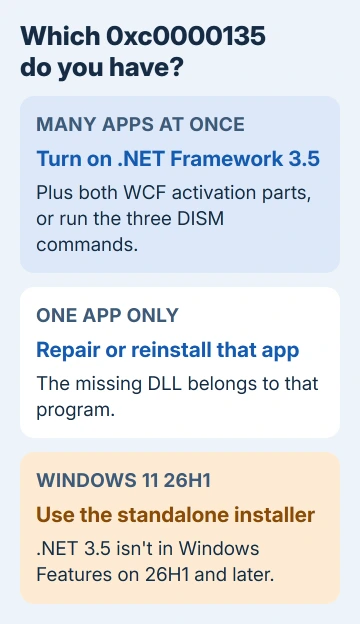
When several apps fail with 0xc0000135 at once, often right after a Windows update, a piece of .NET Framework 3.5 is usually missing.
The code means a program couldn't find a DLL, a shared code file it loads at startup, so it quits before its window opens.
Turn .NET Framework 3.5 and its Windows Communication Foundation parts back on in Windows Features, or run three DISM commands that do the same. If just one program fails, repair or reinstall that program instead.
In this guide
Tell which kind of 0xc0000135 you have
The box that pops up says "unable to start correctly (0xc0000135)" and offers only an OK button. Windows' own name for the code is STATUS_DLL_NOT_FOUND, and its description suggests reinstalling the program.
Count how many of your programs show it. When unrelated apps fail on the same day, Windows tools like PowerShell or Event Viewer included, something they all share is missing. In the reports on this code, that was .NET Framework 3.5.
That's what happened in spring 2022. After KB5012643 in April and KB5013943 in May, KeePass, ProtonVPN, Discord, ShareX, Visual Studio and more stopped opening on many Windows 11 PCs.
If you see it on one program while everything else opens, the missing DLL belongs to that program. Skip to fix 5.
1. Turn on .NET Framework 3.5 and its WCF parts
Apps built for older .NET versions need .NET Framework 3.5, which covers 2.0 and 3.0 as well, and Windows leaves it off until you or an app asks for it.
Some apps also use Windows Communication Foundation (WCF), the part of .NET that lets programs talk to other programs and services, and it's switched on separately.
I'd start here rather than with commands, because the list shows you exactly what's on.
Press Windows+R, type optionalfeatures and select OK. In the Windows Features list, tick .NET Framework 3.5 (includes .NET 2.0 and 3.0), then select the plus sign beside it.
Inside, tick Windows Communication Foundation HTTP Activation and Windows Communication Foundation Non-HTTP Activation. Leave .NET Framework 4.8 Advanced Services ticked too. Select OK and restart if Windows asks.
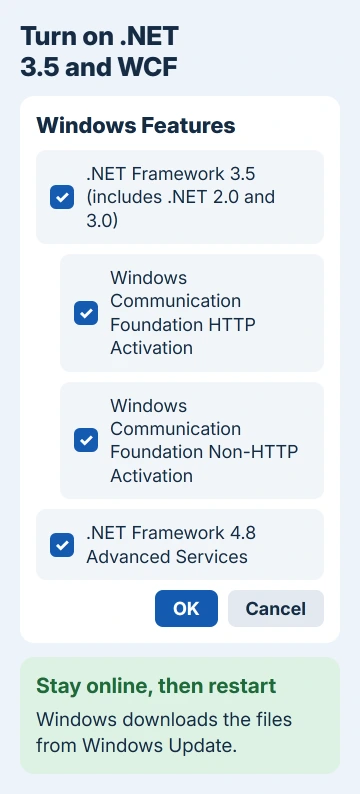
Windows downloads the files from Windows Update, so stay connected until the bar is done. If an older app pops up a prompt to install a .NET feature instead, choose Download and install this feature; it flips the same switch.
That's how owners got their apps back in 2022. One fixed KeePass by "installing .NET 3.5, which was not useful before (as only the 4.8 was requested)." Another put it more bluntly: ".NET 3.5 is the answer!!"
If the install itself stops with 0x800f0954, Windows couldn't reach its download source, and the 0x800f0954 fix gets the feature to install.
2. Run the three DISM commands
DISM, Windows' built-in tool for turning features on and repairing system files, can flip the same switches from the command line. That helps when the Windows Features window won't apply them.
Right-click Start, choose Terminal (Admin) and paste these in one at a time:
dism /online /enable-feature /featurename:netfx3 /all
dism /online /enable-feature /featurename:WCF-HTTP-Activation
dism /online /enable-feature /featurename:WCF-NonHTTP-Activation
Microsoft's own workaround for the 2022 problem lists exactly these three. Restart when they finish, then open the apps you couldn't start before.
A failed command doesn't always mean the fix failed. An owner who ran all three wrote back: "1st & 3rd ran successfully but the 2nd failed (no idea why) but surprisingly it did solve my issue!"
3. On Windows 11 26H1, use the standalone installer
Starting with Windows 11 26H1 (build 28000), .NET Framework 3.5 is no longer a Windows feature, so it won't appear in that list. Check your version in Settings > System > About under Windows specifications.
On 26H1 or later, download the standalone installer from Microsoft's .NET Framework 3.5 for Windows 11 page and run it. Each installer only works on the Windows version it names, so match it to yours.
The two WCF activation parts are gone on these versions, so the installer is the whole fix there. One more catch: a Windows upgrade to the next release doesn't keep .NET 3.5, so reinstall it after each one.
Windows 11 25H2 and earlier still use the Windows Features route in fix 1.
4. Remove the update that started it
If the errors began the day an update installed and fixes 1 and 2 didn't help, removing that update is the fallback. One owner's laptop refused every app after KB5013943 while their desktop was fine; uninstalling it brought everything back.
Open Settings > Windows Update > Update history, scroll to Uninstall updates and remove the newest one. Treat this as a stopgap: it also removes that month's security fixes, and Windows will offer the update again later.
Install newer updates as they arrive. If the apps fail again afterward, go back to fix 1, since the missing .NET parts are the usual reason.
5. One app only: repair or reinstall it
Open Settings > Apps > Installed apps, find the program, open the three-dot menu beside it and pick Modify or Advanced options. Use Repair if it's offered. Otherwise uninstall it and install a fresh copy from its maker.
A clean reinstall puts back any DLL the program shipped with. If its setup notes ask for a runtime such as .NET Framework 3.5, install that first.
Missing Visual C++ files bring their own message naming the file, and the MSVCP140.dll fix handles those. The similar 0xc000007b code is a 32-bit or 64-bit mix-up, covered in the 0xc000007b guide.
If every app still fails
When even Windows' own tools won't open after all of this, start Get Help and describe 0xc0000135, or contact Microsoft Support with your Windows version from Settings > System > About and the date the errors began.
For a single business or specialist program, its maker's support team can tell you which runtime it needs. Send them the exact message text.
The Short Version
Error 0xc0000135 means a program can't find a DLL it needs. When many apps fail, turn on .NET Framework 3.5 and both WCF activation parts, or run the three DISM commands. On Windows 11 26H1, use the standalone installer.
Checked November 20, 2026.
 If you have any business, I can build it online