
You double-click a program and Windows stops it at once: "The application was unable to start correctly (0xc000007b). Click OK to close the application". It can hit a game, Photoshop or Office. The message never says why.
I would first check whether one program fails or every 32-bit program fails, because the fixes differ.
One owner cleared it for all their 32-bit apps with System File Checker, and another fixed a single program by repairing the Visual C++ runtimes it already had.
A Microsoft Q&A thread on it from 2010 has a "Same question" count of 900+, and one from 2020 has 2000+.
What the code tells you
Microsoft's list of Windows error codes names 0xC000007B STATUS_INVALID_IMAGE_FORMAT, a bad image. Microsoft states it plainly: the file was built for something other than your Windows, or it is damaged.
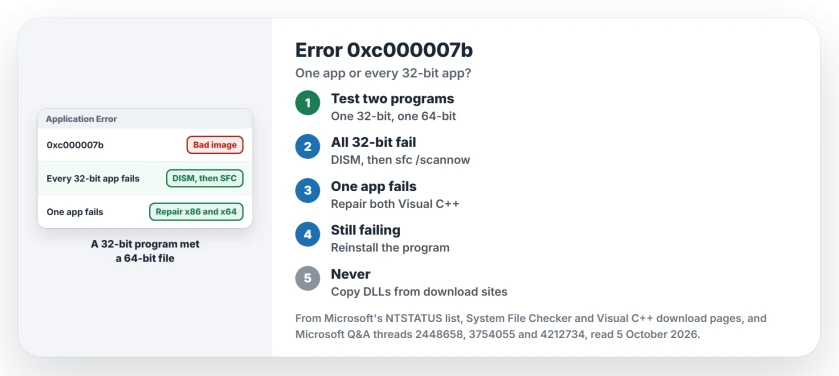
Status: checked 5 October 2026. One owner's 32-bit apps all failed with 0xc000007b, and SFC fixed them. Another owner's single program ran again after repairing both Visual C++ runtimes.
The accepted answer on the 900+ thread explains the usual mix-up: "a 32-bit (x86) executable trying to load a 64-bit (x64) DLL". Your program starts, reaches for a support file of the wrong kind, and Windows stops it.
One program, or all of them?
Open another 32-bit program and a 64-bit one. Ours: anything in Program Files (x86) is 32-bit. One in Program Files is 64-bit.
An owner on the 900+ thread found every 32-bit app failing while 64-bit ones ran, in their words: "IE 32bit no-go, IE 64bit worked fine". That points at Windows, not your program.
1. Every 32-bit app fails: repair Windows files
That owner ran SFC /SCANNOW in an elevated Command Prompt, and it found errors and corrected them. Then they wrote "without rebooting I was then able to launch 32bit applications once again".
Microsoft's System File Checker page runs DISM first, then SFC. In an administrator Command Prompt, enter these two lines:
DISM.exe /Online /Cleanup-image /Restorehealth
sfc /scannow
Does SFC report damage it could not repair? Then see when SFC cannot repair every file for your next step.
2. One app fails: repair both Visual C++ runtimes
Many programs lean on Microsoft's Visual C++ runtimes, and on 64-bit Windows you often have an x86 copy and an x64 copy. A Q&A owner with Photoshop Elements 2020 was told to repair each installed copy.
Confirmed by an owner a few days later: "Thank You, I repaired x64 and x86 and restarted and program is working now". That was the whole fix.
Ours: in Settings, Apps, Installed apps (Apps and features on Windows 10), open the menu next to each Microsoft Visual C++ Redistributable. Choose Modify, then Repair.
Microsoft's download page ties each package to the architecture your app was built for, so a 32-bit program needs the x86 runtime even on 64-bit Windows.
When the error turns into MSVCP140.dll
The same owner first saw 0xc000007b and then a new message about MSVCP140.dll. That one means the runtime is missing. MSVCP140.dll was not found walks you through installing it.
3. Still failing: reinstall the program
Microsoft's text for this code ends with advice: "Try installing the program again using the original installation media". Download a fresh installer from the program's maker.
The 2000+ thread's top reply adds a check. You may have "downloaded the wrong version (bit-wise) for your operating system". Ours: on an ARM laptop, get the build its maker offers for ARM if there is one.
What not to do
The accepted answer on the 900+ thread talks about adjusting PATH or copying DLLs, but that advice was for a developer juggling x86 and x64 builds of their own projects.
Ours: do not pull a DLL off a download site into System32 to silence this error, because you swap one bad image for another and can break other programs.
Is 0xc000007b a game problem?
Q&A holds many threads about games and launchers, from GTA V to the Epic Games Launcher. The code is the same for every program. So the same three checks apply.
Does it mean my PC is failing?
Rarely. The SFC owner suspected disk trouble and ran a disk check as well. If SFC keeps finding new damage after each repair, test your drive next.
The Short Version
- 0xc000007b means a program loaded a file of the wrong kind or a damaged one.
- Check whether one program fails or every 32-bit program fails.
- All 32-bit apps failing: run DISM, then SFC, as one owner did.
- One app failing: repair both the x86 and x64 Visual C++ runtimes.
- Then reinstall the program from its maker.
- Never copy DLLs from download sites into Windows folders.
Where to Next
Open one 32-bit and one 64-bit program now. If only one program fails, go to the Visual C++ repair; if all 32-bit ones fail, run SFC.
Which program showed 0xc000007b on your PC, and what fixed it? Tell me in the comments.

Isaac Smith is the founder and editor of PC Glance, a website that covers computers, laptops, and technology. He is a tech enthusiast and a computer geek who loves to share his insights and help his readers make smart choices when buying tech gadgets or laptops. He is always curious and updated about the latest tech trends.