REGISTRY_ERROR 0x00000051 means Windows hit a serious registry fault, sometimes during a disk read. If this started after a recent change, try restoring the last working configuration. Repeated read errors call for a storage check first.
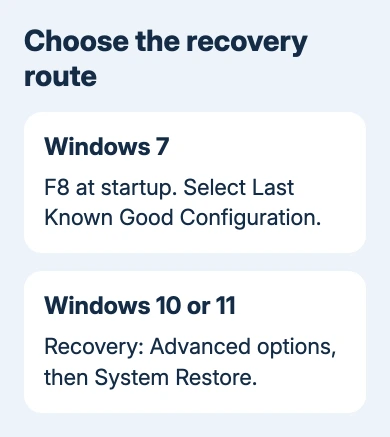
An older startup case was fixed with Last Known Good Configuration. Windows 10 and 11 don't offer that Windows 7-era option. On those systems, use an existing System Restore point instead of searching for the old F8 option.
In this guide
1. Match the stop code and protect your files
Photograph the entire blue screen, including REGISTRY_ERROR, 0x00000051 and any driver filename. A different registry-related message needs its own repair; similar words don't make the stop codes interchangeable.
The registry stores system and application settings. Windows reads it during startup, which explains why a damaged configuration or a failed read can interrupt boot before you get a usable desktop.
Microsoft's 0x51 debugging reference lists hardware trouble and file-system corruption among the possible reasons for a registry read error. The code by itself doesn't identify the failed component.
Save needed files on a separate drive while Windows is accessible. A disappearing drive, unusual drive noises or read failures call for a technician to preserve the data before you attempt more repairs.
Note when this began: after a driver installation, a cleanup utility, a power interruption or no obvious change. That timing helps you decide whether to restore the settings or have the drive checked first.
2. Use Last Known Good Configuration on an older PC
For Windows 7, restart and press F8 before the Windows logo appears. In Advanced Boot Options, select Last Known Good Configuration (advanced) and press Enter. Let Windows attempt a normal start.
This starts Windows with the registry configuration from its last successful startup. That option belongs to the older operating system. It hasn't been renamed or moved in Windows 11.
One owner could use Safe Mode but crashed shortly after normal sign-in. In their March 2015 reply, they said Last Known Good Configuration stopped the crashes. Ethernet still didn't work afterward.
Later that day, they restored a March 1 restore point. Ethernet returned and they reported better performance. Getting back to the desktop let them run System Restore and fix the remaining network problem.
Don't copy the thread's separate SafeBoot registry edits. The owner tried several things but said the boot configuration choice stopped the crashes. Their account doesn't give enough detail to safely repeat the other edits on your PC.
If F8 never opens that menu, confirm which Windows version is installed. On Windows 10 or 11, continue with the recovery route in the next section. Repeatedly pressing F8 won't add Last Known Good Configuration to those menus.
3. Restore a previous configuration on Windows 10 or 11
At the sign-in screen, hold Shift while choosing Power > Restart. In recovery, select Troubleshoot > Advanced options > System Restore. Pick an available restore point from before the crashes began.
Locate the drive's BitLocker key before entering recovery. The BitLocker key guide explains the saved-key locations if recovery asks for it.
From a usable desktop, press Windows + R, enter rstrui.exe, and press Enter instead. Select Next, choose a restore point and use Scan for affected programs to see which apps or drivers will change.
Select Next > Finish to begin. System Restore returns system files, registry settings and installed programs to the selected state without changing your personal files. Let the restart finish before judging the result.
If there are no restore points, this route can't recreate one from before the crash. Move to Safe Mode and collect the crash information rather than downloading registry files from another PC.
After a successful restore, try several normal starts before reinstalling the software that changed. If the same crash returns immediately, record that result for support; the earlier configuration didn't remove the underlying problem.
4. Use Safe Mode to get a stable desktop
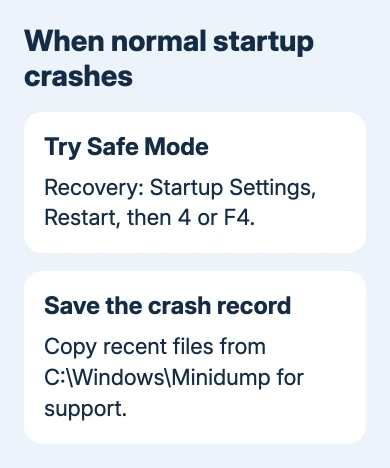
In Windows recovery, choose Troubleshoot > Advanced options > Startup Settings > Restart. Select 4, or use F4, to request Safe Mode. For Windows 7, choose Safe Mode from its F8 Advanced Boot Options menu.
Safe Mode leaves many drivers and services unloaded. A stable desktop there gives you a chance to copy files, review recent software changes and collect crash records. It doesn't mean the registry or the disk is healthy.
I'd use that stable session to collect crash records before installing more drivers. A machine that crashes ten seconds after normal sign-in gives you little time to undo a repair that makes matters worse.
If a new driver or utility came just before the crashes, follow its vendor's uninstall instructions or steps to restore the previous version. Skip registry cleaners; further automatic changes can damage settings you're trying to recover.
If recovery itself won't reach Startup Settings, the Windows 11 Safe Mode access guide covers that separate obstacle. If Safe Mode also crashes, move directly to support with the stop-code photo.
When 0x51 keeps returning: check storage and dumps
Check C:\Windows\Minidump for recent crash files while Windows is accessible. Copy available files for the technician, along with the stop-code photo, Windows release and whether Safe Mode could start.
Have the manufacturer or repair technician examine the drive and file system, then read the crash files for the registry operation that failed. A clean quick disk check doesn't explain every intermittent read failure.
The original owner had already run a drive check without it reporting a problem. Restoring the configuration helped them, but a 0x51 crash can still come from a drive problem.
If storage checks pass but startup remains broken, discuss reinstallation after securing the files. Tell the technician which data you need and supply the BitLocker key when it's required to unlock the drive.
The Short Version
On Windows 7, use Last Known Good Configuration. On Windows 10/11, use an existing System Restore point. Continuing 0x51 failures need storage and crash records checked after preserving your files.
Checked November 26, 2026.
 If you have any business, I can build it online