Secure Boot event 1801 reports unfinished certificate and boot-manager updates in the PC's firmware. Install current Windows security updates and restart, then check for success. Old errors stay in the log after the update succeeds.
This message doesn't identify the cause of a game crash or a sudden restart. Keep those symptoms separate while checking whether the certificate update is progressing, blocked by firmware, or waiting for its scheduled task.
In this guide
1. Read the event date and look for later success
Right-click Start, open Event Viewer, then select Windows Logs > System. In Filter Current Log, type 1801,1808 into the event-ID field. Apply the filter and check each entry's date and event source.
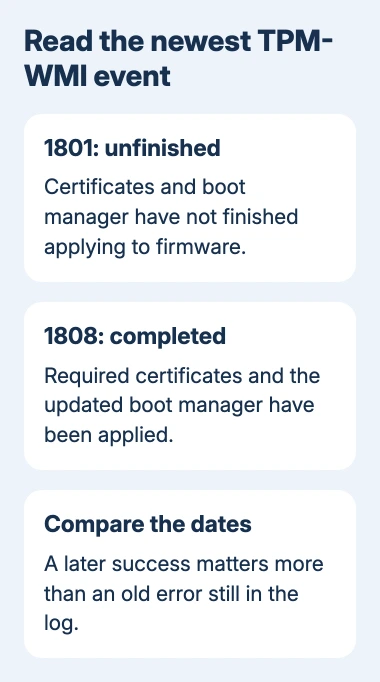
The relevant source is TPM-WMI. Event 1801 means the update hasn't finished. Event 1808 confirms that the needed certificates and the Windows boot manager signed with the 2023 certificate have been updated.
Read them in time order. A later 1808 is more useful than an older red error symbol. Clearing the log won't apply a certificate, and keeping the old entry doesn't mean the successful update was undone.
Microsoft's Secure Boot event descriptions distinguish completion from the different blocking events. Record the newest relevant event before changing settings.
If 1808 is present after the last 1801, focus any remaining crash troubleshooting on the crash itself. If only recent 1801 entries appear, work through the update and task checks next.
2. Bring Windows up to date and allow the restart
In Windows 11, visit Settings > Windows Update. Choose Check for updates. Install its offered security updates. Save open documents before accepting a requested restart. Return to Update history afterward to check the result.
On Windows 10, open Settings > Update & Security > Windows Update. Certificate updates still depend on whether your Windows version qualifies for updates, including applicable Extended Security Updates or a supported long-term edition.
A failed installation means Windows hasn't finished the update it needs. If Windows Update itself reports an error, finish repairing that failure before expecting certificate servicing to move forward.
These updates coordinate Windows with the computer's UEFI firmware, the software that starts the PC. Some work happens through a scheduled task rather than entirely during the visible Windows Update download.
Check the event log again after the requested restart. Don't assume that several quick restarts will override a firmware block. If 1801 continues, check the scheduled task that applies the update.
3. Check whether the Secure Boot update task can run
Search Start for Task Scheduler and open it. In the left pane, expand Task Scheduler Library > Microsoft > Windows > PI. Look for Secure-Boot-Update in the task list.
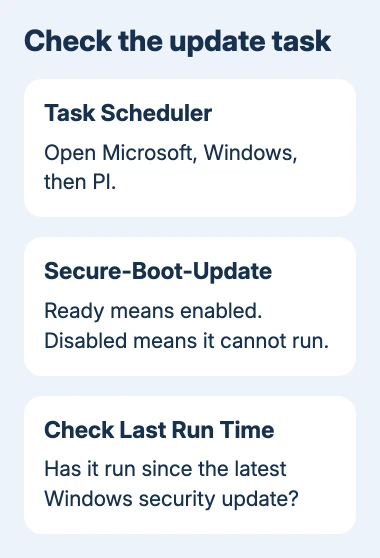
The task should exist and be enabled. Ready means it's available to run; Disabled means it can't perform the certificate work. Check Last Run Time to see whether it has run since the latest security update.
To get the task's details as text, open Terminal (Admin) from the Start shortcut menu and run this read-only command:
schtasks.exe /Query /TN "\Microsoft\Windows\PI\Secure-Boot-Update" /FO LIST /VThe normal task runs as SYSTEM, at startup and every 12 hours. That schedule gives it another chance if a previous attempt couldn't finish. A disabled or missing task prevents that work from happening.
On a personal PC, right-click an existing disabled task to enable it. On a managed machine, ask IT to restore the task's settings. Record its next run time and then check for newer events.
If the query says the task wasn't found, don't create a replacement from an unrelated download. Ask support to restore the expected task using the current Secure Boot troubleshooting instructions for your Windows version.
4. Match a continuing block to the firmware event
Return to the System log and remove the earlier filter, or change it to include 1795,1802,1803. Read the TPM-WMI entries near the latest update attempt. Their details tell you what to ask the manufacturer to fix.
Event 1795 can indicate firmware failure while Windows tries to update a Secure Boot variable. Ask the manufacturer whether newer BIOS or UEFI firmware fixes certificate handling on this model.
Event 1802 means Windows blocked the update because of a known hardware or firmware problem. Give the manufacturer that event instead of forcing repeated attempts past the protective block.
Event 1803 points to missing authorization for the key update. The manufacturer must supply the required signed key material for that device. Reinstalling Windows won't supply that missing authorization.
Find the BitLocker recovery key before installing firmware. Follow the model-specific update instructions; changing firmware or startup security can bring up a recovery-key request.
I'd send the event details to the manufacturer before resetting Secure Boot keys. Restoring factory defaults can remove certificates a newer Windows boot manager needs, so it can create a startup failure instead of completing this update.
5. Give support the update state, not just the red icon
Open System Information from Start and record System Model, BIOS Version/Date, Secure Boot State and BIOS Mode. Pair those details with the latest TPM-WMI event's full text and timestamp.
If Secure Boot State is Off or Unsupported, use the Windows 11 Secure Boot checks to understand the current boot configuration before changing it. Legacy boot and UEFI boot need different planning.
For a Windows Security badge instead of an Event Viewer entry, the Secure Boot warning guide explains the wording shown there. A green badge alone doesn't confirm completion the way event 1808 does.
Ask the maker whether this model supports the 2023 certificate transition and whether a firmware update or signed key is still required. Include the task's status and last run time if the update mechanism appears stuck.
For a simultaneous crash, also give support the crash time and any stop code. The forum discussion contains owners reporting game crashes alongside 1801, but seeing both doesn't mean the certificate problem caused the crash.
The Short Version
A newer 1808 confirms the update reported by an earlier 1801 has finished. Install Windows updates, restart and check the task. A continuing firmware or signed-key block needs the PC maker's fix, with event details and the exact model.
Checked November 26, 2026.
 If you have any business, I can build it online