Connected AirPods can stay silent when the phone is sending audio somewhere else. Start a song and select your AirPods in its audio destination menu. For one silent earbud, check each side's charge before a reset.
Those are different faults. Sound from the phone's speaker points toward the playback destination; one silent side needs its own charging and listening check. AirPods Max also have a different restart procedure from earbuds in a case.
In this guide
1. Send the playing audio to your AirPods
Start audio in Music or Podcasts, then tap the audio destination button. You can reach it through the app, the Lock Screen or Control Center. Select your AirPods by name. Keep them nearby while checking the result.
For a Face ID iPhone, pull downward from the upper-right display corner to reach Control Center. On a Home-button iPhone, swipe up from the bottom. Expand the playback panel if its audio destination control is hidden.
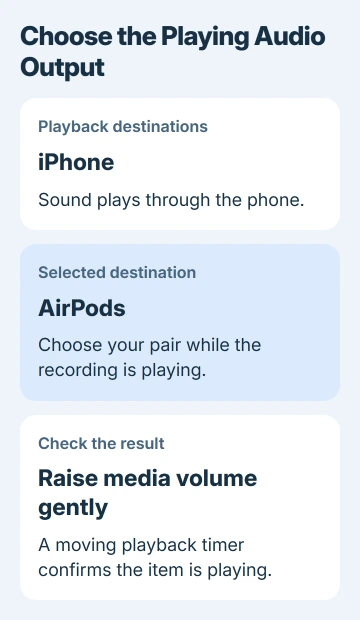
Turn up the media volume a little while the item is playing. Check that the playback timer is moving. A paused item, a silent recording and the wrong output can all look like a Bluetooth problem when the connection itself is working.
The Bluetooth playback controls let you choose the output directly. A Bluetooth connection in Settings doesn't replace that check when several audio devices are available.
Try a second item in another audio app. If that plays normally, check playback in the app that remained silent. If you can't hear either app through the AirPods, continue with the charging and connection checks.
For a Mac, select the AirPods in Control Center > Sound. On Windows 11, open Settings > System > Sound > Output and select them; on Windows 10, choose them under Choose your output device on the Sound page.
If the trouble is the output changing between Apple devices rather than constant silence, the AirPods switching guide covers that separate behavior.
2. Check each earbud's charge, not just the case
For AirPods or AirPods Pro, make sure the case is charged. Put both earbuds inside for 30 seconds, then open the case near your iPhone or iPad. Look at the charge display and confirm that each earbud is charging.
A full case battery doesn't mean both earbuds are charging. If one side doesn't show as charging, put that earbud back in place and check again. Deal with the missing charge before treating it as an audio-balance problem.
Put the silent earbud in its matching ear. Leave the other one in the case and close the lid. Check the AirPods connection in Bluetooth, then play audio. This tests the silent earbud without sound from the other one getting in the way.
If that earbud now plays, put both back in the case for another 30 seconds and test them together. If it still stays silent despite charging, move to the model-specific reset.
Apple recommends this individual listening test in its one-AirPod troubleshooting steps. It's more useful than repeatedly reconnecting the pair without knowing which side isn't working.
3. Correct a quiet side before treating it as dead
A very quiet earbud needs a slightly different check from one producing no sound. On iPhone or iPad, open Settings > Accessibility > Audio & Visual and move Balance to the middle.
Check the speaker mesh for debris. On AirPods Pro, remove the ear tips to inspect the mesh properly. Use your model's cleaning instructions. Don't force debris into an opening or improvise with liquid.
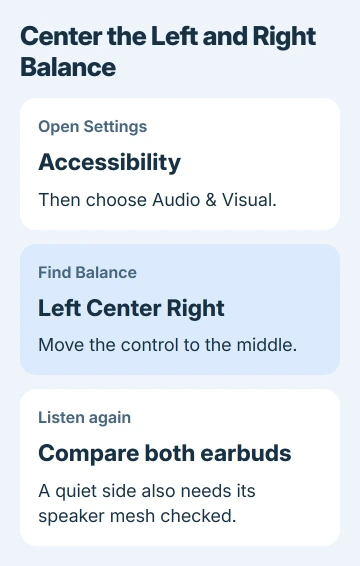
Listen again with a familiar spoken recording. If centering Balance restores both sides, leave it there. If one side is still much quieter with a clean mesh, try a reset next.
Sound that changes position with head movement needs a different check. The one-ear sound-shifting guide covers head tracking and balance when the apparent position changes with movement.
4. Reset earbuds using the correct case controls
Place the earbuds inside their case. Leave its lid shut for 30 seconds. On the paired iPhone or iPad, open Settings > Bluetooth, tap the AirPods row's information button, then choose Forget This Device. Confirm the removal.
If they aren't listed, continue with the case procedure. Open the case lid and use the matching model's sequence. Newer cases have different controls, so the rear-button steps won't work for every pair.
For AirPods generations 1 through 3 and first- or second-generation AirPods Pro, hold the case's rear setup button down for about 15 seconds. Wait for amber flashes, then white. Follow the phone's connection prompts.
AirPods 4, AirPods 5, and third-generation AirPods Pro use the case front. Start with a double-tap while the status light is on.
When white flashing begins, give the front another double-tap. At the faster flashing stage, double-tap once more. The reset finishes with amber flashing followed by white.
Keep the open case close to your phone to finish setup. Play the same recording afterward so you can compare how it sounds before and after the reset.
If the light won't reach white, close the case for 20 seconds, reopen it and repeat the correct case sequence. If the case still won't complete those steps, check its charge or arrange service rather than repeatedly trying to pair it.
5. Restart AirPods Max before a factory reset
For AirPods Max, get the battery to 50 percent or more before starting. Press the Digital Crown together with the listening mode button. Release both controls when the LED flashes amber to complete the restart.
I'd try this first with Max because it restarts the headphones without resetting them to factory settings. Reconnect as needed and check playback after the restart.
If it doesn't help, hold the same two controls for 15 seconds, until the LED flashes amber and then white. That is the factory-reset sequence. Pair the headphones again and retest your audio.
If your AirPods are charged but still silent after a reset, ask about AirPods service. Tell Apple Support which side fails, whether both charge and whether another playback device produces the same fault.
The Short Version
Choose AirPods as the active audio output first. Test a silent earbud on its own after checking its charge, center Balance for uneven sound, then use the reset for your case model. AirPods Max need their own two-button restart or reset.
Checked November 12, 2026.