AirPods can die fast because they didn't charge fully, one earbud missed its charging contact, or the batteries now hold less charge. Check both earbuds and the case after charging to tell a missed recharge from short playback time.
A case losing charge while refilling the earbuds is a different situation from fully charged earbuds shutting down during use. Check which battery is losing charge before choosing your next step.
In this guide
1. Check what actually reached a full charge
Place both earbuds in their case, then plug a charging cable into its Lightning or USB-C port. For a charging failure, leave AirPods and AirPods Pro connected for at least 15 minutes before checking them again.
Lift the lid beside your paired iPhone, then check each battery. The iPhone AirPods battery checks explain where to read earbud and case percentages in Settings.
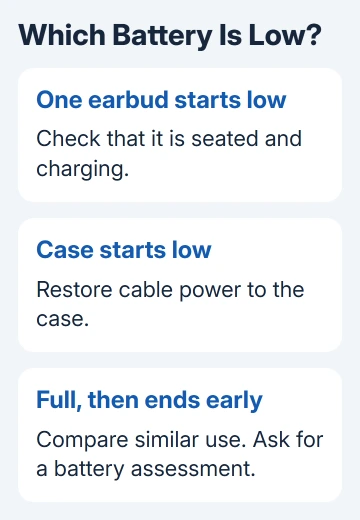
If one earbud is still nearly empty, it didn't get the same recharge as the other. Reseat it in its correct slot and check whether charging begins. A full case reading alone doesn't tell you that both earbuds charged.
With AirPods inside, the case's status light describes the earbuds. With them removed, it describes the case. Green indicates full charge; amber means the earbuds or case aren't fully charged yet.
If the same earbud repeatedly fails to charge, follow the single AirPod charging checks before judging its listening time. Starting a session almost empty can look like a worn-out battery.
2. Check the cable and charging case
Check the wall outlet, then firmly seat the cable at both the case and adapter. If a wireless charging attempt leaves the case low, try a cable to check whether the case charges when pad placement isn't involved.
Apple recommends checking the cable and clearing port debris for charging trouble. Follow the case's cleaning guidance, keeping liquid and metal objects out of the port.
On a wireless pad, place a supported case with its lid closed and light facing up. The light can turn off after several seconds while charging continues. Check the battery reading rather than expecting a permanent light.
An empty case can't recharge your earbuds between uses. If each earbud lasts normally after a wired charge but is empty after returning to an uncharged case, charge the case first.
The case also spends charge refilling used earbuds. Its percentage falling after a listening session is different from a large unexplained loss while the earbuds stay full and unused. Tell support which situation you observed.
3. Look for an intentional charging limit
On supported models, Optimized Battery Charging learns your routine and can postpone the last part of charging. AirPods Pro 3 also have an Optimized Charge Limit, which can choose a lower stopping point to reduce battery wear over time.
These features affect the starting charge, rather than making a fully charged battery empty faster. If the earbuds stop short of full before a long trip, check their Battery settings before assuming a charging fault.
Connect your AirPods to the iPhone or iPad while wearing them. Open Settings > your AirPods > Battery. Supported models show Optimized Battery Charging; AirPods Pro 3 can also show Optimized Charge Limit.
Use the relevant option to allow a full charge when needed. Pro 3 can offer turning its limit off for a day or entirely. Read the choice shown on your device, then charge again and check the new starting percentage.
I'd keep the battery-preserving setting on normal days and change it when the extra starting charge is useful. A temporary full charge is a better way to check listening time than comparing two sessions that started at different levels.
4. Compare the kind of use and the temperature
Compare similar sessions: the same earbuds, a similar starting charge and the same kind of listening. A model's advertised listening time describes particular test conditions, not every mix of calls, audio features and volume.
For example, the AirPods Pro 2 USB-C specification lists up to six hours of listening, or up to 5.5 hours with Spatial Audio and head tracking. Those times apply to its test conditions.
Check your model's specification. A total including the charging case counts recharges between sessions, not continuous listening on one charge. If yours only last minutes after a full charge, a different audio mode won't explain that gap.
AirPods Max need a different charging check from in-ear models. Charge them directly for at least five minutes when power is the problem. Use their Smart Case when they're not in use to help preserve charge.
Cold conditions can temporarily shorten battery life or make AirPods turn off. Let them return to normal indoor temperature, then check battery life again. Very hot conditions can permanently shorten it, so don't leave them in a parked car.
If the apparent loss only happens outdoors in cold weather, that pattern matters. Record it for support instead of assuming the charging case failed. Avoid heating the earbuds directly to hurry the process.
5. Reset persistent charging behavior using the right case
If charging still doesn't work reliably, try a reset next. A reset clears your custom AirPods settings, so you'll need to reconnect them and set those preferences again. It won't restore capacity lost to battery aging.
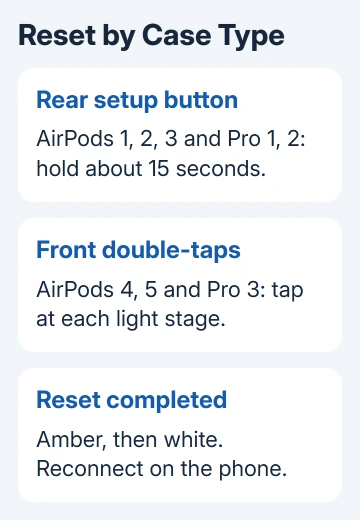
For the first three AirPods generations, and first- or second-generation AirPods Pro, leave the earbuds inside the closed case for 30 seconds. On your iPhone, use Settings > Bluetooth > info beside the AirPods > Forget This Device.
Leave the lid open. Press the case's rear setup button without releasing it for about 15 seconds. The light should flash amber, then white. Bring the case beside your iPhone, leaving the lid open, and complete the pairing prompts.
The fourth- and fifth-generation AirPods cases, plus AirPods Pro 3, need the front double-tap method instead. After the same closed-lid wait and forgetting step, lift the lid. While the light is on, double-tap the case front.
Double-tap again when the light flashes white, then a third time as it flashes faster. Amber followed by white marks the reset. Use the phone's pairing prompts. Check the reset procedure if needed.
Ask for battery service when full charges still end early
If both earbuds reliably reach full charge but one consistently shuts down much sooner, book a battery check with Apple or a repair center authorized for AirPods. Give them the model and each earbud's approximate runtime.
Ask whether battery service or replacement is covered by your warranty or AppleCare plan. Record unusual case drain separately. Repeated resets aren't a useful repair for a battery that no longer holds enough energy.
The Short Version
Check both earbuds and the case after charging. Fix a missed recharge first, and account for optimized charging and temperature. If a full charge still runs out quickly, get the batteries checked rather than guessing at a charging fix.
Checked November 12, 2026.