Crackling in original AirPods Pro may qualify for Apple's sound service program, but coverage ends three years after first retail sale. Check the purchase date before booking: matching symptoms don't mean you'll get a free replacement.
The program covers confirmed crackling, static and certain noise cancellation faults in the original AirPods Pro. It doesn't cover every AirPods sound problem, newer generations or the charging case.
In this guide
1. Check the purchase date before arranging service
Apple says its sound service program has two separate conditions: the affected units were manufactured before October 2020, and coverage runs for three years after their first retail sale.
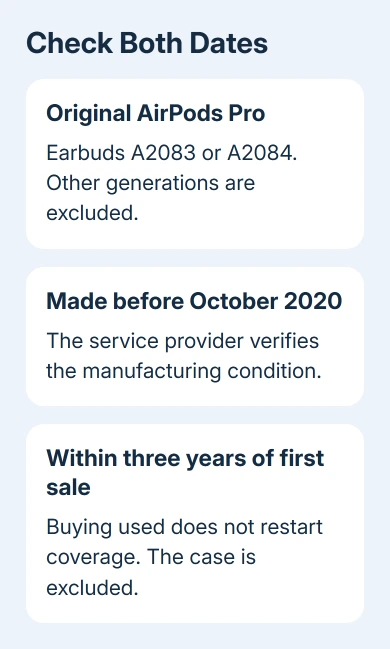
Those are different dates. Buying used AirPods doesn't start another three years, and the program page being online doesn't mean your pair is still covered. An early purchase will now be outside that period.
Find the original receipt or order confirmation, especially if the purchase date in your service record is unclear. Bring it to your appointment and ask them to check program coverage using the first-sale date.
An expired standard warranty in a serial-number lookup isn't the whole answer. The program has separate conditions, although it doesn't extend the standard warranty. Request a separate program eligibility check.
Past the three-year limit, ask about ordinary repair coverage, applicable AppleCare coverage and a paid replacement quote. Local consumer rights may also apply. These are separate routes from the sound service program.
2. Confirm that these are original AirPods Pro
On a connected iPhone or iPad, open Settings > Bluetooth. Tap your AirPods' information button and find Model Number. Original AirPods Pro use A2083 and A2084.
For an iPhone running iOS 13, find the connected pair under Settings > General > About instead. Select the AirPods entry to read its model number.
The number is also printed underneath each earbud. That helps when a faulty pair won't stay connected. Check the number on the earbud, rather than relying on the charging case alone.
The service program doesn't include AirPods Pro 2, AirPods Pro 3, ordinary AirPods or AirPods Max. A similar noise on another generation needs that model's normal troubleshooting and service route.
For example, hissing or weak ANC on AirPods Pro 3 belongs to a different fault check. A newer product doesn't become covered by an older replacement program because both have noise cancellation.
Model numbers identify the generation, but they don't tell you every eligibility detail. Seeing A2083 or A2084 doesn't tell you when the earbud was made. Let the service provider verify that part.
3. Match the sound problem to the covered symptoms
The crackling or static covered by the program can become louder in noisy surroundings, during exercise or while talking on the phone. Note which earbud makes the sound and the situation that brings it on.
The other covered behavior is active noise cancellation, or ANC, failing to work as expected. Examples include lost bass or more background sound getting through, such as street or airplane noise.
Try familiar audio in a quiet place, then compare Noise Cancellation with Off from the AirPods controls. This gives you a useful description for service. The provider still needs to examine the earbuds to decide whether they qualify.
A connection dropout differs from an earbud that crackles while audio keeps playing. If the connection itself breaks, the AirPods Pro 2 disconnection checks explain that separate problem for the newer model.
Avoid increasing the volume to overpower a damaged earbud. The useful detail is whether the noise continues during normal listening and whether changing the listening mode changes it, not how loud you can make it.
4. Check fit and clean before assuming hardware failure
Weak noise cancellation can also come from a poor seal or dirty meshes. Seat both earbuds properly and check that the tips fit comfortably. A loose tip lets background sound in even when ANC is enabled.
Use the cleaning instructions for original AirPods Pro. Don't push debris through the mesh or put a sharp tool into it. Methods differ across generations, so instructions for a newer pair aren't automatically suitable.
After cleaning, compare the same listening modes again. Improved bass and reduced outside sound point to a fit or blockage problem. That can save you a service visit for a pair that isn't faulty.
If ANC still fails, place the two earbuds inside the charging case. Shut its lid for 30 seconds. On the iPhone, open Settings > Bluetooth, use their information button, then choose Forget This Device and confirm.
Open the case lid. Press its rear setup button for roughly 15 seconds. Watch for an amber flash followed by white. Keep the open case near the iPhone and follow the pairing prompts.
This reset can clear a setup problem. It can't repair a damaged microphone or make an expired service window start again.
I'd check the date before spending an evening resetting them. Once the purchase is outside the program period, the practical decision is whether another coverage route or a paid replacement makes sense.
5. Ask for the right service assessment
Use the AirPods service page to arrange help, or find an Apple Authorized Service Provider. Ask for an assessment under the original AirPods Pro sound-issue program.
Explain whether the left earbud, right earbud or both are affected. Include the original purchase date, model numbers and a short description of the crackling or ANC fault. Bring the complete pair and case if the provider requests them.
The earbuds are examined before service. When the issue and eligibility are confirmed, the affected left earbud, right earbud or both are replaced free of charge. The charging case isn't affected by this program and isn't replaced under it.
If service is refused, ask which check failed: generation, manufacture date, time since first sale or sound examination. That determines the next step: supply purchase information or request an ordinary paid service estimate.
The Short Version
Verify the original-model numbers, pre-October 2020 manufacture date and three-year first-sale limit. Matching symptoms don't promise free service. An authorized provider must examine the earbuds and check that they qualify.
Checked November 12, 2026.
 If you have any business, I can build it online