
You run an installer and it stops with Error 1500: "Another installation is in progress. You must complete that installation before continuing this one". You are not installing anything else.
I would restart first, then end any leftover msiexec.exe in Task Manager, which got owners on the two largest threads installing again.
Windows only runs one of these installers at a time, so something else is holding the slot, and you can find out what.
On Microsoft's Q&A, the oldest thread about this message lists 1,800+ people with the same question.
Why only one install at a time
Microsoft's installer documentation is blunt: "two installations cannot be run in the same process". An answer on the 1,800+ thread put it plainly: "One install or repair process must finish before the other process can be launched".
The holder is often an app checking itself as you sign in, and an adviser on a 2020 thread noted that "it is not uncommon for msiexec process to run at system startup/logon".
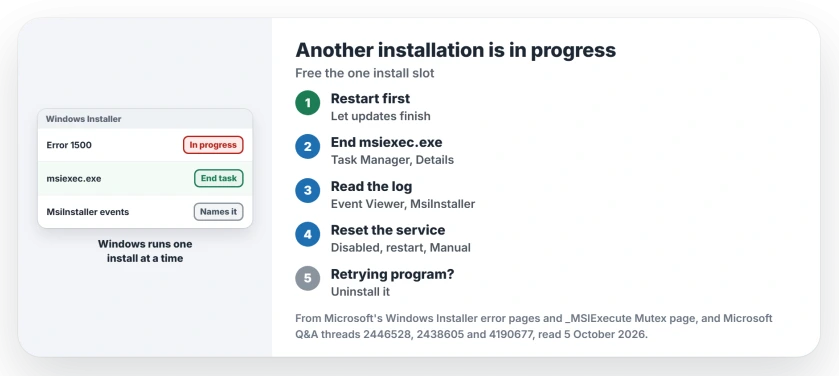
Status: checked 5 October 2026. Ending msiexec.exe in Task Manager got owners installing again; others stopped the Windows Installer service across a restart.
Restart, and let updates finish
Check Settings, Windows Update for anything waiting on a restart, and restart. That same answer on the 1,800+ thread asked first: "Did you try restarting your computer".
A 2013 reply on the 400+ thread put the error down to "another software is trying to install (maybe a windows update)". Ours: give an update its restart before you fight it.
End msiexec in Task Manager
Open Task Manager, go to Details, select each msiexec.exe and choose End task. Then run your installer again. The fix was reported working by a 2020 owner: "holy cow that totally worked".
A 2015 owner went through the Services tab, right-clicking msiserver and ending each msiexec task it showed: "After that, installing software was smooth sailing". 200+ readers marked that helpful.
A 2021 reader found no msiexec.exe in the list at all. Ours: then nothing is installing right now, and I would simply restart to clear your stale lock.
Find out what is installing
Microsoft says to look in the log: "See the Event Logging messages for information about what application is being installed".
Ours: open Event Viewer, then Windows Logs, then Application, and filter the current log by the source MsiInstaller; the newest entries name the product holding the slot. Reliability Monitor lists installs on a timeline too.
Reset the Windows Installer service
When the service will not let go, you can stop it across a restart. In services.msc, set Windows Installer to Disabled, restart, then set it back to Manual.
A 2010 reader posted that route, and replies followed: "Works brilliantly" and "This worked wonderfully".
The same reader added a warning to keep in mind: "dont forget to click start after putting back to manual though". Ours: if it stays on Disabled, every installer will fail, so put it back the same day.
A program that keeps retrying
Your PC may have a program stuck in a failed install that retries every few seconds. A 2011 owner saw two msiexec.exe processes come back within seconds of ending them.
The cause was a failing install of OMCI, a Dell management tool, and their fix was simple: "By uninstalling that software, I was able to fix my system". Uninstall yours from Settings, Apps, then try your installer again.
What not to do
Never delete files from C:\Windows\Installer, which a 2013 reply suggested with an unlocking tool. Ours: Windows keeps the files it needs to repair and remove your programs there.
When that folder has grown to tens of gigabytes, find out which product owns the files first, then move rather than delete.
Do not leave Windows Update switched off after you finish. Updates that hang have their own fixes, and switching them off for good leaves you unpatched.
What does error 1618 mean?
The same thing, from the developer side. Microsoft lists 1618 as "Another installation is already in progress". Some installers show 1618 where others show 1500.
Is it safe to end msiexec.exe?
Owners do it routinely on these threads. Ours: if Windows Update is mid-install, let it finish first, because an update you interrupt may roll back and start again.
Why does the error return after every restart?
Something starts an install each time you sign in, so read the MsiInstaller events for its name, then repair or uninstall that program.
The Short Version
- Restart, and let Windows Update finish.
- End every msiexec.exe in Task Manager, Details.
- Event Viewer, MsiInstaller, names what is installing.
- Disable Windows Installer, restart, set it back to Manual.
- A program retrying every few seconds? Uninstall it.
- Never delete C:\Windows\Installer files.
Where to Next
Restart now, then open Task Manager and look for msiexec.exe before you run the installer again. If it keeps reappearing, read the MsiInstaller events.
Which program was holding the installer? A comment naming it saves someone else the hunt.

Isaac Smith is the founder and editor of PC Glance, a website that covers computers, laptops, and technology. He is a tech enthusiast and a computer geek who loves to share his insights and help his readers make smart choices when buying tech gadgets or laptops. He is always curious and updated about the latest tech trends.