
Your PC will not start, so you open Command Prompt from recovery and type bootrec /fixboot, as the guides say. It answers Access is denied, while bootrec /fixmbr goes through fine.
I would stop fighting fixboot on a modern PC. Rebuild the boot files with bcdboot instead, which is what worked for the owners. Since 2018, the Super User thread on this error has been opened 278,363 times.
A reader confirmed the fix on Windows 11 23H2.
Why fixboot is the wrong tool on most PCs
Microsoft's boot problems guide gives /FIXBOOT one line: "To repair the boot sector, run the following command". That is a BIOS idea. A boot sector is what a PC with the older BIOS layout starts from, on an MBR disk.
A UEFI PC keeps its boot files somewhere else. They sit in a small EFI system partition with no drive letter.
On those PCs, Microsoft documents that BCDBoot "creates the \Efi\Microsoft\Boot directory and copies all required boot-environment files to this directory".
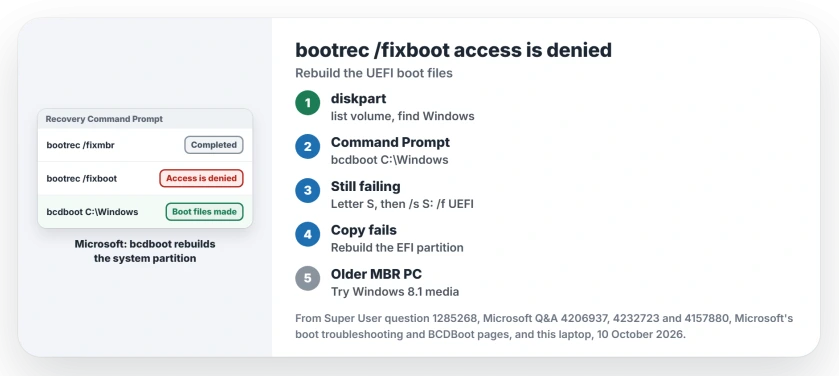
Status: Microsoft documents bcdboot as the tool that rebuilds a system partition. Owners confirm it for this error. This laptop's partitions and bcdboot help checked 10 October 2026.
Ours: this laptop starts in UEFI mode from a GPT disk, and its EFI system partition is 260 MB with no letter. bootrec.exe is not even in System32 here; it lives in the recovery environment. bcdboot.exe is in both.
The demand is steady. On Microsoft Q&A, one thread about it counts 10+ people with the same question, another 6.
1. Find the Windows drive letter first
Inside recovery, drive letters move. X: is the recovery system itself, and your Windows partition may not be C:. Start diskpart and list the volumes:
diskpart
list volume
exit
Pick the large NTFS volume that holds your Windows folder. Note its letter. The owner whose rebuild steps worked for others added a note beside bcdboot: you may need to change C: to the letter diskpart showed you.
2. Rebuild the boot files with bcdboot
Type this, with your Windows letter in place of C:
bcdboot C:\WindowsThe top answer passes on a reply from Microsoft's own forum. It gathered thanks for years.
One reader wrote "Simply running bcdboot C:\windows without the /s part sufficed". Another had "cloned my SSD to a new bigger one", and the same line fixed it.
Why no partition letter? This laptop's own bcdboot help explains it: "The default is the system partition identified by the firmware".
Microsoft lists the same job among BCDBoot's uses. It can "recreate the system partition files by using new copies of these files from the Windows partition", Microsoft says.
Your files stay put, which is why I run it first. bcdboot only writes boot files to that small partition, copied from the Windows folder you name.
If bcdboot cannot find the partition, give it a letter and name it. In the list, the EFI one is the small partition marked System:
diskpart
list disk
sel disk 0
list part
sel part 1
assign letter=S
exit
bcdboot C:\Windows /s S: /f UEFI
Change the disk and partition numbers to match your list. Microsoft notes that "If you specify the /f option, you must also specify the /s option", which is why S: comes first.
When bcdboot fails to copy the boot files
If bcdboot itself stops with Failure when attempting to copy boot files, your EFI partition is damaged. A 2021 owner hit it after the June 2021 update for Windows 10 20H2, with "Operating system not found" on screen.
They deleted and recreated the EFI partition from the Windows USB, and two readers later confirmed it. One fixed a laptop with BCD error 0xc0000098 after a BIOS update.
Is BitLocker on? Then look up the recovery key first. Recovery will ask for it.
I would try both bcdboot lines before deleting anything. In diskpart, select your disk and the System partition as before, then:
del par override
cre par EFI
for fs=FAT32 quick
assign letter=s
exit
bcdboot C:\Windows /s S: /f UEFI
One reader could not delete it at all. Diskpart told them "Delete is not allowed on the current boot, system, pagefile, crashdump or hibernation volume".
The owner's steps start from a Windows USB stick, so run yours from there, not from inside Windows.
An older PC with an MBR disk
Check the Gpt column in diskpart's list disk. No star there means your disk is MBR. On those PCs fixboot is the right tool, and it just failed from Windows 10 media for some owners.
One answer booted Windows 8.1 media instead, and every bootrec command worked. A reader with a legacy MBR setup confirmed it.
Another wrote that in August 2020 "/fixboot failed persistently" on Windows 10 2004 media. It worked "first time using Win 8.1 install media", so you may need an older stick.
A Microsoft support specialist on Q&A suggested bootsect /nt60 sys before fixboot. You can try it, but one asker tried bootsect /nt60 all and called it a loophole "which does not make the error go away".
When the boot files were never the problem
If your Windows drive sits in a USB or NVMe enclosure, none of this helps, one answer warns. That PC stops with INACCESSIBLE_BOOT_DEVICE. The INACCESSIBLE_BOOT_DEVICE page starts from the storage mode instead.
Stuck in a loop where Startup Repair gives up? Its SrtTrail.txt log tells you which part failed before you rebuild anything.
Why does bootrec /scanos find 0 installations?
The 2018 asker saw "Total identified windows installations: 0" from both /scanos and /rebuildbcd. bcdboot does not need that scan, because you tell it where Windows is.
The Short Version
- Access is denied from bootrec /fixboot is normal on many UEFI PCs.
- In diskpart, list volume and note your Windows drive letter.
- Run bcdboot C:\Windows with that letter.
- Still failing? Assign the EFI partition a letter and add /s S: /f UEFI.
- Failure copying boot files? Rebuild the EFI partition, BitLocker key at hand.
Where to Next
Did plain bcdboot do it, or did you need to rebuild the partition? Tell me what your PC showed before it would start.

Isaac Smith is the founder and editor of PC Glance, a website that covers computers, laptops, and technology. He is a tech enthusiast and a computer geek who loves to share his insights and help his readers make smart choices when buying tech gadgets or laptops. He is always curious and updated about the latest tech trends.