
A 3DS can send its screens to a Windows PC with Snickerstream and homebrew, software made by the community. You'll need a compatible homebrew setup on the console first; your model determines which streaming method you can use.
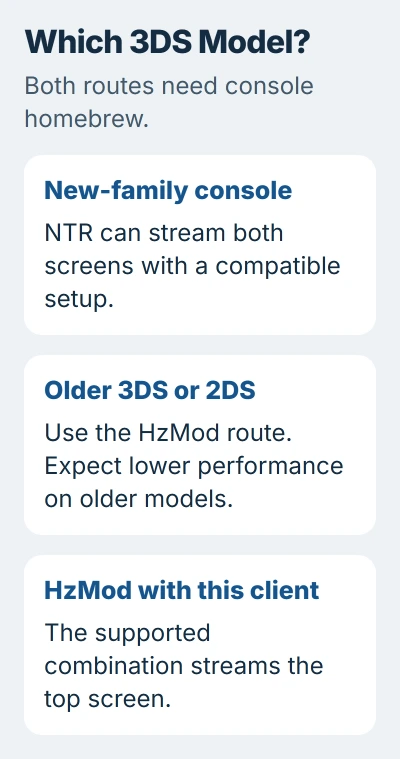
NTR is one option for a New 3DS-family system. Older 3DS and 2DS systems need another method, such as HzMod, with limits on speed and which screens it streams. Check your model before installing the PC receiver.
Choose the route that fits the console
New is part of the console's name. It doesn't mean you bought it recently. Check whether you have a New Nintendo 3DS, New Nintendo 3DS XL, New Nintendo 2DS XL, or an older model.
Snickerstream's getting-started guide explains that NTR needs a New-family system. Its supported HzMod setup also works on older systems, but streams only the top screen and can be slow on older hardware.
Both methods need homebrew access on the console. Custom firmware is modified system software that lets homebrew run. Installing the PC application alone doesn't prepare an unmodified handheld for it.
Use the current 3DS Hacks Guide for that separate setup, matching your exact console and system version. Back up the files it tells you to keep. Start these streaming steps once your console is ready for homebrew.
If the handheld can't stay powered, resolve its 3DS charging problem first. A power interruption and a dropped stream can look similar from the PC, but need different repairs.
Prepare the Windows receiver and home network
Open the Snickerstream project, read its instructions and download the Windows release from Releases. Extract it into a folder where your Windows account can save files.
Connect the PC and handheld to the same home network. The computer can use Ethernet while the console uses Wi-Fi; they need to be able to reach each other through the router. A guest network can prevent that communication.
Keep streaming on your trusted home network. You don't need to forward router ports, which would expose the receiver to the internet. The FAQ advises against it.
Open an installed homebrew tool such as FTPD to find the console's current local IP address. That address identifies the handheld on your network. Copy the address it shows so you can enter it on the PC.
The address may have changed since your last session. Check the current one whenever a previously working connection fails, especially after reconnecting the handheld or restarting the router.
Start NTR on a compatible New-family system
Check the BootNTR release requirements before installing the loader. The current release needs Luma3DS v13.0 or newer. Follow that requirement when older firmware advice says something different.
The original NTR streaming procedure uses BootNTR Selector on the console, default paths and NTR 3.6. Once the loader returns you to the HOME Menu, open Snickerstream on your PC.
Enter the console's IP in IP, keep NTR selected as the streaming app, and start with the default quality settings. Click Connect!. The handheld's top screen can flash briefly before the receiver starts showing the screens.
Look for the HOME Menu on your PC before opening a game. That tells you the basic connection works. If the menu never appears, check the connection before trying fixes for a particular game.
NTR can lose its stream when you leave or restart a game. After switching titles, restart the handheld and reload NTR before reconnecting. A connection that worked in one game may need starting again for another.
Use the HzMod route for an older console
Follow the HzMod setup instructions for Snickerstream's supported package. Install HorizonM.cia and HzLoad.cia. Older systems that need the high-memory loader also use HzLoad_HIMEM.cia.
Start HorizonM Loader on the handheld. For a high-memory game on an older system, use the matching HIMEM loader. The notification light should turn cyan when the module is ready.
In Snickerstream, find Streaming app under Other Settings and select HzMod. Enter the console address, then click Connect!. The light should turn green as the top-screen picture reaches your PC.
Don't keep NTR selected while running the HzMod module. The receiver and console need to use the same method. A correctly entered address can't fix a mismatch between those two choices.
With this setup, you get top-screen capture, and older consoles stream more slowly. If you need both screens, check that your model supports a suitable method before setting up a recording.
Fix a connection that never reaches the receiver
Read the exact error before changing settings. For a connection timeout, check the console address, active streaming module and local network first. Reopen the module after a console restart instead of assuming it starts automatically.
If Windows Firewall blocks the trusted receiver, use the app-allowance controls. Allow the intended application for the trusted network rather than switching the firewall off.
The troubleshooting page also covers games that turn Wi-Fi off, unsupported TARGA image streams and errors displaying the picture. Use the fix that matches your message and streaming method.
For a choppy picture, move closer to your Wi-Fi access point and reduce image quality. Change one setting, reconnect as your method requires, then compare the same scene. I'd get a steady picture before adding recording software.
Record the received picture and recognize the limits
Once the stream is stable, use a Windows screen recorder to capture the receiver window. Streaming the display to your PC and saving a video are separate steps. Record a short test and play it back before starting the full session.
Native DS and GBA modes stop the 3DS system software these methods need. NTR and HzMod can't stream those modes. If the stream stops as you enter one, changing picture quality or the PC recorder won't help.
If setup still fails, tell the project your console model, streaming module and Snickerstream versions, and the exact error. Name the game if only one fails. Leave device identifiers and private network details out of a public report.
The Short Version
Match the homebrew streaming method to your console model. Enter its current local IP and get a steady receiver picture before capturing video. Check which screens and game modes your method can stream.
Checked November 5, 2026.

Isaac Smith is the founder and editor of PC Glance, a website that covers computers, laptops, and technology. He is a tech enthusiast and a computer geek who loves to share his insights and help his readers make smart choices when buying tech gadgets or laptops. He is always curious and updated about the latest tech trends.