
A 3DS charger that seems to have stopped working may need its AC adapter reset. Disconnect it from the console and wall outlet for 30 seconds, then reconnect it and check the orange charging indicator.
That light matters more than an immediate power-on. A depleted system can need charging time before it starts, while no orange light after the reset calls for checking the adapter and console separately.
Check the adapter and reset both connections
Use a suitable Nintendo 3DS adapter. Nintendo lists WAP-002 for the 3DS family; check the adapter's regional electrical rating too. Do not assume an imported adapter accepts the local mains voltage.
Inspect the cable, plug and console connector without forcing them. Stop using damaged accessories. If a cradle is involved, disconnect it and connect the adapter directly to the console for this check.
Status: Nintendo adapter-reset, LED and comparison instructions reviewed November 3, 2026. US service availability is restricted by model. No console was tested.
Nintendo says to unplug both ends, wait 30 seconds, then reconnect in its 3DS power troubleshooting. Use a working outlet and keep the cord free of tight bends or trapped sections.
The 3DS charging connector is not an ordinary USB-C or Micro-USB socket. The USB connector comparison helps identify those common plugs before choosing a cable for a different device.
After reconnecting, look specifically for the orange recharge LED. The blue or red power indicator reports something else, so a red battery warning alone does not tell whether charging has started.
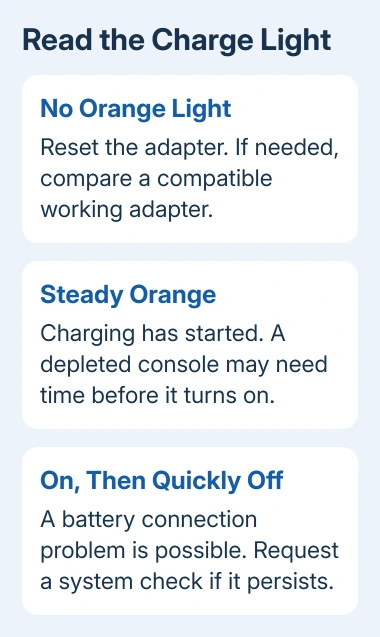
A steady orange light means charging has started
Nintendo states that a system can require up to 15 minutes of charging before it turns on. Leave it connected during that period instead of repeatedly disconnecting the charger.
Its orange-light instructions give approximately 3.5 hours for a full charge, with longer charging when the system is in use. This is guidance, not a test of battery health.
The recharge light normally goes out when charging finishes. Compare that normal behavior with a light that goes dark almost immediately while the system still cannot run.
A console that starts on external power but cannot retain charge needs a battery or system assessment. A working orange indicator does not prove that an aging battery can store usable energy.
No orange light: compare another compatible adapter
If a known-working, compatible 3DS adapter is available, connect it to the same console. Keep the outlet and console unchanged so the adapter is the part being compared.
This comparison is documented by Nintendo. Charging with the second adapter points to the original adapter needing replacement. Failure with the second points toward the console needing service.
Do not buy a battery solely because the first charger produced no light. A cable, connector or charging circuit can stop power reaching the battery, and a second adapter cannot identify which internal part has failed.
For a separate phone with the same no-charge complaint, use the Android charging checks. Its port and power controls differ from this Nintendo system.
A light that immediately goes out needs another check
Nintendo's startup guidance says an immediate light-then-dark pattern can mean the battery pack is not connected correctly. Blinking can also indicate a battery connection problem.
That is a possible cause, not proof that the charger is faulty. If the pattern persists, give a repair service the exact model, light behavior and result with the second adapter. Avoid bending connector contacts to make the light stay on.
Check repair availability for the exact model
Nintendo's current US page lists New Nintendo 2DS XL as available for service. It lists the original 3DS, 3DS XL, New 3DS, New 3DS XL and original 2DS as no longer serviced.
Check the support options in your region before sending anything. For an unsupported model, ask a repair shop experienced with Nintendo handhelds to assess the console and charger together and quote the repair before replacing parts.
The Short Version
Reset the adapter and watch the orange charge light. Allow a depleted console time to start if charging begins. With no light, compare a compatible working adapter; a brief flash or failure to retain charge needs a console assessment.

Isaac Smith is the founder and editor of PC Glance, a website that covers computers, laptops, and technology. He is a tech enthusiast and a computer geek who loves to share his insights and help his readers make smart choices when buying tech gadgets or laptops. He is always curious and updated about the latest tech trends.