
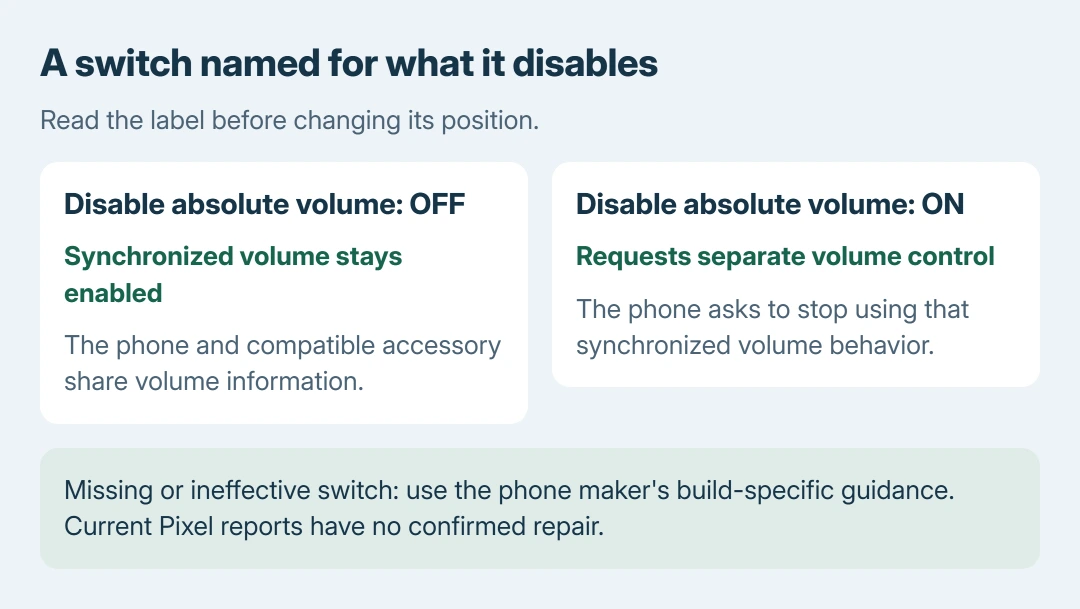
To disable absolute Bluetooth volume on Android, turn Disable absolute volume on in Developer options, where that switch is available. Its reversed wording matters: enabling the switch disables synchronized volume control.
Some current Pixel builds have reports of a missing or ineffective switch. The documented setting is therefore a supported option to check, not a universal fix for every Android phone's Bluetooth volume.
Find Developer options for the phone model
Google states that Developer options are normally hidden. Find Build number in Settings and tap it seven times to reveal the developer menu. Complete any device authentication prompt.
On a Pixel, Build number is under Settings > About phone. On Samsung Galaxy S8 and later, Google's table places it under Settings > About phone > Software information. Other manufacturers can arrange it differently.
Status: Android's documented volume switch and current Pixel failure reports checked October 28, 2026. Availability varies by build. No Bluetooth audio device was tested.
Return to Settings and find Developer options. Google's general route is System > Developer options; some makers put that menu directly in the main settings list. Leave unrelated developer settings unchanged.
Turn the negatively named switch on
Open the networking or Bluetooth portion of Developer options and look for Disable absolute volume. Turn that switch on. AOSP documents this action in its Bluetooth services reference.
Google says absolute volume is enabled by default. With synchronization working, the phone sends both audio and volume information to the receiving device, and changes made on the accessory can be reported back to the phone.
Disabling that link is meant to let the phone and accessory keep separate controls. It does not promise extra volume steps, a louder amplifier or a repair for damaged headphones.
Disconnect and reconnect the accessory, then compare at a low listening level. Adjust both volume controls and check whether they still move together. This comparison is ours; the result matters more than the switch's appearance.
To request the original synchronized behavior again, turn Disable absolute volume off. Keep the developer menu enabled while checking a change. Google adds that switching its master control off disables most developer options.
Xiaomi can put the control on the paired device
Xiaomi documents another route on its newer phone software: connect the headphones, open Settings > Bluetooth, tap the arrow beside the earbuds, then open Audio and disable Keep volume consistent.
Its Bluetooth-volume guidance also gives different routes for Android 10 and Android 11. Follow the instruction for the installed software instead of assuming the global developer switch exists on every Xiaomi.
A device that cannot pair at all needs connection troubleshooting first. The Android Bluetooth connection checks explain pairing records and the distinction between calling and media playback.
Stop when the switch is absent or makes no difference
An owner reports that their Android 17 Pixel 11 Pro XL has a problem: the switch remains visible but the phone and headphones stay synchronized. The October 2026 issue report does not contain a confirmed repair.
A second public issue tracks requests surrounding the missing control. These reports describe affected builds, without establishing that every Android handset behaves alike.
A generic Android reference cannot establish that a particular phone exposes the switch.
Check available software updates through Google's Pixel update instructions, then ask the manufacturer about the specific software build and accessory if the control remains absent or ineffective.
Do not assume a factory reset will restore an option removed from a build. No successful reset remedy was established in the sources checked for this guide. Use a comfortable volume while waiting for device-specific advice.
For overly loud Bluetooth audio from Windows, the Windows absolute-volume procedure uses a Windows setting. Its registry command has no role on Android.
The Short Version
Turn on Disable absolute volume when available, then compare the controls at a quiet listening level. Xiaomi can use a per-device equivalent. The checked reports establish no repair for missing or ineffective Pixel controls.

Isaac Smith is the founder and editor of PC Glance, a website that covers computers, laptops, and technology. He is a tech enthusiast and a computer geek who loves to share his insights and help his readers make smart choices when buying tech gadgets or laptops. He is always curious and updated about the latest tech trends.