An ESIF line with TYPE: ERROR MODULE: IPF is Intel's Innovation Platform Framework writing to the Application log, filed as Event ID 17 from the source IPF. On a PC that otherwise works fine, it's background noise rather than a fault.
If you want it gone, install a newer version of Intel's IPF driver; that's what stopped the entries for one owner. Crashes or overheating at the same time are a separate problem to chase on their own.
In this guide
What the entry is
IPF is a layer of driver software on recent Intel laptops and desktops. It gives apps a single way to reach the chip's platform features, such as power and thermal settings, and PC makers ship it as a chipset driver.
The ESIF number, such as 1.0.11002.28566, is the version of the framework that wrote the entry. It changes with the driver, which is why you'll see 1.0.11401 or 1.0.11904 in other people's posts about the same entry.
The end of the line names what complained. Text such as Unauthorized EsifPrimitive or Unauthorized EsifEventRegister comes from IPF's permission check, AuthMgr in the log: something asked IPF for a setting or event and was turned away.
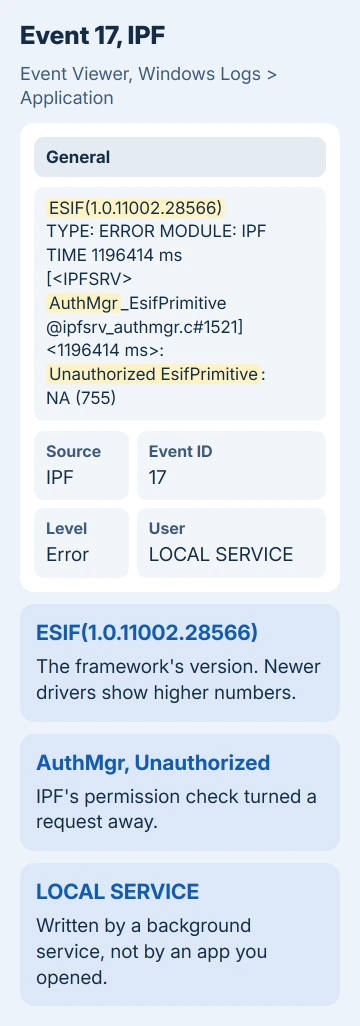
To see it yourself, press Win+X, choose Event Viewer and expand Windows Logs > Application. Look for IPF in the Source column with Event ID 17, and double-click one to read the full ESIF line.
It's logged under the LOCAL SERVICE account, often many times a day, so your log can fill up fast. One owner counted 790 in a week, and the thread on Microsoft's forum has over 400 people with the same question.
Does it need fixing?
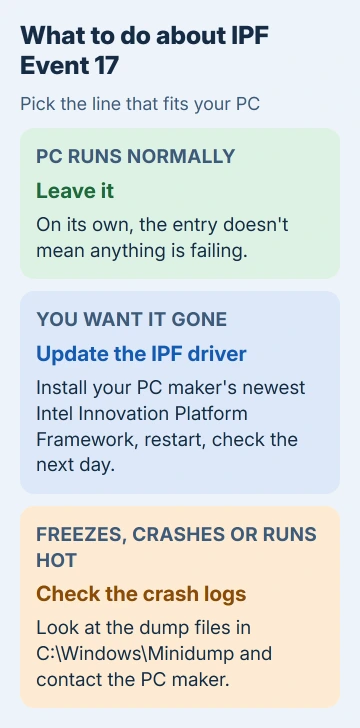
Usually not. The owner with 790 entries a week noticed no effect at all on how the computer ran, and an IPF line on its own doesn't mean any hardware is failing. I'd leave yours alone if the PC runs fine.
Treat it as a problem only when your PC also freezes, crashes, runs hot or drains its battery fast. Even then, look at what else the logs say before blaming IPF.
Seeing several Intel(R) Innovation Platform Framework entries in Device Manager is normal too. HP's package alone installs a Manager, a PCH ACPI Participant and a Processor Participant, so a short list of them isn't a duplicate driver.
One Dell XPS 15 owner tied daily blue screens to IPF Event ID 17 because it showed up at each crash. Their crash logs also named NVIDIA and DirectX graphics drivers, which pointed somewhere else entirely.
You may also see a related version that reads TYPE: ERROR MODULE: IPF next to lines from DPTF, Intel's thermal framework, with the text The feature is not implemented.
One owner linked it to a chime at every shutdown. They tried the driver and BIOS steps with no change and decided to leave it.
1. Install your PC maker's newest IPF driver
This is the one fix an owner says worked, and it's the one I'd try first. They installed a newer version of the framework, restarted, and saw no IPF errors through more than a week of heavy use.
First, note which version you have now. In Device Manager, expand System devices, open Intel(R) Innovation Platform Framework Manager and check the Driver tab for the version and date.
Then download your PC maker's own package, because it's built for your model's firmware. Search the maker's website for your model; the driver sits with the chipset downloads, under the name Intel Innovation Platform Framework.
Install it, restart, and check Event Viewer the next day to see whether new IPF entries still appear. Windows Update can also offer an Intel Extension for this framework; if it keeps reinstalling, the Intel Extension loop has its own fix.
If your PC maker has nothing newer, Intel's own download of the framework is what that owner used. Device Manager's Update driver option is a third route: right-click an IPF entry, choose Update driver and let Windows search.
2. Update the BIOS and the related Intel drivers
The usual advice is to update the BIOS, chipset and Intel Dynamic Tuning drivers from the same support page, since IPF works alongside them. Use the maker's own update tool if it has one, and keep a laptop plugged in for any BIOS update.
Keep your expectations modest, though. The owner with the shutdown chime did all of this and saw no change, so once the drivers are current, stop reinstalling them. Chasing driver updates rarely helps a PC that already works.
3. Hide the entries if they bother you
Event Viewer can hide them from your view without touching IPF. Right-click Custom Views, choose Create Custom View, pick the Application log, and type -17 in the event ID box to exclude Event ID 17.
That's purely cosmetic: IPF still writes the entries and your view just stops showing them. The full Application log still has them if a support technician asks.
When the PC also crashes or overheats
Note your model number, the IPF driver version from Device Manager and the times of the crashes, then contact the PC maker's support. For blue screens, the dump files (crash reports) in C:\Windows\Minidump show which driver failed.
Those dump files tell you more than the IPF lines do. In the XPS 15 case the crash logs pointed at the graphics drivers, so if yours name a graphics or storage driver, update that one first.
The Short Version
Event ID 17 from IPF is Intel's Innovation Platform Framework logging a refused request. Leave it if your PC runs normally. If you want it gone, install your PC maker's newest IPF driver and restart.
Checked November 20, 2026.
 If you have any business, I can build it online