
Your child clicks Chrome and it closes at once or asks for permission, while Edge opens fine. That is annoying when a school site works best in Chrome. I would look at one Family Safety setting first.
Every part of it is documented by Microsoft, across its Family Safety pages and its Windows release health page. Nothing is broken on the PC.
Why only Edge opens
Microsoft says: "Microsoft Family Safety's web and search filters only work in the supported browsers."
Its release health page is plainer: "Currently, Microsoft Edge is the only supported browser that provides this functionality within Microsoft Family Safety".
So the other browsers get stopped. Microsoft states: "When this setting is on, unsupported browsers are blocked so that filtering cannot be bypassed."
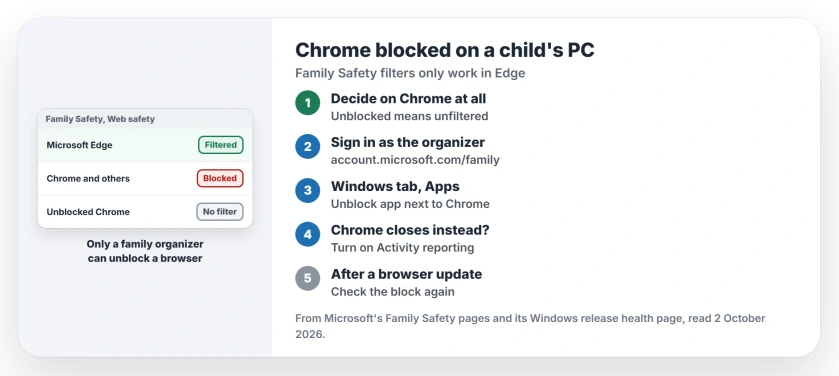
Status: checked 2 October 2026. With Family Safety web filtering on, Microsoft blocks every browser except Edge. A family organizer can unblock Chrome, but the filter does not work inside it.
1. Decide whether Chrome should run at all
Unblocking Chrome lets your child use it, but the filter stays an Edge feature. Microsoft says family members "must use a supported browser while signed in to their Microsoft accounts" for the filters to work.
So you are choosing between Edge with filters, or Chrome without them. Edge alone is the safer setup.
2. Unblock Chrome as the family organizer
Only one kind of adult can do this. Microsoft states: "Only Family organizers can block or unblock apps."
Sign in at account.microsoft.com/family and select your child's card. Pick the Windows tab, then Apps, features, and games, open the menu next to Chrome and choose Unblock app.
3. If Chrome closes instead of asking
Microsoft named this on its release health page. In its words: "When children try to open these browsers, they shut down unexpectedly."
Normally a parent approval prompt appears. Microsoft says the shutdown happens only when Activity reporting is off, so turn Activity reporting on under the Windows settings in Family Safety.
Microsoft has since fixed the shutdown on its own servers, too. It says: "If your device presented this symptom, please let it connect to the internet to receive the resolution."
4. Recheck after big browser updates
The block list needs updating each time a browser changes version. Microsoft says "the latest version of the browser cannot be blocked until we add it to the block list".
So a new Chrome version can slip through. Microsoft warns that "some browsers may temporarily appear unblocked during this update process".
The filter itself lives in Edge
Keep web filtering on for your child in Family Safety, under the Web safety tab. Microsoft says the filters work on Windows, Xbox and mobile devices that have Edge and the Family Safety app.
You can also list sites to allow or block there, which helps when a school site has to open.
If your child does not have their own account on the PC yet, the user account page shows how to add one. And if the family also uses an iPhone, the iOS 27 parental controls page covers what blocks Apple's settings.
Why does Chrome close on my child's computer?
Microsoft says it happened when web filtering was on and Activity reporting was off. Turning Activity reporting on brings back the approval prompt, and Microsoft has fixed it on its side.
Can Family Safety filter websites in Chrome?
No. Microsoft says the web and search filters only work in supported browsers, and Edge is currently the only one.
How do I unblock Chrome in Microsoft Family Safety?
As a family organizer, open your child's card at account.microsoft.com/family, choose the Windows tab, then Apps, features, and games, and unblock Chrome.
The Short Version
- Family Safety filters work only in Edge.
- With filtering on, other browsers are blocked.
- Only a family organizer can unblock Chrome.
- Unblocked Chrome has no filtering.
- If Chrome closes, turn on Activity reporting.
- New browser versions can slip through for a while.
- Keep filtering on in Edge, with allowed sites listed.
Where to Next
Open your child's card at account.microsoft.com/family tonight and check the Web safety tab. Then decide whether Chrome stays blocked.
If Chrome still closes with Activity reporting on, describe what your child sees in a comment. I will check it against Microsoft's notes.

Isaac Smith is the founder and editor of PC Glance, a website that covers computers, laptops, and technology. He is a tech enthusiast and a computer geek who loves to share his insights and help his readers make smart choices when buying tech gadgets or laptops. He is always curious and updated about the latest tech trends.