Garamond that stays italic while Word's Italic button makes it bold can be a font conflict. Update Word, then try Garamond in a blank document. A 2020 bug affected an installed Garamond collection.
The old workaround involved removing the conflicting installed font so Word could use its own Garamond. Don't delete fonts from macOS system folders to try it. Returning to the old Word version isn't a sensible fix today either.
In this guide
1. Get Word current before changing fonts
Open Word > About Microsoft Word and record the version. In the historical report, the problem affected versions 16.35, 16.36 and 16.37. A later owner still had it in 16.40 on macOS Catalina 10.15.6.
For Word installed from Microsoft, choose Help > Check for Updates. Install updates through AutoUpdate, then quit and reopen Word. For the Mac App Store version, open App Store > Updates and update Word there.
The Office for Mac update steps explain the two installation routes. Choose the update route for your Word installation. The App Store copy gets its updates through the App Store, rather than AutoUpdate.
If no supported Word version runs on this Mac, ask your administrator about a supported macOS and Office combination. The old 16.34 package is a historical workaround, not the version to choose for everyday work in 2026.
One owner confirmed that reverting to 16.34 restored their fonts in August 2020. That linked their problem to the Word version they were using. Check your current installation before assuming it has the same fault.
2. Check Garamond in a new document
Create a blank document with File > New Document. Type a short sample, select it and choose Garamond from the font list. Open Format > Font and choose Regular under Font style, then check the text.
Next apply Italic, then return to Regular. Repeat with Bold if needed. You're checking whether Word can show different styles, rather than just watching the Italic button change its highlighted state.
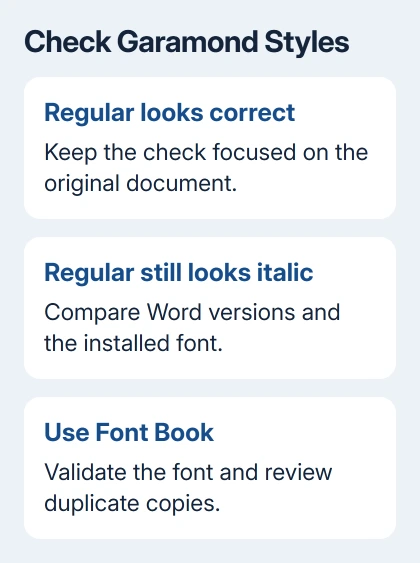
If Regular looks italic and the Italic button changes the text's weight, that matches the reported problem. If the fresh sample behaves correctly, focus on the original document instead of removing a font used by every document.
In the original file, select the affected text and inspect Format > Font. Check the family and style together. Another family, such as Adobe Garamond Pro, isn't the same font just because its name contains Garamond.
Try the sample in another installed family. If only Garamond behaves incorrectly, work through Font Book for that family. If unrelated families fail too, include that wider result when reporting the Word problem.
I'd preserve the unedited original during this comparison. A font substitution can change line endings, page breaks and the length of a finished manuscript, even when it makes the letters look normal again.
3. Validate the installed Garamond in Font Book
Quit Word and open Font Book from Applications. Search for Garamond and select the installed family. In current Font Book, choose File > Validate Selection. Older versions may label the command Validate Font.
Green means the font passed, yellow means a warning and red means a failed check. Open a warning's details before deciding what to change; a yellow result doesn't mean the file failed validation.
The Font Book validation instructions also provide File > Validate File for checking a particular font file. Use that route when you have a known font file to check, rather than searching through protected macOS folders.
Passing validation means the font file passed Font Book's checks. Word could still be choosing the wrong style from that file. Reopen the blank sample after any correction and check both Regular and Italic again.
If a font you installed separately fails the check, keep its licensed installer before removing or replacing the font. Leave protected system fonts to the supported macOS controls and get help if those controls won't allow a change.
4. Review duplicates and the old font-conflict workaround
In current Font Book, choose File > Resolve Duplicates, then Resolve Manually to review the copies. Check which copy is active and where each comes from. Decide which version you need to keep before resolving the duplicate.
Automatic resolution can deactivate duplicates or send inactive copies to the Trash, depending on Font Book settings. Choose manual review when your document needs a particular licensed font, so you can check which copy Word will use.
For Garamond you installed yourself, choose Edit > Deactivate if Font Book allows it. Older macOS versions may call it Disable. Deactivation keeps the file available to turn on again. Reopen Word and check which Garamond styles remain.
The old thread's accepted answer described uninstalling an installed Garamond.ttc collection so Word could use its own Garamond. It also warned that other apps, including TextEdit, would lose access to that installed font.
Don't manually delete the system copy in the historical answer. Current macOS doesn't allow system fonts to be removed or deactivated in Font Book. If the controls are unavailable, send your version and font details to support.
When should Word support check the font?
Use the feedback or support option in Word's Help menu. Include Word and macOS versions, the exact font family and whether a new document fails too. Add the validation result and details of duplicate copies.
Attach a short sample without private text, plus a picture showing Regular and Italic beside their selected styles. Ask support which font and style Word is using from the installed collection. This shows why it isn't just a stuck button.
For a different family with the same kind of display problem, the Helvetica Neue Light checks cover that separate report. If the document is now correct, save the Word file on your Mac and review its pagination before sending it.
The Short Version
Update Word and compare Garamond's Regular and Italic styles in a blank file. Validate the font and review duplicates in Font Book. The old rollback to 16.34 and protected-system-font deletion aren't current repair steps.
Checked November 16, 2026.
 If you have any business, I can build it online