
You play back a clip you just filmed and see a faint grid over the picture, like a screen door. It was not there while you were filming. Now you are wondering if the camera on your new iPhone is faulty.
Before you book a swap, give it three minutes. I will show you three checks that show whether the video file itself is damaged, and so far the answer in the thread has been no.
What the grid looks like
The thread's starter on Apple's forum describes "a weird grid pattern in the video that's just barely noticeable". The timing is the odd part: "It's not there when I recorded the video but it's visable after I record it".
It is not only the new iPhone 18 either. One owner wrote: "Same here though my device is iPhone 17". Two iPhone 17 Pro owners report it as well.
On the thread, 67 owners have pressed Me too. None has an answer from Apple yet.
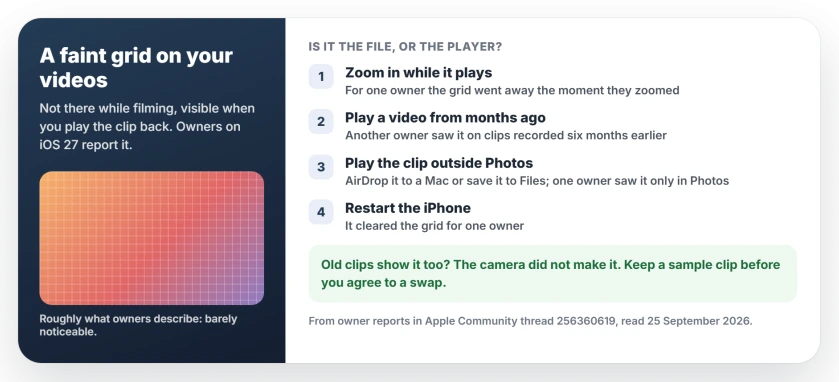
Status: iOS 27.0, checked 25 September 2026. Owners report the grid on videos from the iPhone 18, the iPhone 17 and the 17 Pro. It vanished on zoom for one owner, showed on six-month-old videos for another, and cleared after a restart for a third. Apple has not commented.
1. Zoom in while it plays
Open the video in Photos and pinch out a little. One owner found: "It goes away the moment I zoom a bit into a video".
A grid baked into the file would scale up with the picture. One that disappears when you zoom is being drawn by the player, not recorded by the camera. That reading is ours, but it matches everything else in the thread.
2. Open a video from months ago
This check settles it for me. Scroll back to a video you filmed long before the update, and play it.
One owner tried it and wrote: "it's a video playback issue - it's showing up for videos I recorded 6 months ago".
If your old clips show the grid too, your new camera did not put it there. Those videos were recorded on a different day, and maybe on a different phone.
3. Play the clip outside Photos
Another owner narrowed it down further: "it only appears in the photos app".
You can test that yourself. Send the clip to a Mac or iPad with AirDrop, or save it to the Files app, and play it there.
A clean picture outside Photos means your video is fine, and sharing it should be safe too, though I would check the copy on the other device before you post it anywhere important.
4. Restart your iPhone
The simplest fix in the thread came last. One owner wrote: "I restarted the iPhone and it disappeared".
Turn your iPhone off and on again, then replay the same clip. It is one owner's result, and the grid may come back later.
Before you agree to a swap
An iPhone 18 Pro owner went to Apple, and "the apple person said they'll have to exchange my phone". That may be the right call for them.
My view, and it is ours: if your old videos show the grid too, a new phone is unlikely to help. The same iOS 27 would be playing the same files on it.
A Level 9 adviser asked for proof before anything else: "If you want assistance with the issue you'll need to post a link to an example". The adviser has a point. Keep one short clip that shows the grid, and take it with you to Apple.
If your video looks wrong in other ways
A video that plays with no sound has its own list of causes. If it will not send because of its length, the too-long fixes cover that.
Why is there a grid pattern on my iPhone videos?
Owners report a faint grid on video playback since iOS 27, on the iPhone 18, the iPhone 17 and the 17 Pro. It vanished when one owner zoomed in, and another saw it on videos filmed six months earlier, which points at playback rather than the camera.
Is my iPhone camera broken if videos show a grid?
Probably not, if your old videos show it too. Play the clip outside the Photos app, on a Mac or in Files, and if it looks clean there, the file is fine.
Can I fix the grid on my iPhone videos?
A restart cleared it for one owner. Zooming in hides it while you watch. Apple has not released a fix yet.
The Short Version
- A faint grid on iPhone videos since iOS 27 looks like a playback fault, not a camera fault.
- Zoom in while it plays; for one owner, the grid went away.
- Play an old video. If it has the grid too, the camera did not make it.
- Play the clip outside Photos to check the file.
- A restart cleared it for one owner.
- Keep a sample clip before you agree to swap the phone.
Where to Next
Run check 2 first. It takes seconds and tells you the most.
Then tell me what you found in the comments. Does the grid show on your old videos, and is it gone outside Photos? A few answers from readers will show this fault more clearly than the thread has so far.

Isaac Smith is the founder and editor of PC Glance, a website that covers computers, laptops, and technology. He is a tech enthusiast and a computer geek who loves to share his insights and help his readers make smart choices when buying tech gadgets or laptops. He is always curious and updated about the latest tech trends.