
You ask your HomePod to read a message or call someone, and it says it cannot reach your iPhone. Nothing changed on the speaker, but your phone just updated. That is annoying when the speaker is how someone at home calls and texts.
I read Apple's HomePod guide for HomePod software 27 and a MacRumors thread from 30 September. Two owners there point to the same few switches, and Apple names the rest.
What one owner saw
One owner's father uses his HomePods to text and call, hands-free. Then his iPhone moved to iOS 27. Now the speakers say they cannot connect to it.
The family restarted everything and checked the Wi-Fi. In their words: "Another iPhone in the household that has not been upgraded to iOS27 still works flawlessly."
They also noted: "Also personal content is still active on his phone/home settings." So the obvious switch looked fine.
Status: checked 1 October 2026. One owner lost HomePod personal requests after an iPhone moved to iOS 27. Another owner, on a new iPhone, got them back by turning both voice switches on again.
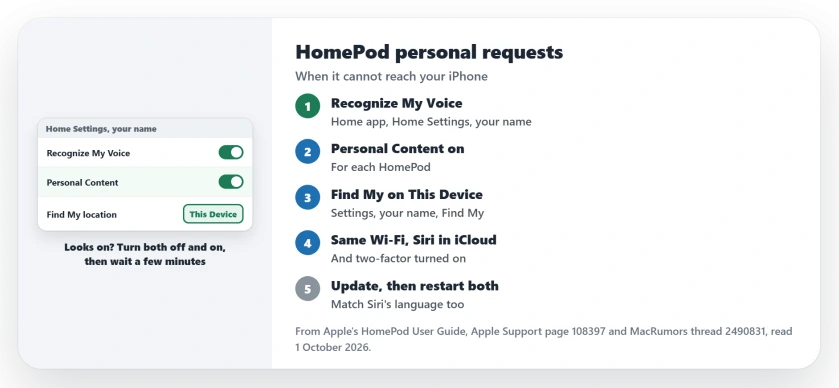
1. Turn Recognize My Voice and Personal Content on again
The reply that helped came from an owner who hit this with a new phone. They advised: "see if recognize my voice is turned on and personal content too".
Their switches looked on. They still had to set them again. In their words: "when I got my 18 pro max a couple of weeks ago I needed to do this to enable personal content again although it was enabled on my old iPhone."
Apple's route is in the Home app. Tap the More button, then Home Settings, then your name under People. Apple's step: "Turn on Recognize My Voice."
Then, Apple says: "Tap Personal Content, then turn on Personal Content for the HomePod speakers you want to use for requests."
Both already on? Turn them off and on. Apple's own reset says to "turn Recognize My Voice off then on. Wait a few minutes before trying Siri again."
2. Point Find My at this iPhone
Location is one of Apple's conditions. Its step: "Tap your name, tap Find My, then make sure My Location is set to This Device."
Do this on the iPhone that should answer. If you own an iPad or a second iPhone too, I would check this right after the voice switches.
3. Check Wi-Fi, iCloud and your account
Apple lists three more conditions. The first: "Make sure your iPhone or iPad is connected to the same Wi-Fi network as HomePod."
The second matters after an update: "To use voice recognition, you must allow Siri to use iCloud in iPhone or iPad settings." Look under your name, then iCloud, then See All, for Siri.
The third is account security. Apple says: "Tap your name, tap Sign-In & Security, then make sure Two-Factor Authentication is turned on."
4. Update the HomePod, then restart both
Apple's first fix for voice trouble is to "Update your HomePod or HomePod mini and iPhone or iPad to the latest software." Apple's guide is written for HomePod software 27. Bring the speaker up to it.
Then restart both ends. Apple lists "Restart the iPhone or iPad that you use with Siri." and a restart of the HomePod itself.
5. Check Siri's language and your voice
A language mismatch breaks recognition too. On the iPhone, Apple says to check Siri and "make sure that it's set to the same language as your HomePod".
Two people can also confuse it. Apple warns: "If you have two Apple Accounts in your home that have Recognize My Voice set up with the same voice, you might need to turn off Recognize My Voice on one account."
When it still cannot reach the phone
The owner suspected the link between the two devices. They wrote: "It seems more a continuity issue between HomePod and iPhone since it can't seem to find it".
They also filed a report with Apple. I would do the same if every switch is right, and note the iOS version in it.
If your HomePod also starts music on its own, the HomePod music page covers that. And if it will not work as an Apple TV speaker, see the HomePod and Apple TV page.
Why can't my HomePod connect to my iPhone for personal requests?
Owners report it after an iPhone update or a new iPhone. Turning Recognize My Voice and Personal Content on again worked for one owner. Apple adds Find My, Wi-Fi and Siri checks.
What is Personal Content on HomePod?
It is Apple's name for personal requests in the Home app. Apple says these are "voice commands that use info from certain apps on your iPhone", such as Messages and Calendar.
Do HomePod personal requests need the same Wi-Fi?
Yes. Apple wants your iPhone or iPad on the same Wi-Fi network as the HomePod.
The Short Version
- The HomePod says it cannot reach your iPhone.
- Turn Recognize My Voice on again in Home Settings.
- Then turn Personal Content on for each HomePod.
- Set Find My to This Device on that iPhone.
- Same Wi-Fi, Siri in iCloud, two-factor on.
- Update the HomePod, then restart both.
- Match Siri's language to the HomePod.
Where to Next
Switch Recognize My Voice and Personal Content off and on in the Home app today. Then wait a few minutes and ask the HomePod to read your messages.
If it still cannot reach your iPhone, leave a comment with your iOS and HomePod versions. I add every fix that works to this page.

Isaac Smith is the founder and editor of PC Glance, a website that covers computers, laptops, and technology. He is a tech enthusiast and a computer geek who loves to share his insights and help his readers make smart choices when buying tech gadgets or laptops. He is always curious and updated about the latest tech trends.