
Your HomePod or HomePod mini starts playing music on its own, sometimes loud and in the middle of the night. Nobody asked Siri, and nobody touched it.
That is worrying when it wakes the whole house. I read Apple's page on the HomePod's touch settings and a long MacRumors thread where owners have fought this for over a year.
Music out of nowhere
The thread has about 12,000 views and 83 replies. One owner said they were "so sick of having to unplug it or hearing nonsense come on at 4am".
Another owner's speaker was "playing music at max volume randomly, not responding to touch". Owners call it ghost touch: the touch surface on top acts as if someone pressed it.
Some think it is software and some think it is the touch panel wearing out. Either way, one setting has helped several owners.
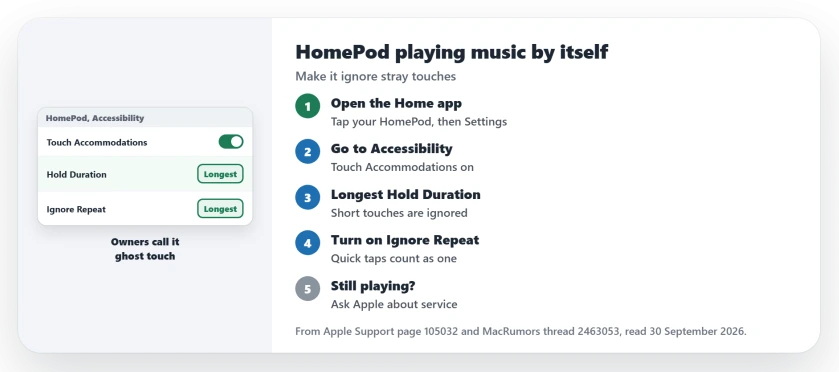
Status: checked 30 September 2026. Owners report that Touch Accommodations, with the longest Hold Duration, stopped the random music. Apple replaced two faulty speakers for one owner.
1. Turn on Touch Accommodations
Open the Home app on your iPhone, iPad or Mac and tap your HomePod. Tap the Settings button, choose Accessibility, then Touch Accommodations, and turn it on.
Apple's Touch Accommodations page explains why this helps: "HomePod and HomePod mini ignore touches that are shorter than the Hold Duration."
Set Hold Duration as long as it goes. One owner who did this wrote that the speaker had not played music on its own "for the last 4 days".
2. Turn on Ignore Repeat as well
The same owner also turned on Ignore Repeat and set it to the maximum. With it on, Apple says, "if you touch the controls several times quickly, your HomePod or HomePod mini treats the touches as one."
Owners report the pair held up. Another owner, a month later, wrote that they were not having problems "since the Accessibility -> Touch Accommodations tip".
The first owner later switched the settings off to test an update, and the music came back weeks after. They restored the HomePod and set the same options again.
3. Keep the HomePod software current
One owner on a HomePod mini says a beta ended it. In their words: "no more random playing music by itself, finally fixed."
That was a beta, and one report. I would wait for the public update rather than put a speaker on test software, then check the problem again after it installs.
4. Ask Apple for service if it keeps happening
One owner kept at it with Apple Support. Apple "arranged for me to send the faulty HomePod in for service" and sent a replacement. When the second speaker in their pair did the same, Apple dealt with that one too.
Their advice: "be kind but be persistent". Another owner was told a replacement needed AppleCare, so have your coverage details ready when you call.
5. Unplug it until it is sorted
If nothing else works, unplug the speaker at night. One owner took all three of theirs offline "for bad behavior" while waiting for a fix.
One owner planned to open theirs and pull the touch panel's cable. I would not, while Apple can still repair it.
Other HomePod problems
If your HomePod stops working as the Apple TV speaker, the Apple TV speaker page covers that. If AirPlay cannot find it at all, the AirPlay page goes through the checks.
If your HomePod cannot reach your iPhone for messages and calls, the personal requests page covers the voice switches owners had to set again.
Why does my HomePod play music by itself?
Owners in the MacRumors thread blame the touch surface on top, which registers presses nobody made. Apple has not named a cause on any page I read.
Does Touch Accommodations stop HomePod ghost touches?
Apple says Hold Duration makes the HomePod ignore shorter touches. Several owners report the random music stopped with it at the maximum, and for one it came back only after they switched it off.
Will Apple replace a HomePod that plays music by itself?
One owner got two replacements after contacting Apple Support. Another was told replacements need AppleCare.
The Short Version
- Owners call it ghost touch on the top panel.
- Turn on Touch Accommodations in the Home app.
- Set Hold Duration to the longest time.
- Turn on Ignore Repeat too.
- It held for weeks for at least one owner.
- Keep the software current, but skip betas.
- Ask Apple for service if it comes back.
Where to Next
Open the Home app now, tap your HomePod, and turn on Touch Accommodations with the longest Hold Duration. Then leave it for a few nights.
If the music still starts on its own, leave a comment with your HomePod model and software version. I will fold new reports into this page.

Isaac Smith is the founder and editor of PC Glance, a website that covers computers, laptops, and technology. He is a tech enthusiast and a computer geek who loves to share his insights and help his readers make smart choices when buying tech gadgets or laptops. He is always curious and updated about the latest tech trends.