No. Edge doesn't take over HTA files, and they never needed the Internet Explorer app anyway. Windows runs them with mshta.exe, which uses MSHTML, the IE11 engine still built into Windows 10 and 11, so your HTAs keep working without IE.
What does change is anything inside the HTA that opens a browser. Links and scripts that open pages with window.open still lean on Internet Explorer and break if IE is removed completely. A few lines of script send them to Edge instead.
In this guide
What actually runs an HTA
Double-click an HTA and Windows starts mshta.exe, whose file description reads Microsoft (R) HTML Application host. It draws the page with mshtml.dll, the engine Internet Explorer 11 used, and runs the code through VBScript or JScript.
I checked a Windows 11 25H2 laptop: both files were there at version 11.00.26100, and the .hta file type pointed to C:\Windows\SysWOW64\mshta.exe, the 32-bit copy. Neither the Internet Explorer window nor Edge comes into it.
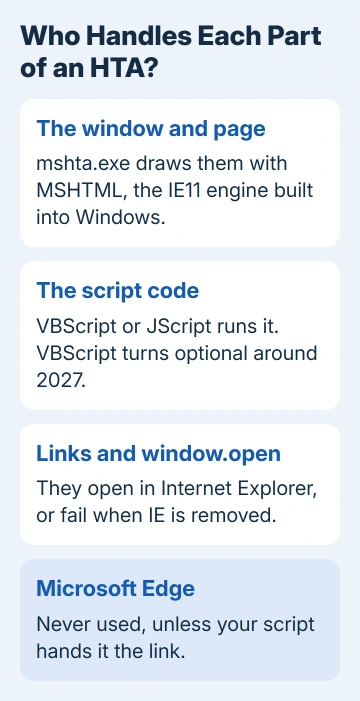
That's why an HTA still opens on a PC with Microsoft Edge removed. The limit is the engine's age: an HTA can't go past what IE11 supported, whatever IE version its X-UA-Compatible tag asks for.
1. Check which program opens .hta files
When your HTA opens in Notepad or a browser instead of running, start with the file association: the program Windows has linked to .hta files. If the file doesn't show its .hta ending, turn on file name extensions first.
- Open the Start menu, type
cmdand open Command Prompt. - Type
assoc .htaand press Enter. A healthy PC answers.hta=htafile. - Type
ftype htafileand press Enter. The answer should be a path ending inmshta.exe, then%1in quote marks and a long code in braces.
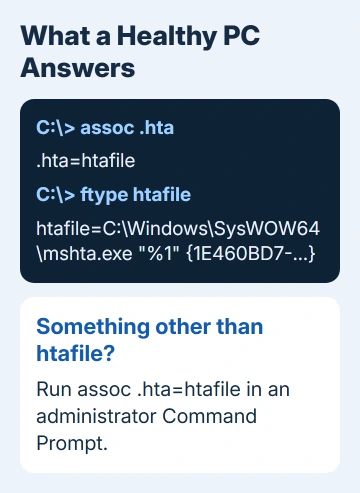
If assoc shows something other than htafile, right-click Command Prompt in the Start menu, choose Run as administrator and type assoc .hta=htafile.
A normal Command Prompt window refuses that command, because changing an association needs administrator rights.
Double-click the HTA again. It should open in its own window with no address bar, which tells you mshta.exe is running it, not a browser.
2. Know what happens to links inside the HTA
Click an ordinary link inside your HTA and it won't load in the HTA's own window. One HTA developer on Microsoft's forum found in 2022 that Windows 11 opens it in an Internet Explorer window instead, and so does Windows 10 with IE disabled.
If you remove Internet Explorer 11 completely in Windows Features, it gets worse. The same developer found a plain href link then does nothing and window.open fails with an error, so they advise keeping IE on any PC that runs HTAs.
Pages shown in an iframe (a frame inside the HTA's window) kept working in every case they tried. Plenty of public websites refuse to load inside a frame, though, so an iframe only helps with your own intranet pages.
3. Send HTA links to Edge or the default browser
The cleaner fix is to stop the HTA opening links itself and hand each address to Windows instead. WScript.Shell has a Run command that does exactly that: give it a web address and Windows opens it in your default browser.
That developer posted a sample on GitHub that catches every click on a link, cancels it and passes the address to Run. This trimmed version does the same for links you've given the class name href:
<meta http-equiv="x-ua-compatible" content="ie=9" />
<script>
  var links = document.getElementsByClassName('href');
  for (var i = 0; i < links.length; i++) {
    links[i].addEventListener('click', function (event) {
      event.preventDefault();
      new ActiveXObject('WScript.Shell').Run(this.href);
    }, false);
  }
</script>
Don't drop the ie=9 line. Without it the HTA runs in an older IE mode that doesn't know addEventListener or getElementsByClassName, so the script fails and your links fall back to Internet Explorer.
To send links to Edge even when another browser is the default, put microsoft-edge: in front of the address: Run('microsoft-edge:' + this.href).
One owner had already written that onto every link and found it too rigid. The loop spares you that, since one script covers every link in the HTA.
4. Plan for VBScript's retirement
For an HTA, VBScript is now a bigger risk than IE. Microsoft's deprecation notes say it becomes a feature on demand, an optional part of Windows, before it's removed. From Windows 11 24H2 on, it comes preinstalled and turned on.
Around 2027 that feature is due to stop being enabled by default. An HTA written in VBScript will then need it switched back on in Settings > System > Optional features, while one written in JScript won't notice the change.
The laptop I checked had the VBScript feature package installed, which is what you'd expect on 25H2. If you look after HTAs that other people rely on, moving their VBScript to JScript or PowerShell now spares you a rushed fix later.
5. Ask IT if HTAs won't start on a work PC
Some companies block mshta.exe outright, because attackers use it to run scripts. It's on the recommended block list for App Control, the Windows feature IT uses to decide which programs may run.
If an HTA works at home but does nothing on your work laptop, a policy like that may be stopping it, and you can't change it from your own account.
Ask IT whether App Control or AppLocker blocks mshta.exe, and give them the HTA's path so they can decide whether to allow it.
When an HTA still won't run
Try the same HTA on a second Windows 11 PC. If it fails there too, the problem is inside the file: often a script error, or an X-UA-Compatible tag asking for an IE version too old for the code.
When you go through the file, the HTA introduction on Microsoft Learn) covers the tags and window settings an HTA can use.
If it only fails on one PC, compare the assoc and ftype answers on both machines. For a business tool, start planning a replacement: the HTA platform hasn't changed in years, and VBScript has a retirement date.
The Short Version
Edge never takes over: HTAs run on MSHTML, built into Windows 10 and 11, with or without the IE app. Keep IE installed if your HTA opens links, or pass them to your browser with WScript.Shell. VBScript goes off by default around 2027.
Checked November 19, 2026.
 If you have any business, I can build it online