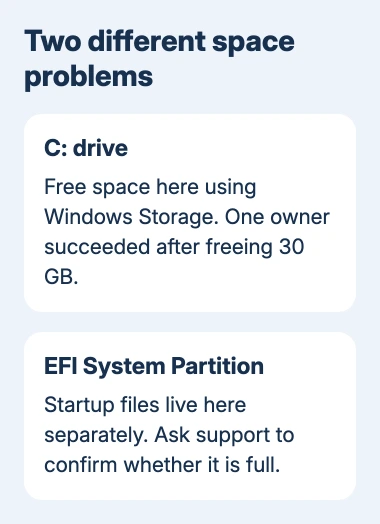
Freeing 30 GB on C: let one owner install 26200.5516 even though Windows called their PC unsupported. Try that before replacing hardware. Another owner needed free space in the separate EFI startup partition.
Those are different storage problems. Space on C: can be cleared through Windows; a full EFI partition needs a careful repair because that small partition holds the files that start your computer.
In this guide
1. Match the warning to the old Dev Channel build
The reported message said the PC couldn't update to this Windows version and that Windows Update would offer it when the issue was resolved. That wording alone didn't identify which compatibility check had stopped setup.
Open Settings > Windows Update > Windows Insider Program to check the enrolled channel. Press Windows+R, enter winver, and record the installed OS build before changing anything.
Build 26200.5516, also identified as KB5054687, was a Dev Channel release from March 28, 2025. Its release announcement describes the 26200 series as based on Windows 11 version 24H2.
This is a historical build, so use the current build offered to your enrolled PC rather than hunting for an old preview download. The error still needs attention if current offered builds fail in the same way.
If the PC already runs a later build and updates normally, don't force a reinstall because of an old failed entry. Check the latest successful installation in Update history before treating the old error as a current hardware problem.
2. Free space on C: and retry the offered build
Check C:'s free-space figure in File Explorer > This PC. The adviser asked for 30 GB of space, and the asker confirmed that freeing 30 GB solved their failure.
Windows upgrades don't all require that same amount of free space. Around 30 GB available is a practical first check for this fault, alongside any space request setup displays.
Open Settings > System > Storage > Temporary files. Let Windows finish calculating the categories, then review the selected items before choosing Remove files. Leave Downloads unselected if it holds files you still need.
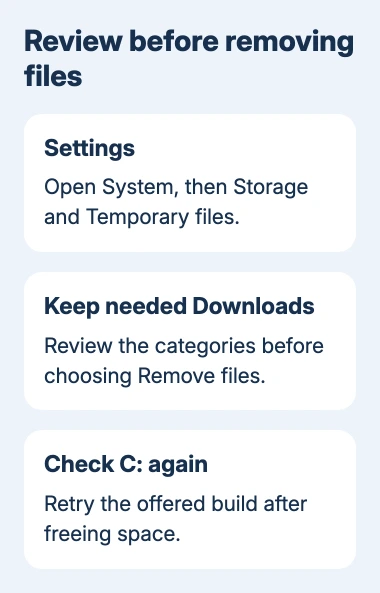
Large personal videos and old installers can often be moved to an external drive instead of deleted. Open the moved copies before removing their originals, then check C:'s free-space figure again.
The Windows drive-space instructions explain the supported cleanup options. Use those controls instead of manually deleting Windows folders to reach a number.
Return to Settings > Windows Update and retry the offered build. If setup completes and winver shows the newer build afterward, the storage cleanup solved that attempt. Keep the free space available until installation has finished.
In the saved replies, the asker reported that freeing 30 GB resolved the issue. That confirms the cleanup worked for their PC. The other owner's full EFI partition needed a different repair.
3. Check the separate EFI case when C: has room
The owner with the full EFI partition reported 579 GB free on their Windows drive. EFI holds startup files separately, so ordinary C-drive cleanup couldn't fix that particular space problem.
Right-click Start > Disk Management. Read the labels in the lower disk view and look for EFI System Partition. Don't assign it a letter, format it or resize it just to inspect the label.
Disk Management helps identify the partition layout, but its size isn't the same as its free space. A technician may need to mount and inspect that partition to confirm whether it is actually full.
For the second successful repair, an adviser first checked the setup information. An adviser identified a full EFI partition, freed space there, and the owner then reported that the upgrade ran without error.
Their EFI cleanup commands targeted boot-font files. Those commands aren't a first step for every compatibility warning. The repair worked after the adviser confirmed that the partition was full; the warning alone didn't tell them that.
The EFI space-check procedure explains how to distinguish startup-partition space from ordinary drive space. Give the partition details to the technician handling this failed upgrade.
4. Let setup logs identify a remaining compatibility block
If C: has adequate room and the EFI partition isn't full, keep the exact compatibility message. That one sentence doesn't tell you whether setup stopped because of unsupported hardware, an app or a storage problem.
In File Explorer, look for the folder C:\$WINDOWS.~BT\Sources\Panther. Setup logs such as setupact.log and setuperr.log can be present there after a failed upgrade. The hidden folder may need View > Show > Hidden items enabled.
Copy the relevant logs for your support case rather than editing or deleting them. Include when setup last failed, installed build, target build and PC model so support can match the failed compatibility check.
I'd have support check why setup stopped before replacing hardware or changing firmware settings. The thread already shows that a hardware-sounding warning can have a storage fix.
Don't disable TPM or Secure Boot as an experiment. Neither successful repair in the thread involved those settings, and changing startup security can create another problem.
5. Choose the right next step for an Insider PC
Open Feedback Hub from Start and report the installation failure under the Windows update or installation category it offers. Attach the message and logs through that case, and include that the PC is enrolled in the Dev Channel.
Give these details to IT when work or school manages the computer. Its administrator needs to check whether the device should be receiving preview builds and whether its update policies match that enrollment.
Changing channels isn't a repair for this old build. When Dev moved to the 26200 series, its switch window to Beta closed. Check the enrollment choices currently available to your PC before planning a channel change.
If the update instead ends with a numbered code, use the Windows Update error-code guide for that result. A new code can point to a different repair than the compatibility message did.
The Short Version
Freeing 30 GB on C: fixed one owner's 26200.5516 failure. A second owner needed a confirmed full EFI partition repaired. If neither fits, have support read the setup logs before changing hardware or boot settings.
Checked November 26, 2026.
 If you have any business, I can build it online