
Zoom, Slack or Chrome says it cannot use your camera or microphone. You open Privacy & Security on your Mac, and the app is not in the list. There is no plus button to add it either.
I start from how that list gets filled, because you cannot add an app to it yourself. On Super User, 222,064 people have looked at this one. An Ask Different copy about QuickTime adds 28,723.
Only an app that asks gets listed
On a Mac, an app joins the Camera or Microphone list the first time it asks for access. You answer the prompt, and macOS stores your answer there.
On its camera page, Apple says exactly that: "The list shows apps you’ve installed that have asked to use the camera."
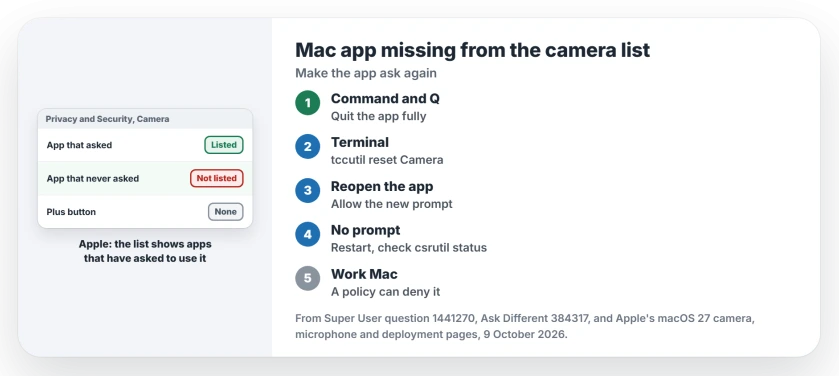
Status: Apple explains how the list fills. Resetting with tccutil is the owner fix on Super User and Ask Different. Written 9 October 2026 against Apple's macOS 27 guide.
So an empty list means no app has asked yet, or macOS lost the request; either way, your fix is to make the app ask again.
Apple's guide adds that apps which come with your Mac, like FaceTime, have access automatically. Ours: if FaceTime shows your camera, the camera works and only the permission is stuck.
With a working camera, Photo Booth can capture a photo file without a live call or a third-party meeting app.
1. Quit the app and reset its permission
Quit the app completely with Command and Q. Then open Terminal from Applications, Utilities, and run one line per permission. For Chrome:
tccutil reset Camera com.google.Chrome
tccutil reset Microphone com.google.Chrome
The last part is the app's bundle ID, such as com.apple.Safari for Safari and com.tinyspeck.slackmacgap for Slack.
For any other app, right-click it in Applications and choose Show Package Contents. Open Contents, then Info.plist. The ID sits under CFBundleIdentifier.
The accepted Ask Different answer stresses the next part: "you must quit your application before the change will take effect". Reopen the app and start a call. When the prompt appears, select Allow.
Don't know the bundle ID?
Leave it off, and the reset covers every app:
tccutil reset Camera
tccutil reset Microphone
Owners on Super User used exactly this. One wrote "I had this problem for Slack and running tccutil reset Microphone worked." One reader replied "tccutil reset Microphone worked for me as well."
There is a cost. The first owner noticed that "all apps vanished from Privacy list" afterwards. Each app will ask again when it next wants the camera, so expect a few prompts this week.
2. Restart if the prompt still does not come
The privacy service can get stuck until a restart. An owner with two Macs wrote that "Simple rebooting solves it in 9/10 cases for a few days again."
I would restart, open the app first, and try your call before opening anything else.
3. Check System Integrity Protection
The reset relies on it. The Ask Different answer warns that protection must be on, "otherwise these commands won't work correctly".
One Super User owner found it off on their Mac. The Console showed "Policy disallows prompt" each time an app asked. Turning protection back on in Recovery fixed it, and Skype asked for the camera at once.
To check yours, run csrutil status in Terminal. It should say enabled. Running an unsupported Mac with a patcher that needs it off? Expect this permission problem to come back.
A work Mac, or a standard account
Your company can block the camera for certain apps, and Apple's deployment guide lists the camera setting as "Use to deny specified apps access to the camera." It can deny. It cannot allow.
So on a managed Mac, a missing app with no prompt can simply be the policy, so ask your IT team. One owner on a managed Mac got it back only after a macOS update, which I would not count on.
Another owner saw a shorter list on a standard account than on the admin one. A quick test: sign in as the admin and run the app there once.
Screen sharing has its own list
Camera and microphone fine, but your screen shows black when you share? That is a third list, Screen & System Audio Recording, and it works the same way. The Chrome screen sharing on Mac fix covers it.
Using your iPhone as the camera? Continuity Camera connection problems are a separate thing.
Listed and allowed, yet callers say you sound faint? The quiet Mac microphone page traces that to an app holding the microphone down.
The Short Version
- Apps join the Camera and Microphone lists only by asking.
- Quit the app, run tccutil reset for Camera and Microphone, reopen.
- No bundle ID? Reset all apps, and allow the prompts as they return.
- No prompt: restart, then check csrutil status says enabled.
- Work Macs can deny the camera by policy. Ask IT.
Where to Next
Did the prompt come back for your app after the reset? The comments are open for that.

Isaac Smith is the founder and editor of PC Glance, a website that covers computers, laptops, and technology. He is a tech enthusiast and a computer geek who loves to share his insights and help his readers make smart choices when buying tech gadgets or laptops. He is always curious and updated about the latest tech trends.