

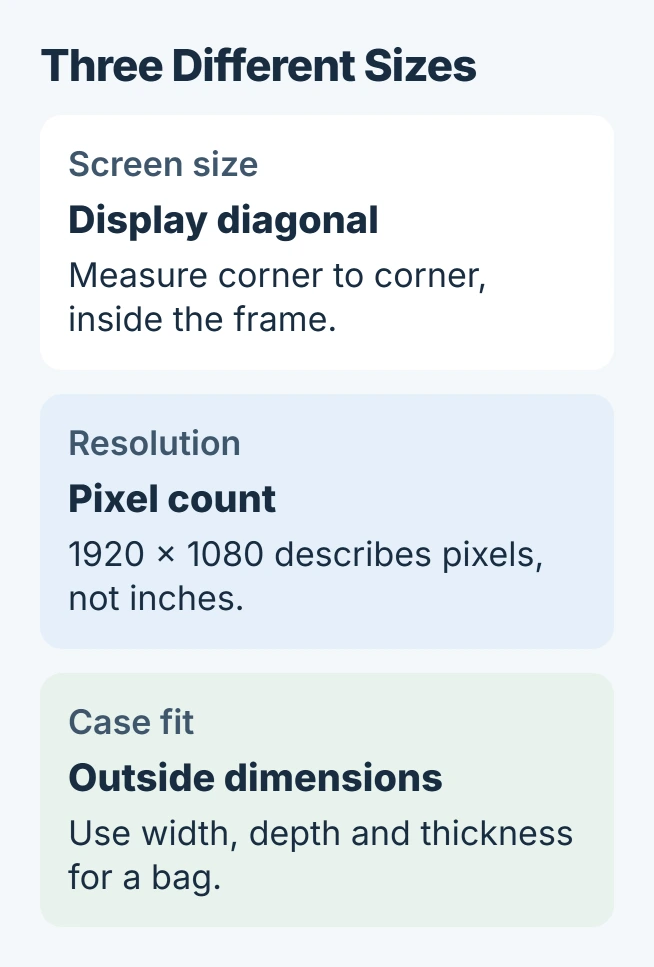
A laptop's screen size is the diagonal of its display, measured in inches. To find it, measure from one corner of the image area to the opposite corner, excluding the surrounding frame. Measuring straight across gives the width instead.
For the manufacturer's advertised size, look up the exact laptop model as well. The display measurement, screen resolution and outside dimensions describe different things.
Measure the display from corner to corner
Use a ruler or a flexible measuring tape marked in inches. Hold it near the display without scraping the surface or pressing on the panel. Start where the visible image begins, inside the frame.
Measure diagonally to the opposite image corner. This method is documented by Lenovo, which specifically excludes the bezel. Record the result without adding the black frame around it.
Status: Diagonal measurement and Windows model lookup checked November 1, 2026. The conversion example is arithmetic; no laptop display was physically measured.
If only centimeters are available, divide that diagonal by 2.54 to convert it to inches. For example, a 39.6 cm diagonal is approximately 15.6 inches. This is an example, not a measurement of a particular model.
Do not rest a metal tape's hooked end against the screen. The handling precaution is ours: hold the tool slightly clear of the panel and read its position against the two corners.
For marks that make the image edge hard to see, follow the laptop screen-cleaning instructions before measuring. Pressing harder on the panel does not improve the measurement.
Find the exact model for its published specification
In Windows 11, open Settings > System > About. Microsoft says the model name appears with the device name in its device-information instructions.
Copy the model as shown and search the manufacturer's support site for its specifications or user manual. Read the Display section for the diagonal size. Match the full model identifier, including any suffix.
When About provides too little detail, the PC model and specification guide explains System Information. A family name alone can cover several laptops, so use the more specific model when available.
For a laptop that cannot start, inspect its underside label or purchase paperwork. Keep any serial number private when asking publicly for help. The manufacturer's support team can use it through its own support channel.
Do not read a pixel resolution as an inch measurement
A resolution such as 1920 x 1080 describes a count of pixels across and down. It does not identify the display's physical diagonal. Two laptops can use that resolution while having different screen sizes.
Lenovo separates screen resolution from physical size in its guidance. Changing Windows scaling can enlarge text, but it does not change the size of the installed panel.
For example, a listing that says 15.6 inches, 1920 x 1080 supplies both measurements. Use the first for the diagonal and the second for the pixel arrangement; neither states the width of the entire laptop.
Match the measurement to the accessory or repair
For a sleeve or bag, compare its usable internal dimensions with the laptop's outside width, depth and thickness. A product labeled for a particular screen diagonal still needs enough room for the surrounding case.
Before flying with that bag, check the laptop's battery allowance and keep spare lithium batteries in cabin luggage.
For a privacy filter, check the filter maker's required display dimensions and fit guide. Knowing the diagonal does not confirm a matching height, width or mounting method.
For a replacement panel, give the repairer the exact model and configuration. Matching the diagonal alone is insufficient to select a compatible part. Ask the laptop maker to identify it if the original specification is unclear.
The Short Version
Measure the visible display diagonally without the frame, then compare that reading with the exact model's specifications. Use outside dimensions for a bag and a model-specific part reference for a replacement screen.

Isaac Smith is the founder and editor of PC Glance, a website that covers computers, laptops, and technology. He is a tech enthusiast and a computer geek who loves to share his insights and help his readers make smart choices when buying tech gadgets or laptops. He is always curious and updated about the latest tech trends.