
A laptop can travel on a plane, and a carry-on bag is the preferred place for it. For U.S. flights, check its battery capacity and condition before packing; separate batteries and portable chargers follow stricter baggage rules.
An ordinary laptop with an undamaged lithium-ion battery rated at 100 watt-hours or less generally qualifies. The airline can impose additional restrictions, especially on international journeys and larger batteries.
Check the battery rating before packing
Find the battery capacity in the laptop manufacturer's specifications or on its battery label. Look for Wh, meaning watt-hours. Use the exact model's specification; the charger's wattage describes a different thing.
The FAA says its passenger battery limits apply to laptops as well as loose rechargeable batteries. For a laptop's lithium-ion battery, the capacity determines the next step.
Status: U.S. FAA battery rules and TSA laptop screening checked November 2, 2026. Airline and international limits can be stricter. No individual laptop or itinerary was approved.
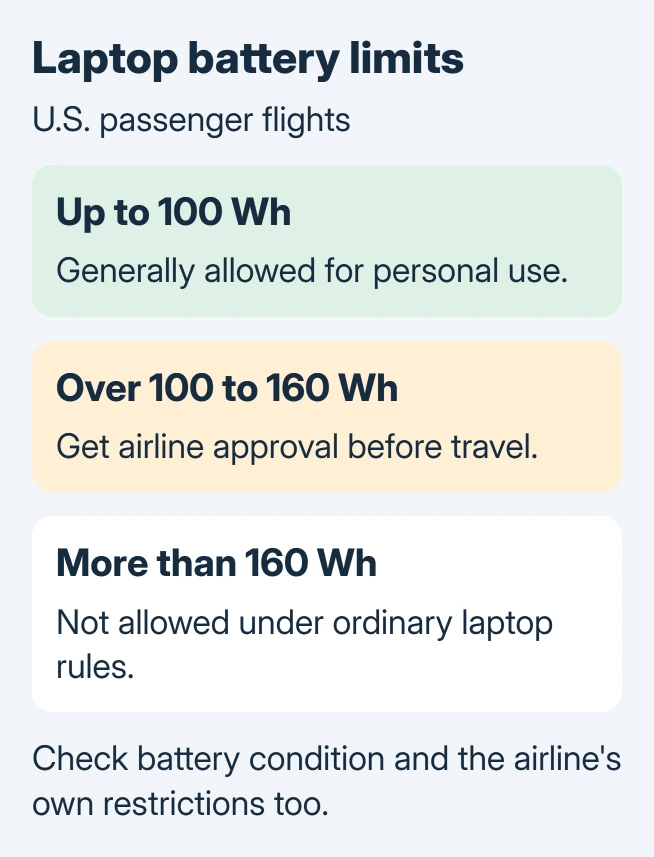
- Up to 100 Wh: generally permitted for personal use, subject to battery condition and packing rules.
- More than 100 Wh through 160 Wh: obtain the airline's approval before travel.
- More than 160 Wh: not permitted under the ordinary passenger rules for laptops.
When a battery lists volts and amp-hours instead, multiply V x Ah to obtain Wh. Divide milliamp-hours by 1,000 first. For example, 11.1 V and 5,000 mAh give 55.5 Wh. Those are practice numbers, not a particular laptop's rating.
Ask the manufacturer when the rating cannot be established without opening the computer. Do not dismantle a sealed laptop merely to read its battery.
Keep the laptop accessible in the cabin
The FAA recommends carrying battery-powered electronics in cabin baggage. This lets the crew respond if a battery overheats. Protect the laptop from impact and pressure.
A sleeve should fit the computer's outside dimensions. The laptop measurement guide separates those dimensions from the screen diagonal printed in a product listing.
If the laptop must enter checked baggage, the FAA requires it to be completely powered off and protected against damage and accidental activation. Closing the lid or leaving the machine asleep does not satisfy that shutdown requirement.
Power banks and detached spare lithium batteries must stay in carry-on baggage when permitted. If staff check your cabin bag at the gate, remove those items before handing it over. Ask to retain the laptop in the cabin too.
Prepare for the security checkpoint
The TSA lists laptops as allowed in both bag types, but that does not remove the battery restrictions. Its laptop screening instructions normally call for a separate X-ray bin.
TSA PreCheck travelers normally leave the laptop packed. Follow the officer's directions for the lane and equipment being used; the checkpoint instruction takes priority over a remembered routine.
Carry permission also differs from permission to use the laptop during flight. Follow the crew's stowage and wireless instructions. On an equipped Delta flight, the onboard Wi-Fi procedure starts after device use is allowed.
Resolve damaged or recalled batteries before travel
Do not pack a laptop with a swollen, damaged or unsafe recalled battery. The FAA's restrictions cover both checked and cabin baggage for batteries likely to spark or produce dangerous heat.
Apple says eligible units in its 15-inch MacBook Pro battery recall should stop being used until serviced. That program identifies affected units by model and serial number; it is not a ban on every MacBook.
For a battery concern, contact the manufacturer and airline before departure. For an unclear size or baggage allowance, give the airline the exact battery rating and itinerary. A generic laptop label cannot settle those details.
The Short Version
Pack a permitted laptop in cabin baggage, check its Wh rating and keep spare batteries out of checked luggage. Obtain approval for a capacity over 100 Wh through 160 Wh, and settle battery damage or recall concerns before flying.

Isaac Smith is the founder and editor of PC Glance, a website that covers computers, laptops, and technology. He is a tech enthusiast and a computer geek who loves to share his insights and help his readers make smart choices when buying tech gadgets or laptops. He is always curious and updated about the latest tech trends.