
You press the decimal key on your number pad and get a comma where you wanted a dot. Or it is the other way round.
The region settings rarely help. I would look at your keyboard layout, because the layout is what decides that key.
Asked in April 2014, the Super User question has 241,192 views. Its Windows 10 follow-up has another 60,606.
Why the region setting leaves the key alone
Every keyboard layout carries its own table of what each key types, the number pad included. The region setting changes how apps show numbers, not that table.
Layouts change shortcuts too: in Word, a non-English default keyboard can leave Ctrl+V dead.
An owner with a Polish layout tried the region change anyway, "but I tried it and for me it doesn't". Another put it plainly: "There is a comma on the keypad, and it will show as a comma whatever you set as separator".
Ours: of the 203 layout files on this Windows 11 PC, 85 put a comma on that key and 118 a dot. German, both Polish layouts, Swedish, Danish, Dutch, Czech and Russian give a comma. US, UK and Swiss German give a dot.
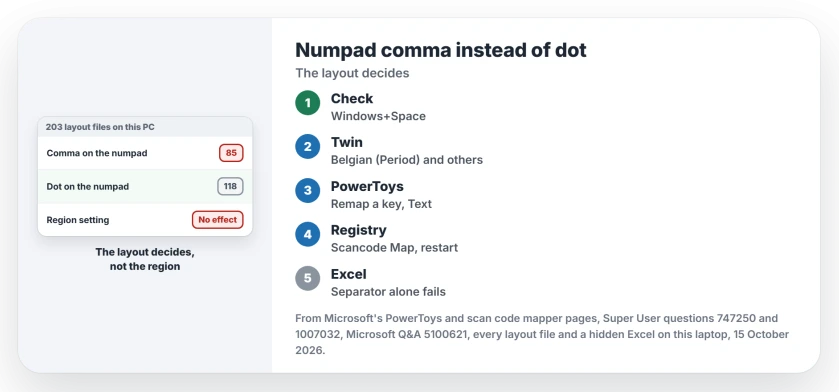
Status: every keyboard layout file on this laptop, 203 in all, checked on 15 October 2026 under Windows 11 25H2, plus a hidden Excel test and Microsoft's PowerToys pages.
Excel will not rescue you either. Ours: in a hidden Excel with its own decimal separator set to a comma, the key still typed a dot, and Excel stored 1.5 as text.
Layouts decide other keys too, such as an apostrophe that waits for your next key.
1. Switch to a twin layout, if your language has one
Your language may ship two layouts for this. Ours: Belgian (Period) and Belgian (Comma) split that way here, and so do Latvian (QWERTY) and Latvian (Standard), and French (Legacy, AZERTY) and French (Standard, AZERTY).
An owner moved from Belgian (Comma) to Belgian (Period), and another confirmed it on a Belgian French keyboard: "I verified OK on my PC".
Add the twin in Settings, under Time and language, then Language and region. Open its options and choose Add a keyboard. Polish and German have no twin here, so go to step 2.
Removing your old layout afterwards can be stubborn. A layout that keeps coming back has its own fix.
2. Remap the key in PowerToys
Microsoft's free PowerToys can make any key send text you choose. In Keyboard Manager, select Remap a key, then Add key remapping.
Press the decimal key in the Select column. In the To send column, switch the box to Text and type a dot, or a comma if you want the reverse.
Microsoft's PowerToys documentation covers remapping a key to text. PowerToys has to keep running for the remap to apply, so let it start with Windows.
I would start here. Undoing it is a single toggle.
3. Rather not run an app? Map the key in the registry
Windows can swap scan codes before any layout sees them, and Microsoft documents it as the Scan Code Mapper. This file makes the number pad's decimal key act as your main period key:
Windows Registry Editor Version 5.00

[HKEY_LOCAL_MACHINE\SYSTEM\CurrentControlSet\Control\Keyboard Layout]
"Scancode Map"=hex:00,00,00,00,00,00,00,00,02,00,00,00,34,00,53,00,00,00,00,00
Save it as numpad-dot.reg, double-click it, then restart your PC. Microsoft says "the system must be rebooted for the mappings to take effect".
Ours: that main period key types a dot on the US, UK, German, Polish, Swedish, Danish, Dutch, Czech and Icelandic layouts here. If you type on Russian, French AZERTY, Belgian (Comma) or Turkish, it gives other characters, so use PowerToys.
You give something up, though. An owner who mapped it with KeyTweak found "the key is permanently as dot key", even with Num Lock off. Another applied it again after moving to Windows 11 and wrote "it works perfectly".
This value holds every scan code map. If you already set one with a tool such as SharpKeys, change it there instead.
Can I build my own layout instead?
You can, with Microsoft Keyboard Layout Creator 1.4. It is old, but owners have built Polish and Swedish layouts with a dot this way, and one wrote that it "did the job".
Results are mixed on newer Windows, though. A commenter wrote that it "Does not seem to work on Win10 anymore", while another owner made one work on the 2004 release of Windows 10. I would try steps 2 and 3 first.
The Short Version
- Your keyboard layout decides what the number pad's decimal key types, not the region setting.
- Here, 85 of 203 layout files type a comma on it, and 118 a dot.
- Switch to a twin layout, such as Belgian (Period), if your language has one.
- Or remap the key to send a dot in PowerToys Keyboard Manager.
- Or map it to the main period key with a Scancode Map, then restart.
Where to Next
Write your layout and the way the key needed to go in the comments. I will check that layout's own table on this PC.

Isaac Smith is the founder and editor of PC Glance, a website that covers computers, laptops, and technology. He is a tech enthusiast and a computer geek who loves to share his insights and help his readers make smart choices when buying tech gadgets or laptops. He is always curious and updated about the latest tech trends.